


Before you evaluate ecommerce platform features, you need to understand what problem the platform is actually solving. Some platforms give you a blank store. Some give you marketplace traffic. Some give you automation. Some package the store, catalog, tools, and support into a more guided system. The mistake beginners make is comparing platforms by feature lists instead of comparing the type of responsibility each platform leaves on the user.
That distinction matters more than any feature comparison. A platform that automates product imports does not solve the traffic problem. A platform with a beautiful dashboard does not solve the conversion problem. And a platform that promises a ready-made store does not guarantee that the store will generate consistent profit. Understanding what each platform actually does – and what it does not do – is the only way to make a rational decision before paying for it.
Quick Answer: Do Not Judge a Platform by Features Alone
Most beginner platform comparisons focus on visible features: templates, apps, integrations, automation capabilities, dashboard design, AI-generated product descriptions, built-in marketing tools. These are easy to compare because they appear on marketing pages in clean bullet-point lists.
The more useful question is harder to answer from a marketing page: what work does this platform actually remove, and what work does it still leave to me?
Every ecommerce business requires the same core functions regardless of platform: a product to sell, a way to reach potential buyers, a reason for those buyers to choose you over alternatives, a process for fulfilling orders, and a way to track whether the business is financially viable. Platforms distribute that work differently. Some remove the technical setup but leave everything else. Some provide traffic but create dependency. Some simplify operations but leave product selection and marketing entirely to the user.
The best platform for any individual depends on their weakest skill. If technical setup is the obstacle, a guided or done-for-you system may help. If product sourcing is the problem, a platform with a built-in catalog matters. If traffic is the bottleneck, a marketplace with existing buyer intent may be more useful than a standalone store. None of these are universally correct answers – they depend on where the user’s own capability gaps are.
What Problem Is the Platform Actually Solving?
Breaking down a few common platforms by the specific problem they solve makes this clearer.
Shopify solves store infrastructure. It gives users a flexible, customizable foundation for building an owned ecommerce store. What it does not solve: product selection, traffic generation, marketing, or customer acquisition. Those responsibilities remain entirely with the user.
Etsy solves marketplace access. Sellers get exposure to an existing pool of buyers actively searching for products. What it does not solve: standing out in a competitive marketplace, dealing with platform dependency, or building a brand that exists independently of Etsy’s rules and algorithms.
WooCommerce gives maximum control and flexibility for users willing to manage a WordPress environment. What it does not solve: hosting reliability, plugin maintenance, security updates, or any of the marketing and traffic challenges that every ecommerce store faces.
DSers, AutoDS, and similar automation tools solve operational workflow. They make order processing, product importing, and supplier management faster. What they do not solve: creating demand, building a customer base, or making any campaign profitable.
Sellvia takes a different approach by combining store setup, a digital product catalog, built-in advertising tools, and guided support in one place – reducing the blank-page problem for beginners. What it does not remove: the need to understand costs, manage ad spend, track margins, and develop realistic expectations about testing timelines. For a closer look at how the platform works in practice, the full Sellvia review covers the setup experience and cost structure in detail.
The key question to ask about any platform: does it solve the specific problem that is currently blocking you?
Setup: Does It Save Time or Just Move the Work Somewhere Else?
Marketing pages for almost every ecommerce platform emphasize how easy setup is. “Launch your store in minutes.” “Start selling today.” “No coding required.” These claims are often technically true and practically incomplete at the same time.
A store can be fully configured and still generate zero sales. Setup is one component of an ecommerce business – it is not the business itself. After setup, the user still needs a compelling offer that makes sense to a cold visitor, a product page that builds enough trust to convert, a source of traffic that does not cost more than the margin it generates, and enough data to know whether any of this is working.
A platform that genuinely reduces setup friction is useful because it removes a real barrier – many beginners never get past the configuration stage. But “easier to start” should not be confused with “easier to profit.” Those are different problems at different stages of the journey.
Before evaluating any platform’s setup process, ask: after the store is ready, what is the plan for the next thirty days? If that answer is unclear, the setup convenience is a smaller advantage than it appears.
Costs: Subscription, Tools, Fees, and the Real Monthly Stack
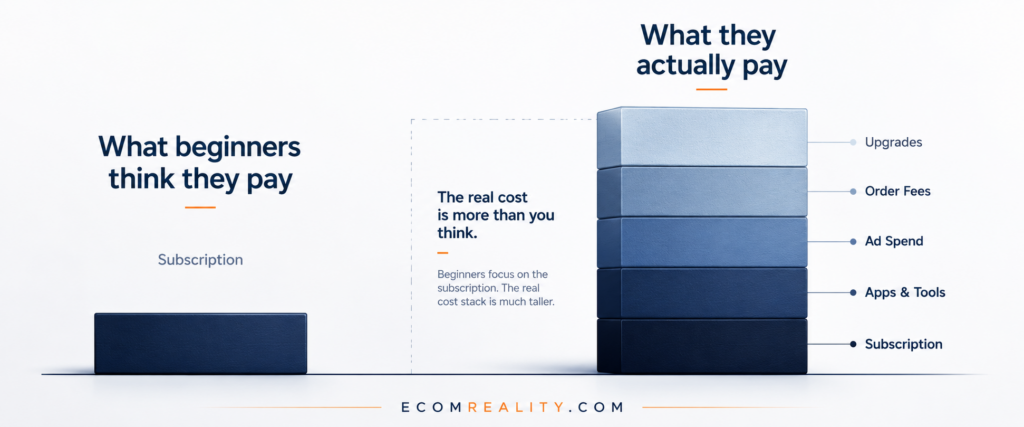
This is the area where the largest gap exists between what beginners expect and what they actually spend. Platform comparison pages typically show the subscription price. The actual monthly cost of operating an ecommerce business on that platform is often two to five times higher once all components are included.
| Cost Type | What It Means | Why Beginners Miss It |
|---|---|---|
| Subscription | Monthly platform access fee | Usually visible upfront – the number everyone sees first |
| Apps and tools | Extra functions not included in the base plan | Often discovered after setup, when basic features feel insufficient |
| Transaction or payment fees | Fees charged on sales or payouts | Easy to ignore before revenue starts – then they add up quickly |
| Advertising | Paid traffic budget | Often the largest variable cost – rarely appears on pricing pages |
| Upgrades and add-ons | Higher tiers, premium features, services | Can feel necessary once the user is already invested and active |
The cheapest-looking platform is not always the cheapest to operate. A platform with a higher subscription price that includes advertising tools, product catalog, and onboarding support may cost less in practice than a cheaper platform that requires five separate apps to function. The only honest comparison is total operating cost against total work removed.
This is why complaint-based reviews are useful: they often reveal costs users did not notice before signing up. The Shopify problems and complaints coverage and the Sellvia problems and complaints analysis both show patterns in what beginners discover only after they are already active on a platform.
Traffic: Does the Platform Provide Demand or Do You Bring It Yourself?
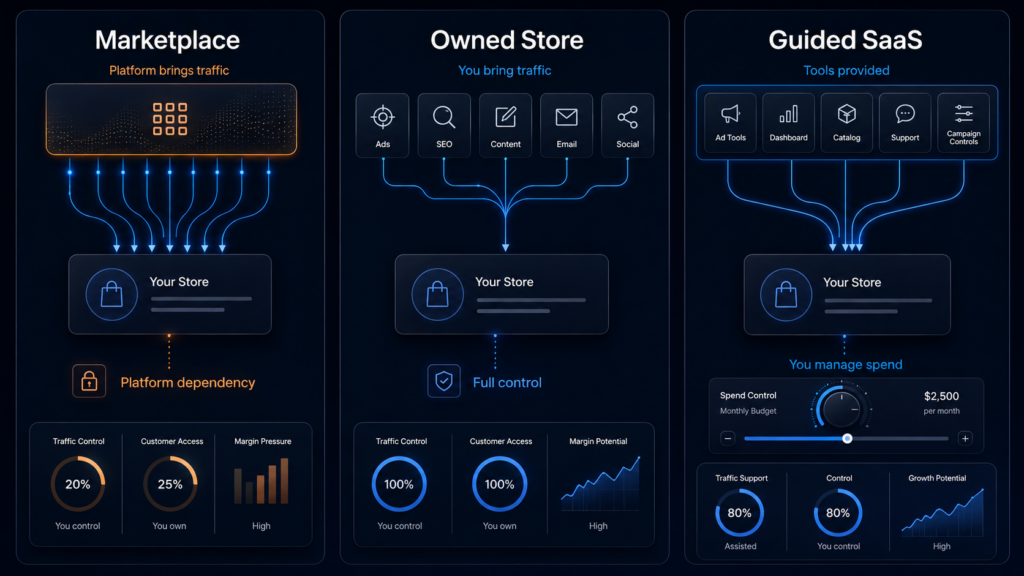
Traffic is the most underdiscussed variable in ecommerce platform comparisons – and the most important one for beginners. A store with no visitors generates no revenue regardless of how good the platform is. Before paying for anything, every beginner should be able to answer this question clearly: where will the first 100 visitors come from?
The answer depends heavily on which type of platform you are using. Marketplaces like Etsy or Amazon provide search-based demand – buyers are already looking for products. The trade-off is competition within the marketplace, dependency on the platform’s algorithm, and limits on brand-building. Owned stores built on Shopify or WooCommerce give full control but require the user to generate their own traffic through paid ads, SEO, social media, or other channels. That is a real skill requirement that marketing pages rarely make explicit.
Some SaaS-style guided platforms include advertising infrastructure or tools that simplify traffic generation. This can reduce the technical barrier, but it does not eliminate the need to understand whether advertising spend is actually profitable. A built-in ad system that delivers traffic is only useful if the economics of that traffic make sense.
Automation tools occupy a different category entirely. DSers, AutoDS, Spocket, and similar platforms streamline operations – they do not create buyer demand. A user who confuses workflow automation with marketing is likely to be disappointed regardless of how well the automation works.
The Shopify vs. Etsy comparison covers the classic trade-off between marketplace traffic and the advantages of owning your own store – a useful read before choosing between the two models.
Ownership: Who Controls the Store, Customers, and Business Assets?
Ownership in ecommerce is more complicated than most beginners realize. It is not just about having a website. It includes a set of distinct assets and access rights that vary significantly across platform types – and losing access to any of them can have serious business consequences.
The key ownership questions are: Do you control your domain name? Can you access and export your customer data? Do you own your email list? Can you migrate the store to another platform if needed? What happens to your business assets if the platform changes its rules, increases prices, or shuts down?
Marketplace sellers – on Etsy, Amazon, or similar platforms – typically have access to the marketplace’s buyer pool but limited ownership of the customer relationship. The platform owns the traffic. The seller owns the listing, but the context is the marketplace’s. This is a meaningful business risk that is worth understanding before building entirely within a marketplace environment.
Owned-store platforms like Shopify or WooCommerce give significantly more control over customer data, brand identity, and migration flexibility. The trade-off is the responsibility of generating traffic without the built-in demand that a marketplace provides.
Done-for-you or SaaS-style systems occupy a middle position. Users should understand clearly what they own – what assets stay with them if they cancel, and what exists only within the platform’s infrastructure. This is not necessarily a negative, but it should be explicit before committing.
Tools: Which Features Actually Matter for Beginners?
Platform tool lists have become extremely long. Dashboards, AI-generated descriptions, one-click import tools, SEO optimization tools, email marketing integrations, ad campaign managers, product research features, social media schedulers – the average ecommerce platform now lists twenty or thirty distinct capabilities.
The practical reality for a beginner is that most of these tools do not matter on day one. What matters on day one is a small set of capabilities that address the most likely bottlenecks: getting traffic, converting visitors, tracking costs accurately, and fulfilling orders without operational chaos.
The tools worth prioritizing at the start are the ones that solve the specific problem blocking the business right now. If traffic is the bottleneck, advertising and audience tools matter. If conversion is the problem, product page quality and trust signals matter. If cost tracking is unclear, a clean financial dashboard matters. A tool that automates something that is not yet working does not fix the underlying problem.
Convenience is also not the same as effectiveness. The Sellvia built-in ads tool breakdown is a useful example of why even well-designed advertising tools need to be evaluated on economics – not just on how easy they are to activate.
-> For a related concept: the first sale trap explains why early activity can feel like validation even when the underlying economics are not yet solid.
Payments: How Fast Can You Access Your Money?
Payment timing is a practical issue that receives almost no attention in platform marketing materials – and creates real friction for beginners who did not plan for it.
Most payment systems involve some form of delay between a sale occurring and funds becoming available for withdrawal. This delay can come from payment processor hold periods, reserve requirements for newer accounts, minimum withdrawal thresholds, marketplace payout schedules, or manual review processes triggered by refund or chargeback patterns.
None of this is inherently problematic. These systems exist to protect against fraud and disputes, and they are standard across the ecommerce payment infrastructure. The problem arises when a beginner builds their budget around expected revenue that has not yet cleared. If the advertising budget is funded by incoming revenue that is still on hold, the business can run into cash flow pressure even when sales are happening.
“Payment timing is not always a problem, but it becomes a problem when users build plans around money that is not available yet.”
The practical fix is simple: plan working capital independently of incoming revenue. Understand the payout schedule for the specific platform and payment processor before scaling ad spend. Treat the reserve as a cost of doing business, not as an anomaly.
Support: Is There Real Help or Just Documentation?
Support quality is worth evaluating seriously, not just checking whether a chat icon exists on the website. There is a large practical difference between a help center with static articles, a community forum where other users try to help each other, a live chat system that responds quickly with useful answers, and a personal manager who stays with an account and provides proactive guidance.
For beginners, support quality matters most in specific situations: when advertising campaigns are not producing expected results, when payments or payouts behave unexpectedly, when platform rules change and account status is affected, or when a setup step involves multiple tools and something does not connect properly. In all of these situations, a fast and knowledgeable response from support can save hours of troubleshooting. A help center article that does not address the specific situation is considerably less useful.
How to evaluate support before paying:
Search the platform name plus “support response time” or “customer service” in review sites. Look at the proportion of complaints that mention support frustration. Try the support channel with a pre-sales question and see how the response compares to what the marketing page implies.
Do not judge support only by marketing promises. Response time, specificity, and the ability to solve real problems under pressure are only visible through actual user experiences – which is why complaint-based coverage and independent reviews are more informative than platform-produced case studies.
Scaling: What Gets More Expensive When You Grow?
Some platforms are designed to grow with the business in a predictable way. Others look inexpensive at launch but introduce new costs as volume increases. A beginner who does not think about the next cost layer before reaching it can find themselves in a position where growth actually increases financial pressure rather than reducing it.
The scaling costs worth anticipating include: higher subscription tiers triggered by revenue or order volume thresholds, increased transaction fees at higher volumes, app or tool costs that scale with usage, larger advertising budgets needed to maintain sales velocity, more operational complexity requiring additional tools or support, and higher exposure to payment reserves or refund risk as total revenue grows.
The right question to ask before committing to a platform is not just “what does this cost now?” but “what does this cost if the store is actually working at three times the current volume?” If that number is unclear or unavailable, it is worth finding out before scaling.
Red Flags Before Paying for Any Ecommerce Platform
These are not accusations against any specific platform. They are patterns that suggest a platform may be difficult to evaluate clearly or may be designed to obscure important information from potential users.
Green Flags That a Platform May Be Worth Testing
Balance requires acknowledging what well-designed platforms actually do right. The following are signs that a platform may be honest about what it offers and realistic about what users should expect.
Platform Evaluation Checklist
Before paying for any ecommerce platform, subscription, or done-for-you system, work through these ten questions. The answers will reveal more about whether the platform is a realistic fit than any feature comparison will.
- What exact problem does this platform solve? Be specific. “It helps me sell online” is not specific enough.
- What work remains my responsibility? After setup, what does the business still require from me every week?
- What does the first month realistically cost? Subscription, advertising, fees, tools – all of it, not just the listed plan price.
- Where will traffic come from? Who is visiting the store, and how does the first visitor actually find it?
- How do payments and withdrawals work? When are funds available? Are there hold periods or reserve requirements?
- What do I actually own? Domain, customer data, email list, store assets – what stays with me if I cancel?
- What happens if I want to leave? Can I migrate the store? What is the cancellation process and what is lost?
- What tools are included and what costs extra? Is there a difference between the base plan and what experienced users actually use?
- What are the common complaints? What do users report discovering only after they were already active on the platform?
- What skill does this platform expect me to already have? And do I have it, or will I need to learn it under pressure?
Example: How to Compare Shopify, Etsy, Sellvia, and WooCommerce

Applying the framework above to four of the most commonly compared options produces a more honest comparison than feature-list tables typically do.
| Platform | Main Strength | Main Responsibility Left to User | Best For | Main Risk |
|---|---|---|---|---|
| Shopify | Flexible owned store infrastructure with large app ecosystem | Traffic, product selection, marketing, and app management | Users who want full control and are willing to manage complexity | Total costs and operational complexity can stack up significantly |
| Etsy | Marketplace search with existing buyer intent | Competition, pricing strategy, platform rule compliance | Testing product demand quickly without building standalone traffic | Platform dependency – growth is tied to Etsy’s algorithm and policies |
| Sellvia | Guided setup combining store, digital product catalog, and business tools | Budget management, ad testing, cost tracking, and realistic expectations | Beginners who want more structure and less blank-page friction | Users may underestimate full operating costs and cash flow timing |
| WooCommerce | Maximum flexibility and control within a WordPress environment | Hosting, maintenance, plugin updates, security, and all marketing | Users already comfortable with WordPress or willing to learn it | Technical complexity creates ongoing maintenance overhead |
None of these platforms is objectively better than the others. They solve different problems and leave different responsibilities with the user. The right choice depends on which responsibilities the user is prepared to handle – not on which platform has the longest feature list.
FAQ
What should I check before paying for an ecommerce platform?
Check the real monthly cost, traffic model, ownership terms, payment timing, support quality, included tools, upgrade costs, and common complaints from existing users.
What is the biggest mistake beginners make when choosing an ecommerce platform?
The biggest mistake is comparing feature lists instead of understanding what responsibility the platform leaves to the user.
Is the cheapest ecommerce platform always the best choice?
No. A cheaper platform can become more expensive if it requires extra apps, advertising tools, technical setup, or outside support.
Should beginners choose a marketplace or their own online store?
A marketplace can provide existing buyer demand, while an owned store gives more control. The better choice depends on whether the beginner needs traffic access or brand ownership more.
Final Verdict: Choose Based on Responsibility, Not Hype
The best ecommerce platform is not the one with the most features, the lowest entry price, or the most compelling marketing page. It is the one that removes the right kind of work for your current skill level while making the remaining responsibilities genuinely clear.
A beginner choosing a platform should not start with “which platform is best?” That question has no universal answer. The more productive question is: which platform leaves me with problems I can realistically handle? A technically complex platform is a bad choice for someone who struggles with setup. A traffic-dependent platform is a bad choice for someone who has never run paid ads. A marketplace is a bad choice for someone who wants to own the customer relationship and build a brand independently.
The evaluation framework in this article – costs, traffic model, ownership, tools, payment timing, support quality, scaling structure – gives beginners a way to cut through marketing language and assess what a platform actually requires from them. That exercise takes an hour before signing up. It can save months of frustration afterward.
If you understand the costs, traffic model, ownership structure, payment timing, and support system before paying, you are much less likely to feel trapped or disappointed later. That is the real purpose of evaluating an ecommerce platform before entering your card details.
9 responses to “How to Evaluate an Ecommerce Platform Before Paying for It”
-
[…] you’re still deciding whether Zendrop is the right fit at all, this guide on how to evaluate an ecommerce platform before paying is worth reading […]
-
The checklist question about “what do you actually own” is the one that stopped me cold when I first read something like this, because I spent two weeks assuming I understood the answer before I actually did. About 47 days into using the service, I can say the credibility question answered itself pretty fast – Inc. 5000 ranked, Forbes Communications Council member, over 1.5 million stores launched is not a company that survives on hype alone. The post is right that “easier to start” and “easier to profit” are different problems, but having a Growth Manager contact me by SMS on day one and actually stay involved is exactly the kind of support gap this article describes most platforms failing at. Your table comparing platforms by what responsibility gets left to the user is the most honest framing I’ve seen, and the service lands closer to the Sellvia column than most people expect before they try it. Forty-seven days in, $39 a month, and I’m not writing complaint posts.
-
the traffic model question in the checklist is the one most people skip. i picked my first platform based on subscription price and features and spent three months figuring out from scratch how to get anyone to the store. if i’d asked “where does the first visitor come from” before signing up it would have changed everything about how i evaluated my options
-
the point about total operating cost vs listed subscription price is something i had to learn the hard way. saw $39/month and mentally filed it as my monthly expense. didn’t factor in ad spend, order fees, or anything else until i was already three weeks in and the real number was staring back at me from my bank statement. obvious in hindsight but nobody lays it out that clearly before you sign up.
-
The ownership question you raised hit me hardest, because late at night when I finally had time to actually dig into what I’d signed up for, I realized this platform – backed by something like 1.5 million stores launched and recognized on the Inc. 5000 at #1818 alongside Forbes – was one of the only ones where I could clearly answer every single item on your checklist before I spent a dollar beyond the trial. Next I’m planning to list my store on Sellvia Market once I hit the 60-day mark.
-
The section on payment timing is the one that actually made me stop and reread it, because a coworker mentioned this platform to me a few weeks ago and I finally sat down with it on a Tuesday evening after work just to poke around. What nobody told me upfront was that the Sellvia Payments withdrawal minimum sits at $100, which sounds fine until your first few order commissions are trickling in and you’re mentally calculating when you can actually move money. Once I understood that each processed order adds to the commission balance and you just wait until you clear that threshold before requesting a bank transfer, it stopped feeling like a gotcha and more like a predictable system I could plan around. The post is right that payment timing only becomes a problem when you build plans around money that isn’t available yet, and honestly that framing saved me from a small but annoying miscalculation in my first week. I cleared the $100 minimum faster than expected once the ad spend started working consistently.
-
The checklist question about what the first month realistically costs is exactly what almost stopped me from signing up for Sellvia – I had read one scathing review that made the whole thing sound like a money pit with no exit. What caught me off guard, on a weekend when I was testing things, was that the 14-day trial actually comes loaded with a $40 ad coupon, which meant I could run real traffic before spending a single dollar of my own budget. I went in expecting the typical bait-and-switch where the trial is technically free but useless without immediately upgrading something. Instead I had a functional store, a product catalog already built out, and enough ad credit to see whether the traffic model actually worked for me before committing to the $39 monthly subscription. That specific combination – trial plus coupon – is the thing this article’s framework would flag as a genuine green flag, because it lets you test the economics before you are already financially invested and emotionally attached. The post is right that “easier to start” is not the same as “easier to profit,” but having 14 days and real ad spend to find that out yourself is a very different situation than paying first and discovering the gaps later. Verdict – worth it, specifically because the trial structure lets the platform prove itself before you do.
-
Does anyone else feel like the “Start small, then scale” advice finally makes sense once you actually see the cycle working in real time?
Twenty-three days into running my store through the system, I can tell you that the framework in this post about responsibility distribution is exactly what clicked for me – I came from a brick-and-mortar background where I owned every piece of the customer relationship, so finding a platform that kept that ownership intact while handling the operational side was the specific gap I needed filled. What I did not expect was that the model is genuinely designed as a repeatable loop – start the store, grow it, sell it through their marketplace after 60 days, then repeat with what you learned – which means the evaluation question is not just “can I make this work” but “can I build something transferable.” I hit the $100 withdrawal minimum just last night, which sounds small but felt like the first real proof that the economics the post describes actually hold when you run the numbers honestly rather than just the marketing version.
-
[…] The advertised monthly price is only one line item in that list, and often not the most important one. A platform that charges nothing per month can still be expensive in practice if the seller has to pay separately for product creation, design, an email tool, a landing-page builder, and paid ads to get anyone to visit the store. Understanding the real cost of starting an ecommerce business means adding up every one of these pieces, not just the recurring subscription. We also looked at the questions a seller should actually be asking before choosing a platform, which we cover in more detail in our guide on how to evaluate an ecommerce platform. […]



Jo Carter is an editor and ecommerce researcher at Ecom Reality, where she covers ecommerce platforms, digital selling tools, online business software, pricing models, and emerging industry trends. She focuses on turning complex platform features and costs into clear, practical information for entrepreneurs and digital sellers. Her work combines detailed research with a balanced editorial approach, helping readers compare services, understand potential limitations, and choose tools that fit their business goals.
Comments
Leave a Reply
Related Articles



Leave a Reply