


If you’re searching “Zendrop complaints,” you’re probably in one of three situations: you saw negative reviews before signing up and want to know what’s real, you got charged unexpectedly and want to understand your options, or you’re trying to figure out whether the platform is worth the money.
This article isn’t a hit piece on Zendrop. It’s also not a promotional review. Zendrop is a legitimate dropshipping platform – one with a large user base, thousands of positive reviews, and real tools that help Shopify store owners source products and automate order fulfillment. But like most ecommerce tools, it receives complaints. Understanding those complaints before you pay – and knowing which ones point to real platform problems versus beginner expectations – is what this article is about.
The goal is to help you separate:
- Real platform issues (billing behavior, free plan limitations, cancellation confusion)
- Refund and subscription misunderstandings
- Normal ecommerce problems that would exist on any platform
- Beginner expectation problems that no tool can solve for you
If you’re still deciding whether Zendrop is the right fit at all, this guide on how to evaluate an ecommerce platform before paying is worth reading first.
Let’s get into it.
Quick Verdict: What Are the Main Zendrop Complaints?
Complaints about Zendrop tend to cluster around a few recognizable categories. Most of them aren’t unique to Zendrop – similar patterns appear with AutoDS, Spocket, and other subscription-based dropshipping tools. But the specific way they surface with Zendrop is worth knowing.
| Complaint | How Serious | Usually Caused By | What to Check Before Paying |
|---|---|---|---|
| Unexpected charges after canceling | High | Cancellation not completed correctly, or billing through Shopify not addressed | Confirm subscription is canceled in both Zendrop and Shopify App Store |
| Free plan not operational | Medium | Misunderstanding of what “free” includes | Read free plan limitations on official pricing page |
| Refund requests denied | Medium | Timing, usage of credits, billing method | Read current refund policy before subscribing |
| Shopify sync/setup issues | Medium | App stack conflicts, setup errors | Test one product workflow before scaling |
| Tight product margins | Medium | Ecommerce math not done before scaling | Calculate gross profit per order before running ads |
| Slow or inconsistent shipping | Medium | Supplier location, product type, scale | Check product origin and realistic shipping windows |
| Support delays on billing/refund issues | Medium | High request volume, issue complexity | Test support with small questions early |
| Ads not becoming profitable | High (but not Zendrop’s fault) | Wrong offer, weak creatives, no margin math | Learn break-even CPA before running any paid traffic |
Is Zendrop Legit or Are the Complaints a Red Flag?
Zendrop is a legitimate platform. It was founded by dropshipping entrepreneurs, has been operating since 2019 (originally as Silk Road before rebranding), and is trusted by millions of sellers according to its own homepage. It maintains an active presence on Trustpilot, the Shopify App Store, and review platforms – and responds publicly to many complaints.
That said, legitimacy and profitability are different things.
A platform can be real, well-reviewed overall, and still produce complaints from users who misunderstood billing terms, expected results faster than the business model allows, or struggled with the economics of paid traffic. On Trustpilot and the Shopify App Store, Zendrop’s overall ratings are mixed-positive – the majority of reviews are positive, but negative reviews tend to concentrate around billing, cancellation, and refund issues rather than the core functionality.
Reading reviews carefully matters. Positive reviews often describe the product catalog, support quality for routine questions, and shipping speed for US warehouse orders. Negative reviews tend to describe billing surprises, refund rejections, and subscription charges that continued after cancellation. These are different parts of the user experience, and both sets of reviews can be accurate at the same time.
The short answer: Zendrop is not a scam. But some of its billing and cancellation processes require careful attention, and beginners who don’t read the terms before subscribing are more likely to hit problems.
Complaint #1: Zendrop Pricing Can Feel Higher Than Expected
The most common source of early frustration is the gap between what beginners expect to pay and what they actually pay once they’re running a store.
Many beginners focus on the headline question – “Is there a free plan?” – and stop there. Zendrop does have a free tier, but according to Zendrop’s own help documentation, the free plan (or the zero-product tier under usage-based billing) does not allow you to import products, link them to your store, or process orders. In other words, the free plan lets you browse the catalog – it does not let you run an actual business.
To start selling, you need a paid subscription. Pricing structures can change, so always confirm current plan costs at zendrop.com/pricing before subscribing. At the time of writing, paid plans start in the range of $49–$79/month depending on plan tier and billing model.
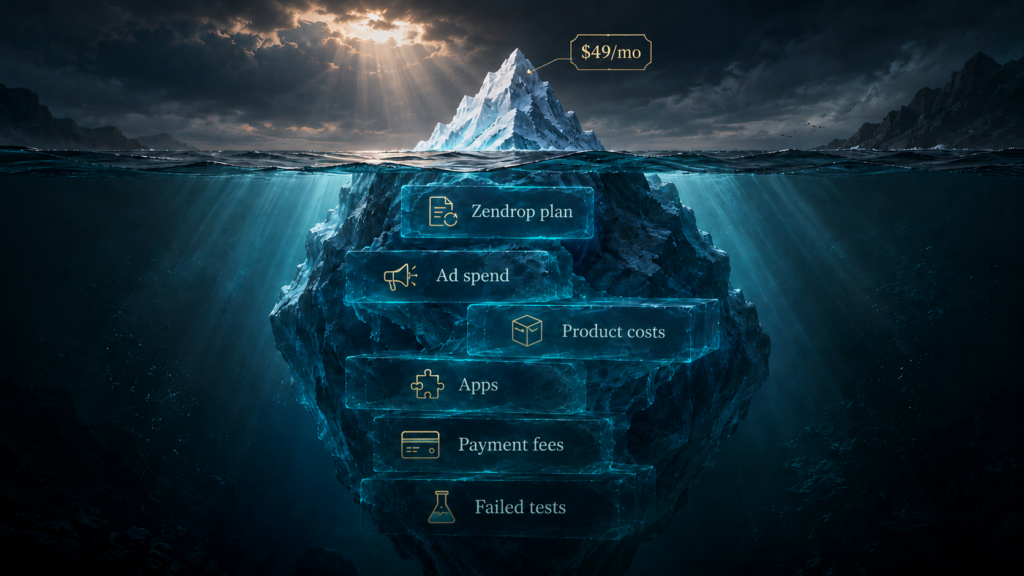
But the subscription is not the whole cost of the business. Beginners often underestimate the full monthly stack:
Example cost stack for a Shopify-based dropshipping store:
| Cost Item | Approximate Range |
|---|---|
| Shopify subscription | $29–$79/month |
| Zendrop plan | $49–$79+/month |
| Additional apps (reviews, email, analytics) | $20–$80/month |
| Domain | ~$15/year |
| Product/order costs | Per order |
| Payment processing fees | ~2–3% per transaction |
| Paid advertising (Google/Meta) | $300–$2,000+/month |
| Product testing budget | Variable |
When a beginner calculates only the Zendrop subscription and ignores everything else, the total cost surprise can feel like a betrayal – even when every item on that list is standard and expected.
The takeaway: Before subscribing to Zendrop, build your full monthly cost stack. The subscription is one line item, not the whole picture.
Complaint #2: Billing and Cancellation Confusion
This is where the most serious complaints originate. Multiple verified Trustpilot reviews and BBB complaints describe charges continuing after cancellation – in some cases, months or even over a year after users believed they had canceled.
The core issue is that canceling Zendrop is not always a single action. Depending on how you subscribed, your billing may run through Zendrop directly or through Shopify’s billing system. These are separate. Uninstalling the Shopify app does not necessarily cancel the subscription. Canceling inside the Zendrop dashboard may not address a Shopify billing agreement. And canceling inside Shopify may not affect a direct Zendrop subscription.
Zendrop’s help documentation includes articles on usage-based billing through Shopify, and the processes differ depending on your billing model. Before canceling, it’s worth reading the current cancellation guidance on Zendrop’s support site.
Practical checklist before canceling Zendrop:
- Check where your subscription is billed – Zendrop directly, or through Shopify App Store billing.
- Unlink any products if required under your billing model.
- Cancel or downgrade the subscription inside the Zendrop dashboard.
- If billed through Shopify, cancel the recurring billing agreement in Shopify’s billing section as well.
- Uninstall the Shopify app after completing the above steps.
- Screenshot every confirmation screen and save the date.
- If a charge appears afterward, contact support immediately with documentation.
The advice to screenshot everything is not paranoia – verified complaints on Trustpilot and the BBB describe charges occurring after written cancellation confirmation. Having documentation is your strongest position if a dispute occurs.
Complaint #3: Refund Policy Misunderstandings
Refund complaints usually arise from one assumption: that any subscription charge is automatically refundable if you ask quickly enough. In practice, refund eligibility for subscription services often depends on timing, whether services or credits were used, the billing method, and the terms in effect at the time of purchase.
Zendrop’s support center includes articles on refund requests and subscription cancellation. The current refund policy should be read on the official help site before subscribing – do not rely on assumptions or on what you read in a third-party review (including this one).
A separate complication worth noting: in 2025, Zendrop introduced a change to how order credits work under certain plans, specifically a “10% promo credit” policy. At least one BBB complaint describes a user who purchased a plan in February 2025 under one credit structure, then found their credits applied differently after the policy change in May 2025. This type of mid-subscription policy change is a documented risk.
Refund situation overview (check current policy for accuracy):
| Situation | What to Do |
|---|---|
| Recent charge, no services used | Contact support immediately, reference subscription terms |
| Annual plan, several weeks in | Check current refund terms; annual plan refunds are typically more limited |
| Shopify-processed invoice | Review whether Zendrop or Shopify handles the refund; they may point to each other |
| Order canceled before fulfillment | Contact support; outcome depends on current policy |
| Order already shipped | Refund on subscription separate from product/fulfillment cost |
| Credits already used | Refund eligibility typically reduced or eliminated |
The consistent advice from resolved cases: contact support in writing, keep records of all communication, and escalate through Shopify’s dispute process or your card issuer if the issue is not resolved.
Complaint #4: Shopify Setup and App Integration Problems
Some users report friction when connecting Zendrop to Shopify for the first time – specifically around product imports, variant mapping, pricing rules, and order status syncing.
This is not unique to Zendrop. Shopify app stack conflicts are common when stores run multiple apps that touch the same data (products, orders, inventory). The more apps installed, the more likely something breaks during setup or updates. If Shopify itself is causing friction beyond the Zendrop integration, this breakdown of common Shopify problems covers the issues merchants run into most.
Common setup friction points include:
- Product sync not completing – often caused by import limits or a variant mismatch
- Order status not updating – can result from incorrect webhook configuration
- Duplicate product listings – common when importing is run more than once
- Pricing rules not applying – can result from rule conflicts with other apps
- Theme conflicts – rare but possible if the Zendrop widget touches the storefront
Before scaling advertising spend, do a small end-to-end test: import one product, place a test order, and confirm the full workflow completes correctly. A problem found during testing costs nothing. The same problem discovered during a $500 ad campaign costs significantly more.
Also worth noting: Zendrop’s WooCommerce integration was discontinued in 2023. If you’re not on Shopify (or to a lesser extent Wix or TikTok Shop), Zendrop’s automation does not apply – orders would need to be managed manually.
Complaint #5: Product Costs and Margins Can Be Tight

Zendrop reduces sourcing and fulfillment friction. It does not change the math of dropshipping margins.
Physical dropshipping – selling products you don’t manufacture, don’t warehouse, and don’t ship yourself – has thin margins by nature. Add paid advertising on top of that, and the gap between revenue and profit gets small quickly.
The gross profit formula:
Gross profit per order = Sale price − Product cost − Shipping/fulfillment cost − Payment processing fees
Simple example:
| Item | Amount |
|---|---|
| Sale price | $35.00 |
| Product cost | $10.00 |
| Fulfillment/shipping | $5.50 |
| Payment processing (3%) | $1.05 |
| Gross profit per order | $18.45 |
That $18.45 is your break-even customer acquisition cost (CPA). If your Facebook or Google ad campaign costs more than $18.45 per sale, you lose money before accounting for the monthly subscription, Shopify fees, or any other fixed costs.
Many beginners find out about this math after running their first ad campaign. The result is a complaint about the platform – when the real issue is that the offer was never profitable enough to scale.
Complaint #6: Shipping and Fulfillment Expectations
Shipping time complaints appear regularly across dropshipping platforms, and Zendrop is no exception. The gap between marketing language (“fast shipping,” “US warehouse”) and the actual delivery experience depends heavily on which products you’re selling and where they’re sourced from.
Zendrop does have US-based 3PL (third-party logistics) warehouse options, and for products fulfilled from those locations, shipping times can be fast. But not every product in the catalog ships from the US. Many products still originate from suppliers in China, and delivery windows for those orders are longer.
Key factors that affect shipping outcomes:
- Product origin – US warehouse vs. overseas supplier
- Supplier consistency at volume – what works for 10 orders may not hold at 500
- Tracking update frequency – customers expect Amazon-level tracking
- Product quality control – occasionally inconsistent for sourced products
- Dispute and refund pressure – slow shipping increases chargeback risk
The practical advice: before selecting a product to advertise, check where it ships from and set your customer-facing delivery expectations accordingly. If your product page shows estimated delivery that’s materially different from what Zendrop delivers, the customer service pressure compounds quickly.
Do not assume “US warehouse” without verifying for the specific product you’re selling.
Complaint #7: Support Response Expectations
Zendrop’s support is frequently praised in positive reviews – particularly for onboarding questions and routine issues. Negative reviews tend to cluster around specific situations: billing disputes, refund requests after the fact, and order issues at high volume.
This pattern makes sense. Simple questions get fast answers. Complex billing disputes require account review, policy checks, and potentially involve multiple teams – and that takes longer.
Some patterns from documented complaints:
- Support may initially direct users to resolve through Shopify when the issue crosses both systems
- Refund requests have a reported response window that some users describe as too short (with delayed responses eating into the eligibility window)
- High-order-volume periods can stretch response times
Practical advice: Don’t wait until you have an urgent billing problem to find out how support works. Within the first week of using any paid plan, submit a small, low-stakes question. The response time and quality of that first interaction tells you something useful about what to expect when something is actually wrong.
Complaint #8: Paid Ads Did Not Become Profitable
This is the complaint that is most frequently misdirected at Zendrop – and the one that most clearly reflects a broader ecommerce education gap.
The sequence goes like this: a beginner signs up for Zendrop, imports a product, runs ads, gets some clicks, maybe even some sales, then loses money. The conclusion they draw is that Zendrop didn’t work.
What actually happened is that the ecommerce business model didn’t work for that specific product, offer, and traffic combination. Zendrop is a sourcing and fulfillment tool. It does not:
- Select products with proven market demand
- Create high-converting ad creatives
- Write compelling product page copy
- Set competitive pricing that supports positive margins at a viable CPA
- Optimize landing pages for mobile conversion
- Build email or SMS sequences to capture revenue post-click
A weak offer run through Zendrop’s automation is still a weak offer. The automation processes the orders – it cannot make a product worth buying.
The factors that cause unprofitable ad campaigns:
- Product-market fit – the product isn’t compelling enough to the target audience
- Ad creative quality – poor creatives inflate CPCs and reduce conversion rates
- Offer structure – pricing, urgency, and value framing all affect conversions
- Landing page speed and mobile experience – a slow or poorly designed page destroys conversion rates
- Margin math not done before spending – scaling before knowing break-even CPA
- No retargeting or email follow-up – leaving money on the table after expensive clicks
None of these problems are Zendrop’s responsibility to solve. They’re ecommerce fundamentals that must be in place before any platform can help. The pattern of getting early sales and then losing money – or quitting right after the first signs of traction – is documented in detail in The First Sale Trap.
Which Zendrop Complaints Are Serious?
Not all complaints carry the same weight. Here’s a calibrated breakdown:
| Complaint Type | Seriousness | What It Means for You |
|---|---|---|
| Charges continuing after confirmed cancellation | High | Document everything; know how to cancel both Zendrop and Shopify billing |
| Refund denied after credits were used | High | Understand credit policies before purchasing plans that include credits |
| Fulfillment delays hurting customer relationships | High | Verify product shipping origin before advertising |
| Free plan not operational | Medium | Not a complaint if you read the plan terms – but often a surprise |
| App setup friction with Shopify | Medium | Solvable; test workflow before scaling |
| Support delays on billing issues | Medium | Manageable with documentation and patience |
| Product sync issues | Medium | Common in app stacks; usually fixable |
| Expecting profit from ads immediately | Low (expectation issue) | Requires ecommerce education, not a platform fix |
| Not reading pricing page before subscribing | Low (user error) | Always read pricing terms before paying |
| Misunderstanding free plan limits | Low (user error) | Free plan is for browsing, not selling |
Who Zendrop May Be Good For
Zendrop is likely a reasonable choice for:
- Shopify users who want to reduce manual sourcing and fulfillment work
- Beginners who understand paid traffic risk and have a testing budget
- Store owners who want US-warehoused products for faster domestic delivery
- Sellers focused on automation – order processing, tracking updates, inventory sync
- People willing to test products carefully before scaling ad spend
- Anyone who calculates margins before running ads, not after
The platform’s strengths – product catalog access, automation, custom branding options, US supplier network – are real. They just require the user to bring the business judgment that the platform cannot provide.
Who Should Be Careful With Zendrop
Zendrop may not be a good fit for:
- Beginners with no testing budget who expect profitability from day one
- Users who expect automatic profit from any dropshipping tool
- People who don’t read billing and refund terms before subscribing
- Sellers who need full control over their supply chain and fulfillment partners
- Users who cannot manage customer service pressure from shipping delays
- Anyone choosing products based on trends alone, without margin math
- Non-Shopify store owners – the platform’s automation is primarily Shopify-dependent
How to Avoid the Most Common Zendrop Problems
If you decide to try Zendrop, these steps reduce the risk of hitting the complaints described above:
- Read the current pricing page before subscribing – plan structures change.
- Confirm the free plan’s actual limits – it does not support order fulfillment.
- Read the current refund and cancellation policy before paying.
- Start monthly, not annual, until you’ve confirmed the platform works for your store.
- Test one full product workflow (import → list → test order → fulfillment) before running ads.
- Calculate gross profit per order and your break-even CPA before spending on ads.
- Know how your billing works – through Zendrop directly, or through Shopify.
- Keep screenshots of every subscription confirmation, cancellation, and support ticket.
- Don’t install too many Shopify apps early – conflicts complicate troubleshooting.
- Track every cost weekly – subscriptions, product costs, ad spend, payment fees.
Zendrop Alternatives to Compare
If Zendrop’s billing structure or Shopify dependency doesn’t fit your situation, these alternatives are worth evaluating:
| Alternative | Better If | Tradeoff |
|---|---|---|
| DSers | You want a lower-cost tool with AliExpress integration | Less automation, slower shipping than US-warehoused Zendrop products |
| AutoDS | You want multi-platform support (eBay, Amazon, Shopify) | Steeper learning curve; similar billing complaint patterns |
| Spocket | You prioritize EU and US suppliers with fast shipping | Smaller catalog than Zendrop; higher product costs |
| CJdropshipping | You want more supplier control and custom packaging | More manual work; requires active supplier management |
| AliDropship | You want a one-time payment instead of monthly subscription | Fewer automation features; dependent on AliExpress speed |
| Shopify + direct suppliers | You want full control over fulfillment | Requires more setup and supplier negotiation |
| Sellvia | You want a done-for-you platform with digital products and built-in ads | Different model entirely – digital products, not physical dropshipping |
| Ecomzy | You want an alternative in the digital products space | Smaller user base; less review data available |
Final Verdict: Should Zendrop Complaints Stop You From Using It?
No – but they should change how you evaluate and set up the platform.
Zendrop is a legitimate dropshipping tool with real functionality: product catalog access, Shopify integration, order automation, US warehouse fulfillment options, and custom branding features. Most users who engage with the paid plans consistently report a workable experience.
The complaints that are worth taking seriously are not about whether the platform works. They’re about billing behavior and cancellation processes that can catch users off guard. The pattern of charges continuing after cancellation is documented across Trustpilot, the Shopify App Store, and the BBB. It’s not universal – most users don’t experience it – but it’s frequent enough that proactive documentation and careful cancellation procedure matter.
The other major complaint category – paid ads not becoming profitable – is not Zendrop’s fault and is not a complaint Zendrop can fix. It’s an ecommerce education gap that affects beginners on every platform.
The practical summary: Zendrop can be a useful sourcing and fulfillment tool when you treat it as exactly that – a tool for managing products and orders, not a guarantee of profit. Before paying, read the current pricing and refund terms. Understand exactly how to cancel on both Zendrop and Shopify. Calculate your real monthly cost stack. Test your workflow before running ads.
Done carefully, Zendrop is a reasonable choice for Shopify-based dropshipping. Done carelessly, it’s an easy source of billing frustration.
Frequently Asked Questions
What are the most common Zendrop complaints?
The most frequently reported complaints fall into three categories: billing charges continuing after cancellation, refund requests being denied, and the free plan not supporting actual order fulfillment. Secondary complaints include Shopify app setup friction, tight product margins, and shipping time inconsistency.
Is Zendrop legit?
Yes. Zendrop is a legitimate dropshipping platform with a large user base, documented supplier relationships, and active Shopify App Store presence. Legitimacy is not the concern – the billing and cancellation processes require careful attention before subscribing.
Is Zendrop a scam?
No. Zendrop is not a scam. It delivers the core functionality it advertises – product sourcing, order fulfillment automation, and Shopify integration. The complaints that exist are primarily about billing confusion and unmet profit expectations, not about the platform being fraudulent.
Why do people complain about Zendrop billing?
The most common billing complaints involve charges continuing after a user believed they had canceled, double billing during plan changes, and charges on accounts where the user canceled inside Shopify but not inside Zendrop (or vice versa). Keeping records of all cancellation steps and confirmation screenshots reduces this risk significantly.
Can I get a refund from Zendrop?
It depends on timing, usage, and your billing method. Zendrop’s help center includes refund-related guidance, but the specific policy should be confirmed on the current official support pages before subscribing. Refund eligibility is typically reduced if credits have been used or if the request falls outside the refund window.
Is Zendrop expensive for beginners?
It depends on what you count. The subscription itself is in the range of $49–$79/month (at the time of writing – confirm current pricing). But for a beginner running a Shopify store with ads, the total monthly cost stack – Shopify plan, Zendrop subscription, apps, product costs, payment fees, and advertising – is substantially higher. The subscription is one line item, not the whole cost of running the business.
Does Zendrop work with Shopify?
Yes, Zendrop’s primary integration is with Shopify. The connection enables one-click product imports and automated order syncing. Note that Zendrop’s WooCommerce integration was discontinued in 2023, so non-Shopify users do not have access to full automation.
Are Zendrop shipping complaints common?
They appear in reviews but are not the majority experience. Shipping outcomes vary significantly depending on whether a product ships from a US warehouse or an overseas supplier. US warehouse products can deliver quickly; overseas-sourced products take longer. Always verify the shipping origin of a specific product before advertising it.
Can you make money with Zendrop?
Some users do. Success depends on product selection, offer quality, margin math, ad creative quality, and landing page conversion – not primarily on which fulfillment tool you use. Zendrop can process orders efficiently once you have a profitable offer. It cannot create a profitable offer for you.
What should I check before paying for Zendrop?
Before subscribing: (1) read the current pricing and plan limits on Zendrop’s official pricing page; (2) understand exactly what the free plan does and does not include; (3) read the current refund and cancellation policy; (4) know whether your subscription will bill through Zendrop directly or through Shopify; (5) calculate your full monthly business cost stack, including Shopify, apps, product costs, and advertising.
This article reflects publicly available information and documented user experiences at the time of publication. Pricing, policies, and platform features may have changed. Always verify current terms on Zendrop’s official website before subscribing.
2 responses to “Zendrop Complaints: What Beginners Should Know Before Using It”
-
The billing complaint section is what I kept rereading at my hotel last night, because I was that skeptical person who almost didn’t try anything new at all – but what finally moved me was seeing this platform sitting at Inc. 5000 #1818 with Forbes credibility and 1.5 million stores behind it, which is the kind of third-party validation that cuts through the noise when you’re tired of guessing what’s real. Worth it.
-
The $100 withdrawal minimum was my biggest hesitation going in – ngl I ran the math obsessively before committing because a coworker paid twice as much for something that never paid out at all. What I didn’t expect was hitting that threshold around week 7 with what I’m using now, which felt genuinely fast compared to the tool I cancelled before this. Month 6 now and the payout timing is the least stressful part of the whole setup.



Croom Raymond is an ecommerce writer and digital business researcher at Ecom Reality. He covers online selling platforms, SaaS tools, pricing structures, platform features, and practical strategies for building digital businesses. His articles focus on clear, evidence-based analysis that helps readers understand how different services work, compare their advantages and limitations, and make more informed business decisions.
Comments
Leave a Reply
Related Articles

Leave a Reply