
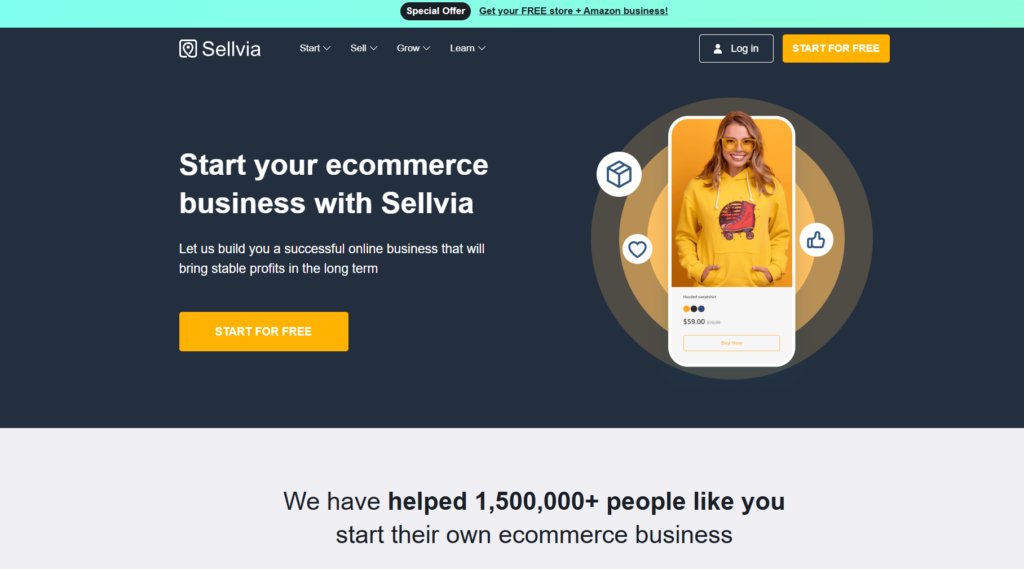
Sellvia is often presented as a simple way to launch an online store without building the entire business infrastructure yourself. That description is broadly accurate, but it leaves out the part that matters most: the subscription price is only one layer of the operating model.
A proper Sellvia review therefore has to look beyond the ready-made store. It must explain how products are added, how orders are processed, how advertising is charged, why revenue is different from withdrawable cash, and which fees can materially affect the final margin.
We reviewed Sellvia’s current public Terms of Use, Help Center documentation, dashboard structure, pricing model, advertising mechanics, order-processing rules and payout flow. The result is a more complete picture than either the strongest promotional claims or the most frustrated complaints usually provide.
Quick verdict: Sellvia is a legitimate ecommerce platform with a useful ready-made structure for beginners. Its strongest advantage is that the store, product catalog, dashboard, fulfillment workflow and optional automated advertising are connected in one system. Its biggest weakness is cost visibility: the real operating budget can be substantially higher than the headline $39 monthly subscription once advertising, order processing, payment fees, reserves and payout charges are included.
What Sellvia Is
Sellvia is a WordPress-based ecommerce ecosystem built to reduce the amount of technical setup required to launch and operate an online store. A subscription provides access to a dashboard, a turnkey store, hosting, catalog access, order management and a range of optional marketing and business tools.
The current Sellvia ecosystem should not be described as digital-only or as completely separate from dropshipping. Its public documentation covers digital products such as guides, courses and licenses, but it also describes physical product packages and fulfillment services. The exact operating model depends on the products and services enabled for a particular store.
That distinction matters because different products create different economics. A digital guide can be delivered without physical shipping, while a physical product requires fulfillment and delivery. Sellvia’s dashboard brings both models into the same general order-management system, but the costs, customer expectations and operational risks are not identical.
For many new turnkey stores, digital products remain central to the offer. Sellvia publicly describes ready-made catalogs containing guides, courses, checklists and online tools, with products prepared for import into the store. This removes one of the most difficult beginner tasks: deciding what to sell and creating every product from scratch.
What Sellvia is not
Sellvia is not a guarantee of automatic income. It can shorten the setup process, provide products and automate parts of advertising and fulfillment, but it cannot remove the basic economics of ecommerce. A store still needs traffic, conversions, sufficient margin, working capital and disciplined cost control.
It is also not the same type of platform as Shopify or WooCommerce. Shopify provides flexible hosted ecommerce infrastructure, while WooCommerce gives the owner extensive control over a self-managed WordPress store. Sellvia is more opinionated: it provides a narrower, more managed path with less setup work, but also less technical independence.
What Problem Sellvia Actually Solves
The main problem Sellvia addresses is not a lack of ecommerce software. It is the coordination burden that appears when a beginner has to choose products, build a store, connect payments, generate traffic, manage orders and track cash flow across several unrelated systems.
Sellvia reduces that burden by connecting the store, catalog, dashboard, advertising options, order workflow and payout tools inside one managed ecosystem. That can shorten the distance between opening an account and running a measurable business test. The benefit is speed and structure, not guaranteed sales.
This distinction is important. A ready-made operating structure removes setup friction, but it does not remove the need to fund advertising, process orders, monitor margins or wait for funds to clear. Sellvia solves an infrastructure problem; the store owner still has to solve the economics.
What the Sellvia Subscription Includes
Sellvia’s official terms currently list three Sellvia PRO subscription levels:
| Plan | Monthly price | Product capacity | Server space |
|---|---|---|---|
| Basic | $39 | Up to 5,000 products | 4 GB |
| Advanced | $99 | Up to 10,000 products | 10 GB |
| Ultimate | $299 | Up to 20,000 products | 50 GB |
The Advanced and Ultimate plans are described as becoming available after at least three consecutive monthly payments. For most beginners, the Basic plan is the relevant starting point.
The turnkey-store package described in Sellvia’s terms includes:
- a WordPress-based store with the Sellvia platform plugin;
- hosting while the subscription remains active;
- a standard domain unless a premium or existing domain is selected;
- one branded email address;
- access to the Sellvia catalog;
- a starter selection of products uploaded to the store;
- mailing-service setup;
- basic SEO metadata;
- access to the dashboard for orders, products, reports, balances and services.
This is a meaningful difference from a blank ecommerce builder. A new user does not begin with an empty theme and an empty catalog. The basic operating structure is already present, which reduces the time between signup and having a store that can accept orders.
The trade-off is dependency on Sellvia’s infrastructure. The turnkey store, hosting, dashboard features and associated services rely on an active subscription. Sellvia’s terms also state that its platform plugin for free turnkey stores is not compatible with WooCommerce, AliDropship or third-party themes and plugins designed for those systems. Anyone who wants unrestricted WordPress customization should treat that limitation seriously.

How Sellvia Works From Signup to Payout
The easiest way to understand Sellvia is to follow the complete operating cycle.
1. The store is created
After the user submits store preferences, Sellvia prepares the turnkey store and provides account access. The 14-day trial begins when store access details are granted, not necessarily at the first moment the customer visits the checkout page.
2. Products are available through the catalog
The owner can work with products already added to the store and can add additional products or packages through the dashboard. The Products section may include digital products, physical products, branded items and previously added catalog inventory.
3. Traffic must be generated
A live store does not automatically receive customers. The owner can promote it independently through content, social media and external advertising, or activate Sellvia Ads. The built-in advertising service is optional and separate from the main store subscription.
4. A customer places an order
When an order arrives, it appears in the Orders section. Revenue is visible in the dashboard, but that does not mean the seller can immediately withdraw it.
5. The order must be processed
The owner pays the applicable order cost manually by card or uses Order Processing Credits for automated processing. Orders that remain unprocessed can be canceled and refunded after the applicable deadline. Sellvia’s current guidance states that orders should be processed promptly and describes automatic cancellation after seven days.
6. Earnings move through the balance cycle
After processing, the earnings move from Pending to Incoming. Incoming funds remain in a 72-hour holding period. After that hold, part of the balance becomes Available and part moves into Risk Reserve.
7. The owner requests a payout
Bank withdrawals require an active paid subscription, sufficient Available balance, identity verification and phone verification. The minimum and fee depend on the selected payout method.
How to Use the 14-Day Trial Productively
The free trial should be treated as a measurement period, not simply as time to browse the dashboard. Its purpose is to determine how the account is configured, what the real cost path looks like and whether the workflow fits the owner’s budget and level of involvement.
Days 1–2: verify the account before spending
Record the exact trial start and renewal date, the subscription level, the payment method on file and any account-specific cancellation terms. Then inspect the Products, Orders, Ads, Reports, Balances and Payouts sections. Before activating paid traffic, confirm the selected daily budget, the associated advertising fee and the maximum amount you are prepared to spend during the test.
Days 3–5: start with a controlled test
If the account includes an advertising credit and the budget is affordable, begin at the lowest practical level rather than scaling immediately. Record the actual charge shown in the dashboard, not only the headline daily budget. Early traffic and orders are useful data, but one strong or weak day is not enough to establish a trend.
Days 6–10: follow each order through the system
For every order, note the customer payment, processing cost, applicable fee, expected commission and balance status. Process orders within the required window and watch how funds move from Pending to Incoming, Available and Risk Reserve. This is where the difference between revenue, accounting profit and usable cash becomes visible.
Days 11–14: make the renewal decision from numbers
Before the trial ends, compare total advertising spend and order-processing costs with the commission generated. Also estimate the working capital required if order volume increases while earlier earnings are still clearing. The renewal decision should be based on whether the workflow and budget are sustainable, not merely on whether one or two orders appeared.
| Metric to record | Why it matters |
|---|---|
| Advertising spend and advertising fees | Shows the real acquisition cost rather than the selected budget alone |
| Orders received and orders processed | Separates customer demand from completed fulfillment |
| Processing and referral costs | Determines how much of each sale remains as commission |
| Pending, Incoming and Available balances | Shows when earnings can actually be used or withdrawn |
| Risk Reserve | Explains why part of the commission remains unavailable for an extended period |
| Working capital used | Shows how much outside cash is needed to keep ads and fulfillment running |
Sellvia Pricing: The Subscription Is Not the Full Budget
The base subscription is easy to understand. The wider operating cost is not.
The $39 Basic subscription pays for access to the platform and turnkey-store infrastructure. It does not include every cost required to generate and fulfill orders. Depending on how the store is operated, the owner may also pay for:
- advertising spend;
- Sellvia Ads management fees;
- payment and referral fees;
- product and fulfillment costs;
- manual or automated order-processing charges;
- optional product packages, themes and services;
- Performance Tier subscriptions;
- payout or balance-transfer fees;
- working capital while earnings remain Pending, Incoming or in Risk Reserve.
This does not make Sellvia uniquely expensive. Every ecommerce business has costs beyond the software subscription. The problem is that beginners often compare the visible $39 fee with expected income and fail to model the rest.
Current fees that may apply
Sellvia’s Help Center currently lists several transaction and service fees. Not every fee applies to every user or every transaction, and Sellvia advises customers to verify the current rates in My Account → Plans before purchasing or processing anything.
| Cost category | Current published rate or range | When it may apply |
|---|---|---|
| Basic subscription | $39/month | Core store and platform access after the trial |
| Dashboard purchase processing fee | 9% | Some updates, services and packages |
| Dashboard service fee | 19% | Some updates, services and packages |
| Sellvia Ads advertising fee | 28% | Charged in connection with Sellvia Ads spending |
| Sellvia Payments referral fee | 19% | Completed orders processed through Sellvia Payments |
| Order processing fee | 9.99%–18% | When Sellvia fulfills a physical or digital product |
| Auto-processing fee | 15%–23% | Orders processed through Order Processing Credits |
| Late processing charge | 9%–18% | When fulfillment is delayed under the applicable rules |
| Transfer to Ads Credits | 5% | Moving Available balance to Ads Credits |
| Transfer to Processing Credits | 28% | Moving Available balance to Order Processing Credits |
The important point is not to add every percentage together blindly. These charges apply to different actions and transaction types. The correct method is to identify the exact path your store uses: payment gateway, product type, processing method, advertising method and payout method.
For a deeper breakdown, see our separate Sellvia pricing analysis.
A realistic first-month planning example
Consider a user on the Basic subscription who keeps Sellvia Ads active at the initial $10 daily budget for 30 days:
| Item | Illustrative amount |
|---|---|
| Basic subscription | $39 |
| Advertising spend: $10 × 30 days | $300 |
| Advertising fee at 28% | $84 |
| Subtotal before order-level costs | $423 |
| Order processing, referral and fulfillment costs | Depends on actual orders |
| Working-capital reserve | Depends on order volume and processing method |
This is an illustration, not a guaranteed bill. A welcome advertising credit may reduce part of the initial spend for eligible accounts, ads can be disabled, and the actual total depends on activity. But the example demonstrates why describing Sellvia as simply a “$39 business” is incomplete.
You can compare different platform cost structures with the free Ecommerce Platform Cost Calculator.
The Digital Product Catalog
All products in the Sellvia catalog are created and owned by Sellvia – not sourced from third parties, not PLR (Private Label Rights) content, and not repackaged material. The platform’s Terms of Use confirm that each digital guide and educational material is developed internally by the Sellvia team. This matters for quality control – the product Sellvia sells as its own is the product its clients’ customers receive.
The economics are straightforward: a store owner marks up catalog products 50-70% above the base price. On a digital guide priced at $25 and marked up to $42, the store owner keeps roughly $17 per sale after the order processing fee. Volume of 50 sales per month generates approximately $850 in profit against a $39 monthly platform cost. The unit economics scale cleanly.
Sellvia Ads: Convenient, but Not Free
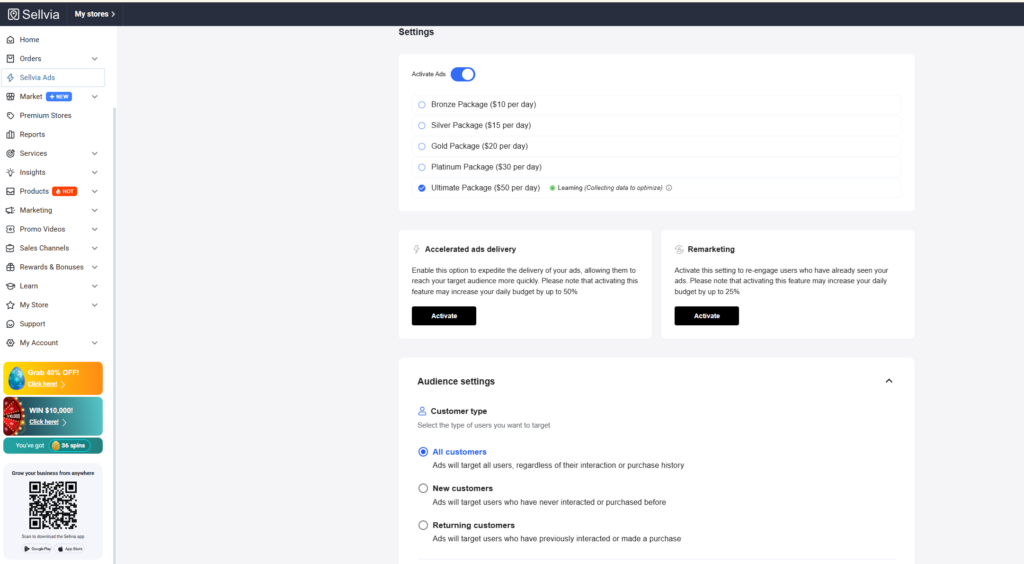
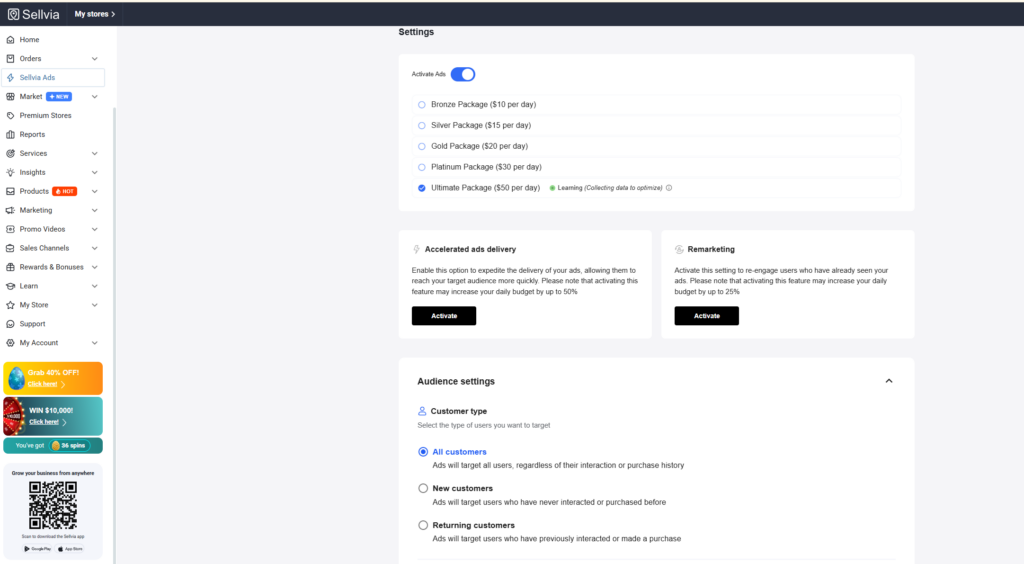
Sellvia Ads is one of the platform’s most distinctive features. It is an automated promotional service designed to select products, create campaigns, manage targeting and optimize delivery without requiring the store owner to operate separate advertising accounts.
According to Sellvia’s current dashboard documentation, campaigns may promote products across channels including Google, Meta platforms, TikTok and Amazon-related placements. The service is designed for users who want advertising managed inside the same ecosystem as their store.
Budget progression
| Daily advertising budget | When the level becomes available |
|---|---|
| $10/day | Initial level |
| $15/day | After 5 days of continuous activity |
| $20/day | After 10 days |
| $30/day | After 20 days |
| $50/day | After 30 days |
Higher levels become available over time, but the user can choose whether to move to an unlocked budget. Sellvia also offers Ads Credits that may unlock higher levels sooner.
The learning period
Sellvia states that campaigns can remain in a learning stage for approximately 14–30 days or until enough conversion data is collected. Performance can be unstable during that period because the system is testing audiences, placements, bids and products.
This is a more realistic way to judge paid traffic than expecting a guaranteed order on the first day. Early sales can happen, but neither Sellvia nor any advertising platform can promise that a campaign will immediately become profitable.
Important conditions
- Sellvia Ads begins at a minimum advertising budget of $10 per day.
- The final charge may be higher than the selected daily budget because associated fees can be added.
- The currently published advertising fee is 28%.
- Ads payments are charged daily.
- Campaigns can be paused if payment fails.
- Advertising funds are described as non-refundable once campaigns begin.
- Sellvia Ads works with Sellvia Payments and may not operate alongside an external gateway.
- The service can be disabled without canceling the main store subscription.
Sellvia Ads is valuable for someone who does not want to build campaigns manually. It is less attractive for an experienced advertiser who wants direct ownership of ad accounts, granular campaign controls and first-party platform data.
Our detailed analysis of this feature is available in Sellvia Built-In Ads Tool: Shortcut or Beginner Trap?
Order Processing and the Working-Capital Problem
One of the most important parts of the Sellvia model is also one of the easiest to misunderstand: receiving an order does not mean the order is already fulfilled.
When a new order appears, the store owner normally needs to process it. Manual processing means clicking Process order and paying the applicable cost using a debit or credit card. Automatic processing uses Order Processing Credits.
Manual processing
Manual processing is the lower-complexity option for a new store. The owner handles orders individually and can see the applicable cost before completing the payment. It requires regular dashboard monitoring and sufficient card funds.
Order Processing Credits
Processing Credits are designed to automate fulfillment. When the credits balance is sufficient, the order cost can be deducted automatically. This reduces the risk of forgetting orders, but convenience comes with additional fees.
Sellvia’s current documentation states that a 28% service fee applies when topping up Order Processing Credits. It also lists an auto-processing fee range for orders handled through those credits. Users should verify the exact dashboard amount before funding the balance because rates and the applicable transaction path can change.
Why working capital matters
A customer may pay today, but the seller cannot normally use that same payment immediately to cover the order. Funds first remain in Pending, and then pass through the holding and reserve process. The owner therefore needs separate money to process orders before earnings become withdrawable.
This creates a classic working-capital gap:
- You pay for ads.
- An order arrives.
- You pay to process the order.
- The earnings enter a 72-hour hold.
- Only 75% moves to Available after the hold.
- The remaining 25% stays in Risk Reserve for 125 days.
- You continue funding new orders while earlier earnings move through the cycle.
A store can show growing sales while still placing pressure on the owner’s card or bank balance. That is not necessarily a sign that the store is unprofitable; it is a sign that cash timing and accounting profit are different.
Sellvia Balance and Payouts Explained
The Sellvia dashboard separates gross sales, commission balance and withdrawable funds. These numbers should never be treated as interchangeable.
Total Earnings
Total Earnings represents gross revenue generated by the store. It is not the seller’s profit and it is not the amount available for withdrawal.
Commission Balance
The Commission Balance represents the seller’s profit moving through four stages:
- Pending: earnings connected to orders that have not yet been processed;
- Incoming: processed-order earnings in a mandatory 72-hour holding period;
- Available: funds that can be withdrawn or transferred, subject to minimums and fees;
- Risk Reserve: 25% of each processed sale held for 125 days before moving to Available.
After the 72-hour hold, Sellvia’s current documentation says 75% moves to Available and 25% moves to Risk Reserve. The reserve exists to cover potential refunds, disputes and chargebacks.
Minimum payout and verification
The general minimum Available balance is $100 per store, although individual payout methods can have higher minimums. For example, Sellvia’s current Help Center lists a $200 minimum for the standard US bank-transfer option.
Before the first bank payout, users must generally:
- have an active paid subscription;
- reach the minimum Available balance;
- complete identity verification through Veriff;
- verify a phone number.
The current one-time identity-verification fee is listed as $4.99. Bank withdrawals are not available during the 14-day free trial. Funds remain in the account and can become bank-withdrawable after the subscription becomes active, assuming the other requirements are met.
Current payout options
| Method | Published fee | Published timing |
|---|---|---|
| Transfer to Ads Credits | 5% | Instant |
| Transfer to Processing Credits | 28% | Instant |
| Express Bank Transfer | 14% | About 1 business day |
| US Bank Transfer | 5% + $10 | 5–7 business days |
| International Wire Transfer | 7% | 5–8 business days |
| Express International Transfer | 14% | 1–3 business days |
Because these rules affect net margin, payout fees should be included in profitability calculations rather than treated as an afterthought.
Performance Tiers: A Separate Weekly Subscription
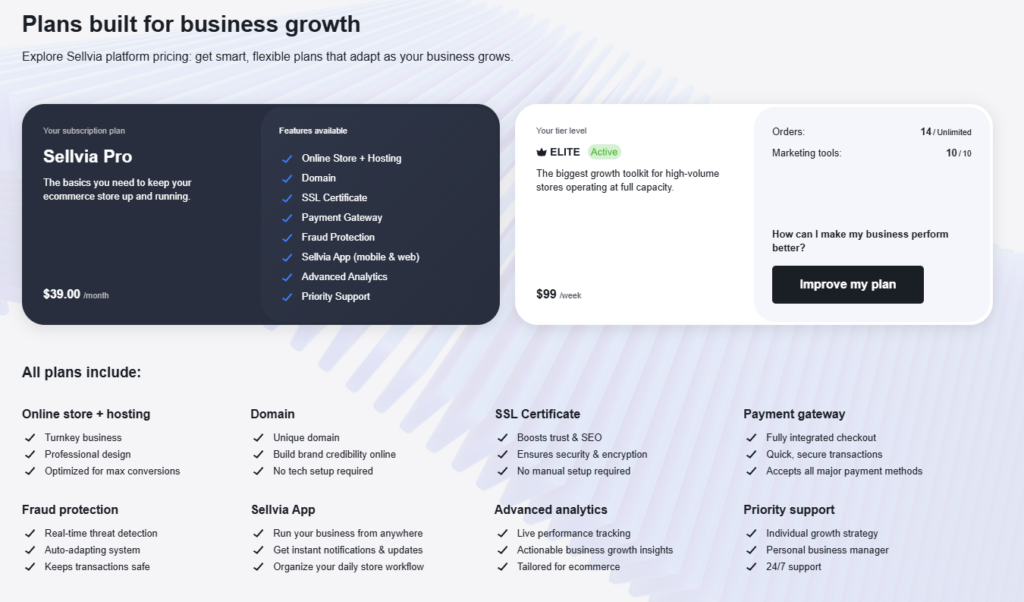
Performance Tiers are optional add-on subscriptions that sit on top of the main Sellvia PRO subscription. They unlock different combinations of marketing, content and design tools.
| Tier | Weekly price | Examples of included tools |
|---|---|---|
| Basic | Free | Limited Performance Tier functionality |
| Plus | $19/week | Email marketing and Google backlinks tools |
| Advanced | $39/week | Plus social media, SEO blog posts and design customization |
| Pro | $69/week | Plus YouTube marketing and promotional videos |
| Elite | $99/week | Full available toolkit, including additional social and theme features |
These prices are weekly, not monthly. That distinction is important: a $39 weekly tier can cost roughly $169 in an average month, while a $99 weekly tier can exceed $400 per month.
Sellvia’s terms state that order thresholds, feature availability and scope may vary and can be updated. The dashboard should therefore be treated as the final source for the tier available to a specific account.
A beginner should not upgrade simply because more tools sound useful. A paid tier should solve a measured bottleneck. If the store does not yet have consistent traffic or enough orders to evaluate unit economics, adding more subscriptions can increase the break-even point without solving the underlying problem.
Common Beginner Mistakes
1. Treating the subscription as the entire budget
The $39 Basic subscription is only the access cost. Advertising, advertising fees, order processing, payment fees, optional services and payout charges can become larger than the subscription itself. A realistic decision starts with the total operating budget.
2. Increasing the ad budget before understanding unit economics
More traffic can amplify a profitable store, but it can also amplify an unprofitable one. Before increasing the daily budget, calculate the effective cost per processed order and compare it with the net commission retained after all applicable fees.
3. Looking at gross sales instead of available cash
Total Earnings can look encouraging while the Available balance remains much lower. Pending orders, the 72-hour Incoming period, Risk Reserve and payout fees all affect when money becomes usable. Gross sales should never be treated as cash in the bank.
4. Underfunding order processing
A store can receive orders faster than earlier commissions become available. Without enough card funds or Processing Credits, the owner may be unable to fulfill new orders promptly. Working capital should therefore be planned before traffic is increased.
5. Waiting until the final trial day to review billing and cancellation
Trial dates, subscription renewal, advertising charges and optional weekly tiers should be checked in advance. Users should save confirmation emails and screenshots of any cancellation or billing changes rather than relying on memory or verbal explanations.
Account-specific questions should be confirmed through the current dashboard or Sellvia support because plans, fees and available tools can vary by account and may change over time.
What Sellvia Does Well
1. It reduces setup friction
The platform’s biggest advantage is not a single tool. It is the fact that the store, hosting, products, dashboard, order workflow and support structure are connected. A beginner can reach an operational store faster than with a blank ecommerce platform.
2. The workflow is structured
Sellvia provides a defined sequence: choose products, activate promotion, receive orders, process orders, monitor balances and request payouts. This structure reduces decision fatigue for users who do not know where to begin.
3. Digital products can simplify fulfillment
For stores centered on digital guides, courses and tools, the model removes physical inventory and shipping complexity. That can reduce customer-service pressure and make the business easier to manage remotely.
4. Advertising can be managed inside the platform
Sellvia Ads gives non-specialists access to a managed promotional system without requiring them to create and configure multiple external advertising accounts. That convenience can be valuable even though the service has a separate cost.
5. Costs and balance stages are documented
The platform’s current Help Center now provides detailed pages covering fees, order processing, balances, reserves and withdrawal requirements. Users who read this documentation can model the business much more accurately than someone relying only on a signup page or sales call.
6. The subscription can be tested
The 14-day trial gives users time to inspect the dashboard, store structure and available tools. The trial does not eliminate financial risk because ads and other services can create charges, but it does make it possible to examine the platform before committing to repeated subscription payments. for launch and early operation.
Where Sellvia Has Real Limitations
1. The cost structure is layered
The platform is easy to start, but not simple to price. Subscription fees, advertising fees, referral fees, order-processing charges, service purchases, credits and payout fees can interact. A user who does not track each layer may overestimate profit.
2. The owner needs working capital
Orders may need to be processed before the associated earnings become available. This means the business can require more cash than expected during growth periods.
3. Part of each processed sale is held for 125 days
The 25% Risk Reserve slows access to the full commission. This is a meaningful cash-flow constraint, especially for a small store trying to reinvest every dollar.
4. The managed ecosystem reduces flexibility
The turnkey-store plugin is not designed for unrestricted WooCommerce compatibility. Advanced store owners may find the managed architecture restrictive compared with a fully independent WordPress or Shopify setup.
5. Automated convenience carries fees
Sellvia Ads and automated order processing reduce manual work, but they are not included as unlimited free services. Convenience must be evaluated against margin.
6. Results are not guaranteed
A ready-made store can solve setup problems, but it cannot guarantee profitable traffic. Product selection, offer quality, conversion rate, advertising performance, refunds and customer demand still determine the outcome.
For a detailed examination of recurring user concerns, read Sellvia Problems and Complaints.
Optional: Store Upgrade Packages (For Those Who Want a Head Start)
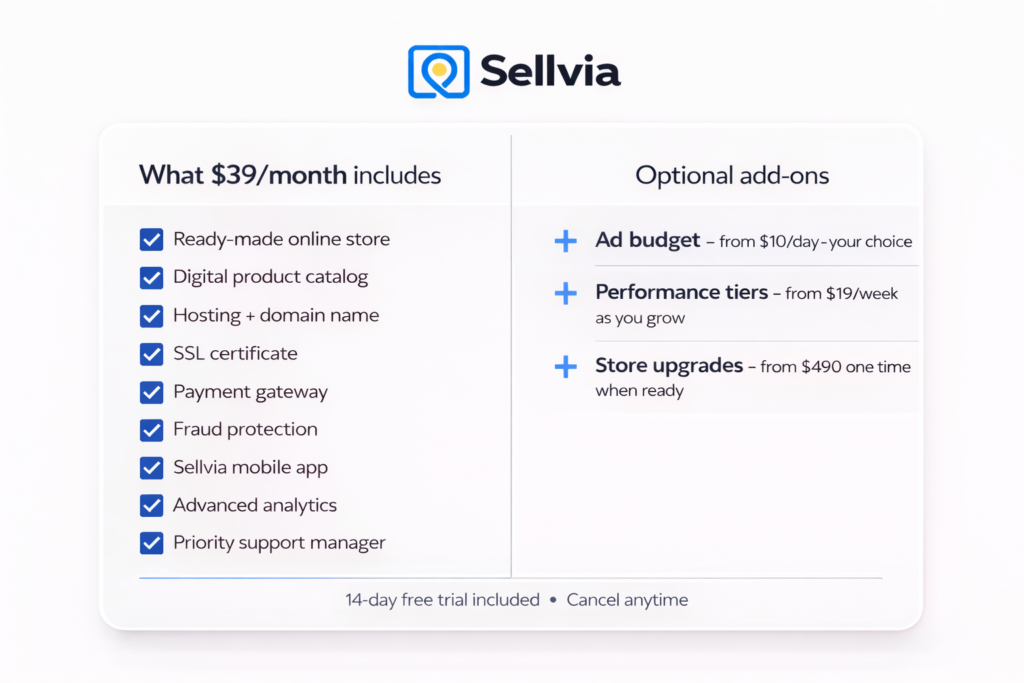
For store owners who want a more differentiated setup from day one, Sellvia offers one-time upgrade packages. These are completely optional and the standard $39/month store is fully functional without them:
- Silver Package: $490 one-time – unique custom store design, unique logo, 20 unique products, 25 high-margin products, 250 proven best-sellers, 25 promotional articles
- Gold Package: $990 one-time – expanded inventory with 40 unique products, 50 high-margin products, 500 proven best-sellers
- Platinum Package: $1,690 one-time – full premium setup with 100 unique products, 100 high-margin products, cinematic homepage video, 1,000 proven best-sellers
These packages make most sense for store owners who have already validated the model and want to invest in standing out from the standard catalog. They are not a prerequisite to getting started – they are an acceleration option for those who want one.
How Commissions Work: Getting Paid
When a sale is made through the store, the commission moves through a three-stage lifecycle: Pending (order awaiting processing) to Incoming (order processed, 72-hour verification) to Available (ready to withdraw). The 72-hour window is standard fraud prevention practice – the same logic used by every major payment platform.
To withdraw: the Sellvia subscription must be active, and a minimum of $100 in available commission must have accumulated (for US residents). For a store running at 10-15 sales per month at $15-20 margin per sale, this threshold is reachable within the first couple of months of active operation.
$39/month gives you everything needed to start and operate a fully functional online business. Advertising spend ($10/day minimum) is your growth investment – optional but recommended. Everything else – upgrade packages, higher Performance Tiers, additional marketing services – is strictly on your own terms, when and if you decide the returns justify it.
Sellvia vs Shopify, Payhip and Gumroad
| Platform | Best suited to | Main advantage | Main trade-off |
|---|---|---|---|
| Sellvia | Beginners wanting a managed store-and-product system | Turnkey infrastructure and connected workflow | Layered fees and ecosystem dependency |
| Shopify | Merchants building a customizable independent brand | Large app ecosystem and strong store control | You must source products and build the marketing system |
| Payhip | Creators who already own digital products | Simple digital delivery and low entry barrier | No ready-made product catalog or managed acquisition system |
| Gumroad | Creators who want the fastest simple checkout | Very easy product publishing | Transaction fees can become expensive at scale |
Sellvia is strongest when the user values speed, structure and managed infrastructure more than customization. Shopify is stronger when brand ownership, integrations and long-term technical control matter most. Payhip and Gumroad are better fits for creators who already have their own products and mainly need checkout and delivery.
Our full comparison is available in Sellvia vs Shopify.
First 48 Hours: Practical Checklist
A useful first two days are less about making an immediate sale and more about understanding exactly what the account will require. Before committing meaningful money, complete the following checks:
- Record the trial start date, renewal date, plan and payment method.
- Open the Products, Orders, Ads, Reports, Balances and Payouts sections.
- Confirm the minimum advertising budget and the fee added to advertising spend.
- Set a maximum test budget that includes both ads and associated fees.
- Open a sample order workflow and identify how the processing cost is paid.
- Confirm the Pending, Incoming, Available and Risk Reserve rules shown for the account.
- Check the minimum withdrawal amount, verification requirements and payout fees.
- Review optional weekly Performance Tiers so they are not confused with the monthly store subscription.
- Save screenshots of billing, advertising, balance and payout settings.
- Only then decide whether to activate a controlled traffic test.
This checklist does not guarantee results. It prevents the more avoidable mistake of entering the trial without knowing the complete cost and cash-flow path.
Who Sellvia Is Best For
Sellvia is most suitable for:
- first-time ecommerce users who want a prepared starting point;
- people who do not want to design a store from scratch;
- users who prefer a catalog of ready-made products;
- beginners who want advertising and business tools inside one dashboard;
- owners prepared to track fees, process orders and maintain working capital;
- users comfortable operating inside a managed platform ecosystem.
Who Should Probably Choose Something Else
Sellvia may not be the best choice for:
- experienced developers who want unrestricted WordPress control;
- merchants who need extensive third-party plugin compatibility;
- creators who already own a catalog and only need low-cost digital checkout;
- advertisers who want direct ownership and granular control of ad accounts;
- users with only enough money for the monthly subscription;
- anyone expecting guaranteed or immediate income.
Is Sellvia Legit?
Yes, Sellvia is a real operating ecommerce platform with public terms, subscription plans, a documented dashboard, order processing, support resources and payout procedures. The more important question is not whether the company exists, but whether the model fits the user’s budget and expectations.
Legitimacy does not mean every customer will make money. It also does not mean every fee will feel inexpensive. A legitimate platform can still be a poor financial fit for someone who lacks advertising budget, processing capital or the patience to work through the campaign-learning period.
The fairest conclusion is:
Sellvia appears legitimate, but it should be evaluated as a real ecommerce operating system—not as a $39 shortcut to guaranteed income.
For a focused legitimacy analysis, see Is Sellvia Legit?
Our Sellvia Review Verdict
Sellvia’s core idea is strong: remove as much setup friction as possible and give a beginner one connected environment for launching a store, choosing products, promoting offers, processing orders and tracking earnings.
The platform does this better than a blank store builder. A user can begin with an operating website, hosting, products and a structured dashboard instead of assembling every component independently. That is a real advantage and explains why Sellvia can feel more approachable than Shopify or a self-hosted WooCommerce setup.
However, the strongest version of a Sellvia review must also be clear about the economics. The $39 subscription is the access price, not the complete business budget. Advertising can begin at $10 per day and carries an additional published fee. Orders need to be processed. Payment and fulfillment fees may apply. Earnings pass through Pending and Incoming. Twenty-five percent enters a 125-day reserve. Withdrawals have minimums, verification requirements and fees.
None of those points make Sellvia a scam. They make it a real platform with a real cost structure.
For the right user, Sellvia can be a practical and unusually structured way to enter ecommerce. For the wrong user—especially someone with no working capital or someone expecting passive profit immediately—the same structure can become frustrating.
Our final assessment is positive but conditional:
- Platform setup: strong for beginners;
- Product access: convenient, especially for ready-made digital products;
- Advertising convenience: useful but expensive enough to require measurement;
- Cost transparency: detailed in official documentation, but complex in practice;
- Cash-flow flexibility: limited by processing requirements, holds and reserve rules;
- Customization: lower than open ecommerce platforms;
- Overall value: potentially good for users who understand the complete operating budget.
The best way to evaluate Sellvia is not to ask whether one order appeared quickly. Inspect the dashboard, list every cost, calculate the margin after fees, understand the payout timeline and decide whether the model still makes sense under conservative assumptions.
Sellvia Review FAQ
How much does Sellvia cost?
The current Basic subscription is $39 per month after a 14-day trial. Advanced is $99 per month and Ultimate is $299 per month. Advertising, order processing, payment fees, Performance Tiers, services and payouts can create additional costs.
Is Sellvia only for digital products?
No. Sellvia prominently supports digital products, including guides, courses and tools, but its current documentation also covers physical products and fulfillment. The exact store model depends on the products and packages enabled.
Does the $39 subscription include advertising?
It includes access to the Sellvia ecosystem, but the advertising budget is separate. Sellvia Ads currently starts at $10 per day and an additional advertising fee may apply.
Can I withdraw money during the free trial?
Sellvia’s current payout documentation states that bank withdrawals are not available during the free trial. Eligible funds remain in the account and can become withdrawable after the subscription becomes active and the other payout conditions are met.
Why is my total balance higher than the amount I can withdraw?
Total Earnings represents gross sales, while Commission Balance is divided among Pending, Incoming, Available and Risk Reserve. Only Available funds can be withdrawn, and the selected payout method has its own minimum and fee.
What is the Sellvia Risk Reserve?
After the 72-hour hold, 25% of each processed sale is placed in Risk Reserve for 125 days. It later moves to Available automatically if no adjustment is required.
Do I need money to process Sellvia orders?
Yes. Orders are normally processed with a bank card or Order Processing Credits. Customer payments do not become immediately available for fulfillment, so working capital is important.
Is Sellvia good for beginners?
It can be. The ready-made store, catalog and connected dashboard reduce technical complexity. But beginners still need a realistic budget, regular dashboard monitoring and a clear understanding of advertising, processing and payout fees.
Can Sellvia guarantee profit?
No. Sellvia can provide infrastructure and services, but profitability depends on traffic cost, conversion rate, product margin, refunds, fees and management decisions.
Sources and Methodology
This Sellvia review was updated using current public documentation available in July 2026. We prioritized official sources for pricing, fees, order flow, advertising and payouts:
- Sellvia Terms of Use
- Sellvia Dashboard: Fees
- Sellvia Dashboard: Balance and Payouts
- Sellvia Dashboard: Sellvia Ads
- How to Process Orders in Sellvia
- How Order Processing Credits Work
Ecom Reality publishes independent analysis of ecommerce platforms, pricing models and online business tools. Fees and terms can change. Verify current charges inside the Sellvia dashboard before making financial decisions. We do not guarantee income or business results.
87 responses to “Sellvia Review: How a SaaS Platform Is Quietly Rewriting the Rules of Online Business”
-
Honestly, this lines up pretty closely with my own experience so far.
I came in with zero background, and the biggest difference for me was not having to figure out 10 different things at once. The store was already there, products were already loaded, and I didn’t have to sit for weeks watching tutorials just to get something live. That alone removed a ton of friction.
The ad system was the part I was most skeptical about, but it actually works if you give it some time and don’t panic after day one. My first few days were slow, then I started seeing orders come in, and that’s when it kind of “clicked” for me. It’s not magic, but it’s definitely more beginner-friendly than trying to run ads completely on your own.
Also agree with the point about expectations. It’s not passive, you still need to pay attention, check what’s working, and reinvest. But compared to everything else I’ve tried before, this felt way more structured and less chaotic.
Not perfect, but for someone starting from scratch, it’s one of the few setups that actually makes sense without overcomplicating everything.
-
this is exactly what i tell people when they ask me about it. the not having to figure out 10 things at once part is what sold me too. i literally tried setting up a shopify store before this and gave up after a week bc it was just too much lol. sellvia felt like someone already did the hard part for you 🙌
-
-
Pretty solid breakdown. I’ve been using Sellvia for a couple of months and the biggest thing for me was just how fast you can get started. No setup headaches, no guessing what to sell.
It’s not “set and forget,” but it’s way more straightforward than anything else I’ve tried. For beginners, that alone makes a huge difference.
-
The ad system is what got me. I expected to spend weeks learning how to run campaigns and instead I just turned it on and let it do its thing. First order came in on day two. Not life changing money yet but it’s real and it’s working, which is more than I can say for anything else I tried before this.
-
Tried a few platforms before this and always hit the same wall – either the setup was too complicated or I’d get the store running and then have no idea how to get actual customers. Sellvia is the first one where both problems were solved out of the box. Store ready, products ready, ads ready to go. Took me maybe an hour to get everything set up and activated. Three weeks in and I’m already seeing consistent orders coming through. For someone with zero background in ecommerce this is probably the most realistic starting point I’ve found.
-
facts 💯 i was literally in the same boat lol tried shopify, etsy.. spent more time watching tutorials than actualy selling anything. with sellvia i just turned on the ads and let it do its thing. ur gonna love it even more once u start scaling up and adding more products to your store, thats when it realy picks up 🔥
-
-
Finally a review that actually breaks down the full cost structure instead of just screaming “$39/month” and calling it a day. The ad spend breakdown by tier is exactly what I needed before signing up. Bookmarking this.
-
The Shopify comparison hits different when you lay it out side by side like that. Been paying $39/mo on Shopify for a blank store for 3 months trying to figure everything out myself 😅 wish I’d read this first honestly.
-
ok so i been looking for somthing like this for MONTHS lol everytime i try shopify or whatever i get lost in like the settings and stuff and give up.. this acutally makes sense to me?? the part about the ads doing it for you is crzy i didnt even know that was a thing. gonna try the free trial def
-
same bro i was in the exact same spot lol. the ads thing is real i was super skeptical at first but got my first order like day 2. just make sure u actually use that $40 coupon right away dont sit on it like i did the first few days 😭
-
-
What stood out to me here was the product model itself. Most platforms still leave you dealing with too many moving parts, but digital products change the whole equation. No shipping drama, no waiting on deliveries, no physical returns eating your time. That alone makes Sellvia feel a lot more practical for someone who wants a cleaner setup and fewer things that can go sideways. It still takes budget and consistency, obviously, but as a system it makes a lot more sense than the usual “here’s your store, now good luck” approach.
-
The digital product angle is underrated honestly. I didn’t fully appreciate it until I had a month with zero shipping complaints, zero “where’s my package” emails, zero refund requests over damaged goods. Coming from physical product experience that felt almost too quiet lol. The mental overhead alone is worth something.
-
The “here’s your store, now good luck” thing is exactly what most platforms do lol. The structured path is underrated until you’ve actually tried building everything yourself from scratch and realized half your time goes to setup not selling.
-
-
What I like most is that Sellvia feels opinionated in a good way. A lot of platforms give you endless options, which sounds nice until you realize you’re doing all the heavy lifting yourself. Here the path is tighter, but for a beginner that is usually a benefit, not a limitation.
-
Yeah “opinionated” is exactly the right word for it.
Most people don’t need infinite options, they need a direction. The tighter path removes decision fatigue which is genuinely underrated as a factor in whether someone actually follows through or just spins their wheels for three months and quits.-
agreed. i was one of those people who spent months researching every possible platform and comparing features i didnt even understand yet. once i just picked sellvia and started, things actually moved. the structure felt limiting at first but looking back it kept me from overthinking everything and just doing the work
-
-
-
Fair review overall. What I appreciate here is that it does not try to sell Sellvia as effortless money, it frames it more as a structured system with clear tradeoffs. That is a lot more useful than the usual hype. It still seems like the kind of platform that depends heavily on operator follow-through, but for people who value simplicity and a more guided setup, I can see why it stands out.
-
I’m still new to all this, but this is one of the first explanations that actually made the model feel understandable instead of overwhelming. Most platforms I looked at felt like they expected me to already know ecommerce before I even started. Sellvia seems a lot more approachable because the path is clearer. I like that it’s not being framed as effortless money, just as a simpler system for someone who doesn’t want to get buried in setup and logistics right away.
-
I like how this actually calls out the real problem most beginners hit – it’s not “which platform is better,” it’s “how long until I quit because nothing is happening.” 😅
With Shopify I felt like I was constantly “almost ready” – tweaking the store, testing products, watching tutorials… but never actually selling. Sellvia feels more like “ok, press the button and let’s see what happens.” That shift alone is huge.
Also the digital product angle is underrated. No “where is my package???” emails at 2am already sounds like a win to me.
-
[…] Sellvia is a complete online business platform built for people who are starting from zero – no ecommerce experience, no technical background, and often a limited budget. The platform gives new sellers a fully operational store, pre-loaded with digital products ready to sell, and a management dashboard that handles the operational side of the business. […]
-
solid overview. one thing that doesn’t get enough emphasis in reviews like this is that the Sellvia ads system needs at least 7-10 days of consistent data before you can judge whether it’s working. too many people activate ads, see no sales for 3 days, panic, change everything, and reset the optimization. patience is genuinely the hardest skill on this platform.
-
[…] This article breaks down the most common Sellvia complaints one by one. For each one, the goal is to explain what is actually happening, what a beginner should realistically expect, and how to make better decisions before scaling up. For a broader platform overview, read the full Sellvia review. […]
-
[…] about testing timelines. For a closer look at how the platform works in practice, the full Sellvia review covers the setup experience and cost structure in […]
-
Honestly, this is the first Sellvia review I’ve read that didn’t make me feel like I was being pushed in one direction. Most reviews either hype it up like the whole business is already done for you, or they act like any paid platform is automatically suspicious. This one is more useful because it explains the middle part: yes, the setup can be easier, but you still have to understand ads, margins, and whether the numbers actually work.
-
The part about traffic responsibility is the main thing for me. People keep asking if Sellvia “works,” but that question is kind of too broad. A store can be set up properly and still not work if nobody is coming to it, or if the ads cost too much. That’s why I liked this Sellvia review – it doesn’t pretend the platform magically brings customers just because the store exists.
-
I was looking for a Sellvia review that explained the money side more clearly, and this helped. The payment timing / cash flow part is something beginners probably don’t think about enough. It’s one thing to see sales or commissions in a dashboard, but it’s another thing to understand when money is actually available and what costs are still going out before that happens.
-
Good breakdown. What I liked most is that the review doesn’t treat Sellvia like some miracle shortcut, but also doesn’t trash it for no reason. It sounds more like: the platform can give you a cleaner starting point, but you still need to treat it like a business. That feels fair. A lot of beginners probably need to hear that before they spend money on any ecommerce platform, not just Sellvia.
-
The “ready store is not a ready business” idea is probably the most important line in the whole article. That applies to Sellvia, Shopify, WooCommerce, really any platform. Setup is only one part. The harder part is getting traffic, testing offers, watching ad costs, and not confusing revenue with profit. As a Sellvia review, this is more useful than the usual feature list because it explains what can go wrong even when the platform itself is doing what it says.
-
The auto-processing deposit thing you kind of glossed over in the pricing section is actually worth flagging harder – I only figured it out on day 3 of my trial Tuesday evening when I realized my store wasn’t running 24/7 the way I assumed it would out of the box. Once I understood that the deposit funds the continuous order processing and isn’t just another fee sitting there doing nothing, it actually made sense to me as a structure. Honestly after that clicked, the whole setup felt more legitimate than I expected for $39 a month – like the service is genuinely built to run without me babysitting it once everything is funded. Going to put in the deposit this week and see what the dashboard looks like after a full 7 days of uninterrupted operation.
-
the store reactivation program section is what I hadn’t seen covered anywhere else. been on the platform 6 months and my growth manager mentioned it recently but gave pretty vague details. the idea that you can eventually hand back a store you’ve built and receive a payout changes how I think about the whole thing – less “am I making enough this month” and more “what is this store actually worth over time”
-
the performance tier table is the thing i wish i’d had before month two. hit 50 orders and had an upgrade decision to make that i didn’t know was coming. only place i’ve seen it mapped out that clearly
-
ready store is not a ready business should be on the signup page. not as a warning, just as realistic framing. it would prevent about 60% of the negative reviews this platform gets
-
This really resonates with what I went through in my first few weeks too.
The “10 things at once” problem is real – I spent three months on Shopify before Sellvia and honestly most of that time was just figuring out basic setup, not actually running a business. The difference when everything is pre-configured is hard to overstate. You skip straight to the part that actually matters.
Your point about the ad system needing time is spot on and I think more people need to hear it. Day one and day two can feel underwhelming, but the algorithm is still learning. I almost pulled back my budget around day 3 and I’m glad I didn’t – by day 6 I had enough data coming in to see what was actually working. Patience in that first week is probably the single biggest factor in whether someone sees results or not.
The “it’s not passive” piece is something I try to tell everyone who asks me about this. It’s a business, not a vending machine. But the structure Sellvia gives you means your energy goes toward actual decisions – which products are converting, what the numbers look like – instead of trying to figure out how to set up a checkout page. That’s where the real value is.
For a first online business, the learning curve here is manageable in a way that most alternatives just aren’t. -
The section on Sellvia Market is where I think this review actually earns its depth, because the exit option after 60 days is the detail most people skip over when they are evaluating whether to start at all. I was sitting on a Tuesday evening after work, genuinely close to abandoning the whole idea, when I realized that building a store I could later sell for a lump sum changed the risk calculation entirely – it stopped feeling like a subscription and started feeling like an asset. My honest critique is that the review could have pushed harder on how the installment payout structure works across the 12 to 48 month range, because that range is wide enough to mean very different things depending on your financial situation. What I can say from my own experience is that knowing Sellvia Market existed made me treat the store more seriously from day one, which probably contributed to reaching the 60-day threshold faster than I expected. Verdict – worth it, specifically because the platform gives you a real exit, not just a monthly bill with no endpoint.
-
[…] the built-in ad system works, what it costs, and how to evaluate whether it is performing, see the full Sellvia Review on this […]
-
After reading what felt like every Sellvia review published this year, this one is the first that actually explains the deposit mechanic clearly enough that I understood it before hitting it myself. Week 9 now and that one detail would have saved me about three days of confusion early on.
-
Every Sellvia review I found before starting focused on the $39 and nothing else – nobody mapped out the performance tier costs the way this article does. Hit 50 orders in month two and had to make that upgrade decision completely unprepared. The table here would have changed how I planned my first 60 days entirely.
-
The Sellvia review question I kept searching for wasn’t “is it legit” – it was “when does the math actually work.” This is the first breakdown that answers that honestly. Month four, $100 withdrawal cleared twice, deposit funded from commissions not personal money. That’s the timeline nobody talks about but everyone needs to know before they start.
-
The article nails the SaaS distinction but the part that actually changed my behavior was when my Growth Manager told me to stop tweaking the store and just let the ad system run for a full 14 days without touching it. Around day 166 I looked back at my spreadsheet and realized the weeks I didn’t interfere were the ones that paid better. Complete beginner with zero technical background – and that one piece of advice was the difference between my week one and week three results. I was the skeptic who made others try this platform, which still feels strange to say out loud.
-
The part I didn’t see coming was the Sellvia Market option – knowing I could sell the whole thing after 60 days in installments over 12 to 48 months changed how I thought about the risk from the start (told myself not to get excited, but that detail actually moved me). At week 23 this platform is worth more than what I put in, and that exit option made the entry feel a lot less permanent.
-
Around day 8 I realized I hadn’t refreshed the dashboard in hours – well, not exactly but close enough – and that was the moment the article’s point about “legit versus profitable” actually clicked for me because the plugin was just running without me hovering over it.
-
bookmarking for the next time someone asks me about Sellvia. way more balanced than most reviews. one thing i’d add – the $39/mo cost framing keeps coming up but it’s not really the relevant number. real monthly cost for an actively running store is closer to $400-500 when you factor in ad spend and processing. that’s still reasonable for what you get but new users keep getting blindsided by the gap between subscription price and actual operating cost.
-
seven months in and the inc 5000 and g2 recognition sections are still what i point skeptical people to first. self-reported numbers don’t move people. external credibility does
-
the $40 coupon framing as an activation mechanism rather than a discount is the most accurate thing i’ve read about how the trial actually works. it’s not a freebie, it’s designed to get you to the first sale before the trial ends
-
switched from etsy two years ago. this review captures the structural difference better than anything i’ve read. etsy gives you a marketplace. sellvia gives you a system. completely different operating models
-
the cash flow timeline section is what i send people who ask if sellvia is legit. once they understand why commissions aren’t instant cash the scam narrative disappears
-
The activation moment concept is the most useful framing I’ve seen in any Sellvia review. Day 11 for me – first order came through at 2am while I was asleep. That single event changed how I thought about the whole thing.
-
Same. Mine was day 8. But honestly I wish someone had told me the $40 coupon runs out faster than you think – I had no daily cap set and burned through it in 36 hours. Still worth it but not the way I did it lol
-
i’d push back on the 2-3 month average lifetime figure. i’m at seven months and still growing. that number probably reflects people who signed up expecting passive income and bounced early
-
the 2-3 month figure is probably accurate as an average across all users including people who quit at week two. the people commenting here are not representative of the average customer
-
the store reactivation program section changed how i think about this. was treating sellvia as a monthly income question. reframing it as building a sellable asset with an exit option is a completely different business case
-
most detailed sellvia review i’ve found. stopped writing the same explanation from scratch every time someone asks me about the platform. just send this link now
-
This is exactly what I tell everyone. The coupon is a proof-of-concept tool, not revenue. Set your cap first. I spent two days figuring that out the hard way before my first real sale.
-
Honest question – does anyone actually net positive after accounting for ad spend, processing fees, AND the subscription? The math in this Sellvia review looks clean but I want real numbers from real people.
-
Month 3 here. Net positive since week 9. Ad spend $10/day, higher-priced products only. The article’s break-even math is accurate – product selection is the 6x lever, not the subscription fee. Run the numbers before you start, not after.
-
Ok that’s actually useful. What’s your average order value and how many sales per month to cover the $339 monthly outlay?
-
Around $85-90 average order. Need about 9-10 sales to break even at $10/day ad spend. I usually hit 15-20 in a decent month. The math works but month one was rough – I almost quit at day 19.
-
-
-
I’ve read probably every Sellvia review published in the last 6 months. This one is the first that actually explained the performance tier auto-upgrade mechanic. Hit 50 orders in month two and got bumped without realizing it. Cost me an extra $76 that week before I caught it.
-
Wait this happened to me too! I thought I’d done something wrong. So it’s automatic? Nobody told me that during onboarding.
-
Fully automatic once you exceed the order cap on your tier. You can downgrade by contacting support but it doesn’t happen on its own. Worth knowing before month two.
-
-
-
This is the thing the article glosses over. The tier system is fine once you understand it but the auto-upgrade is the kind of detail that turns a profitable week into a confusing one if you’re not watching.
-
The Sellvia Market exit option is the detail that actually sold me. Not on the monthly income angle – on the asset angle. I’m treating my store like something I’m building to sell in 6 months. Changes every decision about what upgrades are worth paying for.
-
This is a smarter way to think about it than most people do. The installment option over 12-48 months means the math on selling actually works for both sides. I hadn’t considered this when I started.
-
Honest question though – has anyone actually sold a store through Sellvia Market? Or is this still mostly theoretical? I see it mentioned in every Sellvia review but I’ve never seen someone say “I sold mine for X.”
-
-
Fair point. I haven’t sold yet – I’m at day 47. But my Growth Manager has walked me through the mechanics in detail. The 60-day minimum is real, the installment structure is real. Whether it delivers at scale I can’t confirm yet.
-
The G2 top 1% globally stat is the one I keep coming back to. That’s not an editorial panel – that’s verified users. Hard to dismiss.
-
G2 rankings can be gamed with review campaigns. I’m not saying Sellvia does this but “verified user” doesn’t always mean organic. Worth keeping in mind alongside other signals.
-
That’s fair. Though Inc. 5000 is revenue-audited independently. You can’t fake that one. The combination of signals is what makes me take it seriously – not any single award.
-
Ok Inc. 5000 I’ll give you. That one’s legit. Still think the G2 stat deserves more scrutiny than this article gives it but I take your point about the combination.
-
-
-
Three months in. The Growth Manager is real and actually useful – mine caught that I was selling low-margin products exclusively and walked me through a catalog switch in week four. That conversation is probably worth $500 in avoided mistakes. Ngl I went in expecting a chatbot.
-
Same experience. Mine proactively texted me on day 1 – I thought it was automated at first. Real person, real advice, real response time. The article undersells this feature honestly.
-
Possibly. Mine has been consistent through month three. Could be timing, could be luck of the draw. I’d rate mine 8/10 – not perfect but genuinely helpful when it mattered.
-
-
-
Mine was less proactive after month one. Still responsive when I reached out but not initiating much. Maybe depends on who you get assigned?
-
The most honest Sellvia review I’ve read acknowledged something this article also gets right: the platform works but the owner’s engagement determines outcomes. I spent month one treating it like a vending machine. Month two I treated it like a business. Different results.
-
This is the whole thread right here. The infrastructure is real. The products are real. The ads work. But “it runs itself” is not accurate and anyone who sold you that framing did you a disservice. You still have to show up.
-
I’ve been using Sellvia for a while, and this review is pretty close to my own experience. What I like most is that the store, products, ads, and orders are managed from one dashboard, so I didn’t have to connect a bunch of separate tools. There’s still a learning curve, especially with advertising and budgeting, but overall Sellvia made the setup much easier than starting everything from scratch.
-
[…] a wider assessment of the platform beyond subscription capacity, read our full Sellvia review. You can also compare ecommerce platform costs or review other platforms for selling digital […]
-
[…] Why this distinction matters: screenshots can make “Total Earnings,” order value, Commission Balance and Available Commission look like one continuous money flow. They are not interchangeable. For the deeper mechanics, see our complete Sellvia review. […]
-
The cost breakdown in this review is the part most people skip until it matters – my real operating budget included the $39 subscription plus $10 a day in built-in ads, and once I did that math honestly the 50-70% margin per sale is what determined whether any of it made sense. What I’m using isn’t cheap to run at full capacity, well, not exactly cheap but closer to transparent once you stop reading only the headline number. If the margin holds against actual ad spend, it pays for itself – if it doesn’t, no subscription price makes that survivable.
-
Reaching the $100 withdrawal minimum felt like it took forever – well, not exactly forever, but I kept second-guessing whether the money was real until the transfer actually cleared. Any honest Sellvia review should just say upfront that the threshold exists, because I wasted energy being suspicious when I should’ve just kept going.
-
The cost visibility point in this review is the one thing I’d actually text someone about on day one – the $39 subscription is real but the ad budget on top of it is what you actually need to plan for, and ngl I didn’t fully map that out until I was already a few weeks in.
-
The cost visibility point in this review is exactly what I wish someone had spelled out for me – the $39 subscription is real, but so is the $10 daily minimum once you turn on built-in ads, and those two numbers together change the math fast. Well, not exactly a problem, but more like a planning gap that caught me underprepared the first month.
-
The cost visibility point in this review is the one that almost made me close the tab for good – I built a spreadsheet before committing to the $39 monthly just to see whether the ad spend at $10 a day would actually return anything real. What surprised me (genuinely) is that the margin held in that 50-70% range consistently enough that the spreadsheet stopped feeling like a warning and started feeling like a plan. I went in as the skeptic and somehow became the person recommending this to others, which I did not see coming.
-
[…] your main question is about the larger ecommerce product, start with our Sellvia review. If your question is specifically about the marketplace described on this page, the Sellvia Mall […]
-
The SEO package piece hit me – that’s the part that actually shifted my budget math, because leaning on organic search meant I wasn’t locked into running $10 a day in ads just to stay visible. Well, not exactly free, but compared to what I had mentally set aside for paid traffic, the service ended up costing way less than my original estimate.
-
This is probably one of the most useful Sellvia reviews I’ve read because it actually explains what happens after the store is set up. A lot of reviews stop at the $39 price and make it sound like that’s the whole business.
I’ve been using Sellvia for a while and the structured setup is what I like most. Having the products, orders, ads and balances in one place makes everything much easier to follow, especially when you’re still learning. You definitely need to understand the costs and give the ads some time, but once you figure out the workflow it feels a lot less overwhelming than building everything from scratch.
Good breakdown, especially the parts about working capital and the difference between sales and available balance.
-
[…] you are still mapping the platform itself, our Sellvia review provides broader context. For the marketplace side of the ecosystem, see Sellvia Mall explained. […]



Jo Carter is an editor and ecommerce researcher at Ecom Reality, where she covers ecommerce platforms, digital selling tools, online business software, pricing models, and emerging industry trends. She focuses on turning complex platform features and costs into clear, practical information for entrepreneurs and digital sellers. Her work combines detailed research with a balanced editorial approach, helping readers compare services, understand potential limitations, and choose tools that fit their business goals.
Comments
Leave a Reply
Related Articles



Leave a Reply