

A solo creator does not normally wake up wanting another software subscription. The need starts elsewhere: a customer should receive a welcome email after buying a course, students should get updates, a lead magnet should start a sequence, and the website should convert visitors into subscribers. Soon the creator has a website bill, a checkout tool, a course host, an email service and a few integrations connecting them. Podia’s all-in-one argument is that these workflows can live together. That argument is credible, but it is a cost hypothesis that needs numbers, not an automatic saving for everyone.
This review examines what Podia Email includes, how subscriber-based billing actually works, and when moving a creator business onto a consolidated platform is financially sensible. It also covers two details frequently missed in comparison articles: a sales transaction fee can dwarf the email bill, and an email list exceeding its paid allowance can interrupt scheduled marketing activity. Neither detail means Podia is a bad choice. Both determine whether the product is the right one.
Podia pricing in 2026: the starting point
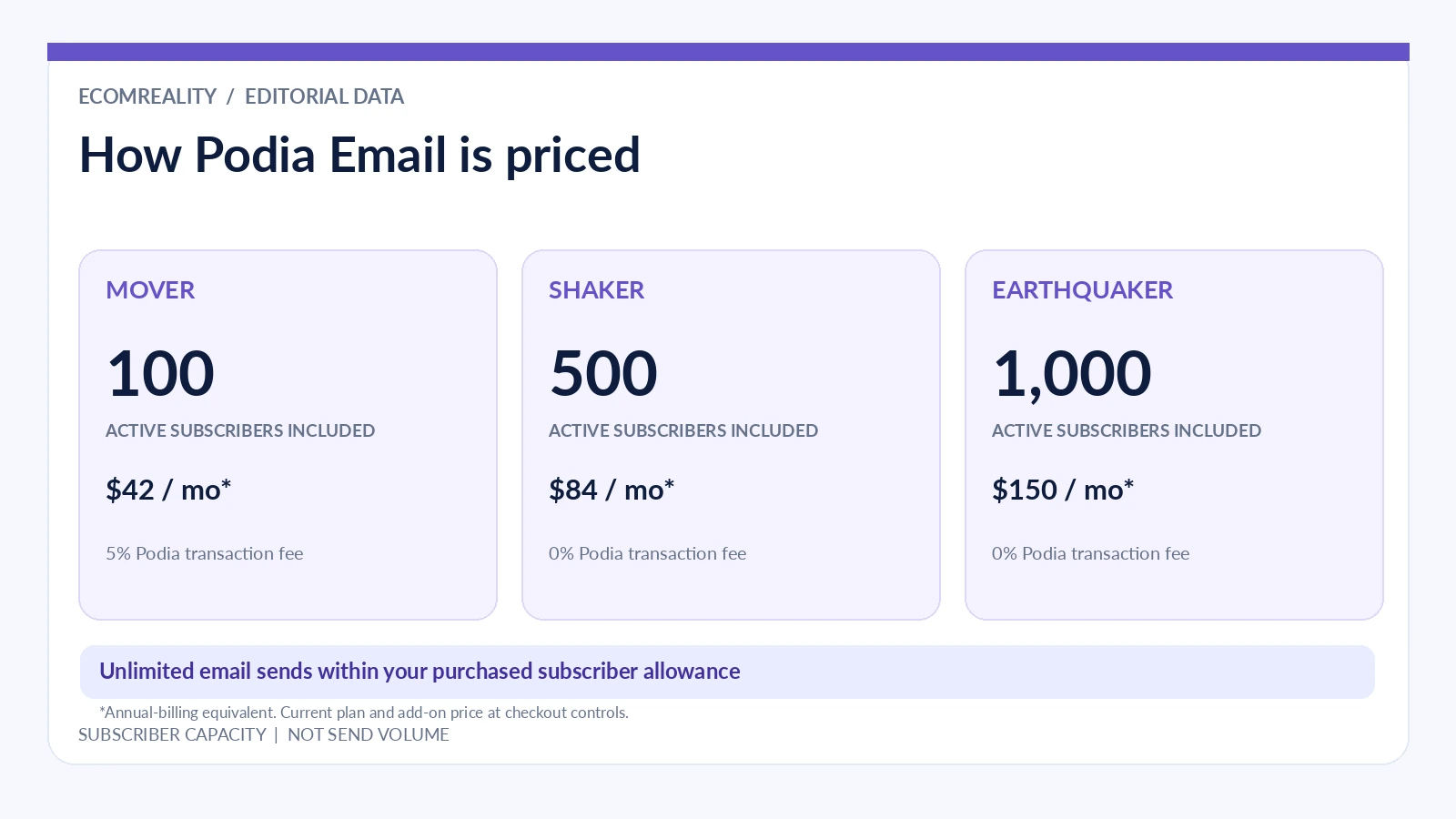
Podia currently advertises three main paid plans. Mover costs $49 monthly or $42 per month when billed annually, with a 5% Podia transaction fee and 100 included email subscribers. Shaker costs $99 monthly or $84 per month annually, with no Podia transaction fee and 500 included subscribers. Earthquaker costs $179 monthly or $150 per month annually, also with no Podia transaction fee, and includes 1,000 email subscribers. Annual prices are effective monthly amounts, not month-to-month commitments; $42 per month, for example, means $504 paid for the year.
All three plans put email alongside a site, blog, digital downloads, courses, coaching and community features. There are other tier differences. Mover’s published limits include 50 products, 500 videos and 25 community spaces. Shaker raises those to 150 products, 1,000 videos and 100 spaces, and adds features such as affiliate marketing and upsells. Earthquaker expands many capacity limits. For a creator building a larger catalog, those limits may be more important than email cost. They should be in the same decision worksheet.
Podia has promoted a trial on its pricing pages, but trial wording has not been consistent across every help article or cached page. The live pricing page reviewed for this article showed 14 days. Treat current signup terms as the authority rather than assuming the trial has a permanent duration.
| Plan | Monthly billing | Effective monthly, annual billing | Included active email subscribers | Podia sales transaction fee |
|---|---|---|---|---|
| Mover | $49 | $42 | 100 | 5% |
| Shaker | $99 | $84 | 500 | 0% |
| Earthquaker | $179 | $150 | 1,000 | 0% |
These are Podia charges. Payment processor charges are separate, and their actual rate depends on provider, transaction, country and account setup. Podia’s public pricing FAQ uses a common illustration of 2.9% plus $0.30, but that is not a universal rate. A creator should not confuse “no Podia transaction fee” with “no payment processing fee.”
Why unlimited emails do not mean unlimited subscribers
Podia Email’s most important billing unit is the active subscriber, not the number of messages sent. The company’s help center states that users may send unlimited emails to subscribers within their purchased allowance. A creator can therefore send an onboarding series, a launch sequence and regular newsletters without purchasing an extra email-send package. That is a meaningful operational advantage for an engaged list.
But included subscribers are capped by plan. If a Mover account has 150 active subscribers, the included 100-person allowance is not sufficient, even if the creator plans to email only 40 people. Podia says the account’s email plan needs to match its active subscriber count. It does not count every stored contact the same way: contacts marked Not subscribed or Unconfirmed do not count toward email billing. For planning, that is more useful than a vague “contact limit,” because list hygiene can change the actual bill.
There is also an operational consequence to missing the limit. Podia’s help center says exceeding a paid subscriber tier disables email sending for broadcasts and campaigns. Scheduled broadcasts can be reverted to draft, and automated campaigns can be paused until the account is back within its allowance. The platform does not automatically upgrade every account. A business that relies on a launch sequence should monitor subscriber growth before the launch begins.
What happens after the included allowance?
Growing lists require additional subscriber capacity. Podia says users can buy higher email subscriber tiers, and the company publishes examples of tiered add-on pricing in its own comparison material. Those examples include up to 500 subscribers at $10 monthly or $8 on annual billing and up to 1,000 at $18 monthly or $14 on annual billing, but the relevant upgrade must be checked against the specific base plan and billing screen. A 500-person allowance that is already included in Shaker should not be blindly added to the Shaker base price as if every business must purchase it twice.
The correct comparison has three steps. First, record how many people are actively subscribed today. Second, estimate the subscriber count after the next launch or lead-magnet campaign, not just the current month. Third, price the matching allowance in Podia’s billing screen and compare the whole stack. If the list will grow substantially over a year, run the model at 500, 2,500 and 10,000 subscribers rather than deciding from the entry-level price alone.
A meaningful hidden cost is not necessarily a charge: it can be the operational labor associated with changing tools. Someone who imports a list into Podia should test consent status, tags and campaigns before sending a large broadcast. If the business is already running elaborate automations in a specialized system, rebuilding them can cost far more in time than the subscription difference for several months.
The break-even point between Mover and Shaker
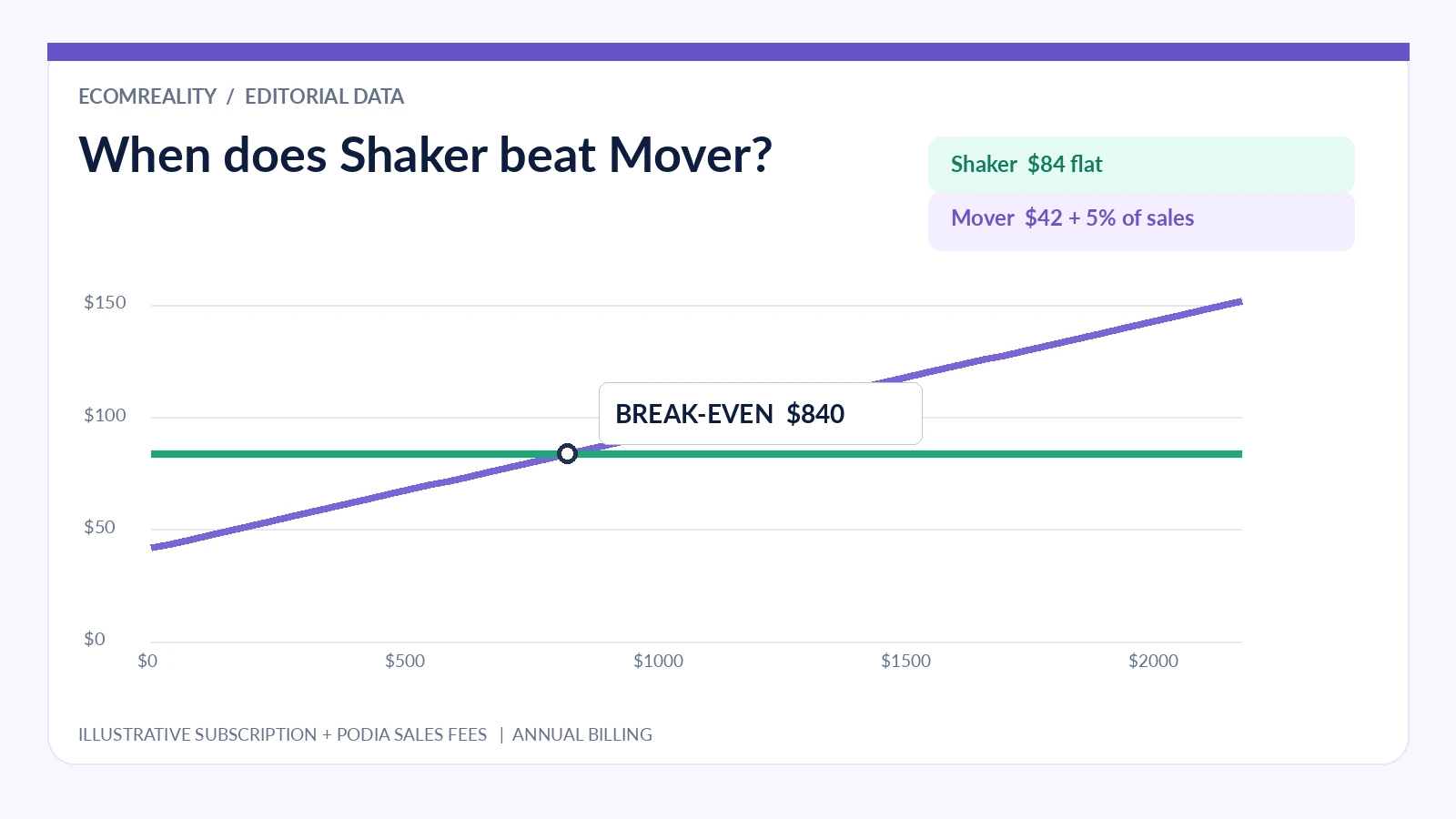
There is a straightforward mathematical comparison between the two entry plans that most reviews do not make. On annual billing, Shaker is $42 more per month than Mover ($84 minus $42), but Mover charges 5% of sales and Shaker does not. If all sales in the comparison are subject to that fee, the base-plan break-even point is $840 in monthly gross sales: $42 divided by 0.05. On monthly billing, the difference is $50 ($99 minus $49), which makes the base-plan break-even point $1,000 monthly gross sales.
That calculation ignores payment processor charges because they would generally apply under either plan. It also excludes optional email subscriber upgrades, VAT or sales tax, discounts and any plan-specific sales exceptions. Those caveats matter. The calculation is an analytical starting point, not a quote from Podia or proof that every $841 seller should upgrade.
For example, a creator selling $2,000 worth of eligible products in a month would pay $100 in Mover platform transaction fees. On annual billing the resulting Mover platform total is $142 ($42 base plus $100 fee), compared with $84 for Shaker, a difference of $58. A creator selling only $300 would face a $15 Mover fee, making Mover’s equivalent total $57 versus Shaker’s $84. In that scenario, Mover is cheaper before considering different subscriber allowances and features.
The real all-in-one savings test
Imagine a business with a course platform, a separate website builder and an email app. If the creator pays $55 for course hosting, $25 for a website, $35 for email and $15 for connector software, that is $130 per month before payment processing and other services. Moving a genuinely equivalent workflow onto Shaker at $99 monthly might free $31 per month. But if the previous platform was already free, or the creator still needs the outside email tool for advanced use cases, the economics change completely.
The key word is replace. Paying Podia and keeping the old tools is consolidation in name only. To estimate net savings, list each existing product, the exact monthly cost and the business function it serves. Mark each as replaced, retained or only partly replaced. Deduct only the costs of tools you can actually cancel. Then add Podia base pricing, email subscriber upgrades and any extra integrations you will still need.
Feature coverage is part of this calculation. Podia’s email features include broadcasts, automated campaigns, templates, tags and segmentation connected to products and other activity on the platform. For a course seller, the native connection between purchase and email follow-up may remove manual syncing work. For an enterprise marketer running complicated multi-branch customer journeys, the built-in system may not replace a dedicated marketing automation platform. Saving $40 monthly is not a win if critical campaigns cannot be recreated.
Three creator scenarios, three different conclusions
The first-time course creator. Assume there are 80 subscribers, two products and $250 in monthly sales. Mover’s included email allowance is enough, the catalog sits comfortably under published limits, and sales volume makes the 5% platform transaction fee manageable. A separate email subscription would add a bill without necessarily adding value. For this creator, Podia’s modest entry cost and unified workflow can be sensible.
The established newsletter-to-course business. Consider a creator with 450 active email subscribers and $2,500 in eligible monthly sales. Shaker’s included subscriber allowance may cover the list, and avoiding Mover’s 5% platform transaction fee is meaningful. Access to upsells and affiliates adds a commercial benefit beyond email. The business should still compare its actual processor fees, but it has a strong case for Shaker on published plan economics alone.
The large content business with sophisticated segmentation. Suppose there are 12,000 active subscribers, complex behavior-based campaigns and a separate CRM. Podia can still host courses and a website, but the email subscription tier and migration effort require an explicit quote. A specialized provider might offer reporting, deliverability tooling or integrations the business depends on. A single dashboard is convenient; it is not a sufficient reason to rebuild a working revenue system.
The same product is therefore capable of being the cheapest practical choice for one creator and an unnecessary compromise for another. The difference is not hidden in marketing terminology. It is visible in audience size, monthly gross sales, existing subscriptions and required campaign sophistication.
Are Podia Email features enough for a real business?
For typical creators, the answer is often yes. Broadcasts cover newsletters and announcements. Campaigns support automated sequences for welcomes and launches. Tagging and segmentation help divide the audience by interests, products and behaviors. Native access to the website and course catalog makes it easier to link directly to an offer without manually keeping product links and integrations in sync.
The real evaluation, however, should start with three workflows rather than a checkbox comparison. Workflow one: when someone downloads a free guide, do they enter the correct welcome sequence? Workflow two: after a purchase, do they stop seeing irrelevant pre-sale messages? Workflow three: can a creator identify inactive subscribers and avoid paying for people who no longer want emails? Build these journeys in a trial account using test contacts. They will reveal whether the system meets actual needs much faster than reading a long feature list.
Another important question concerns migration. Podia says it offers migration help on paid plans, with quantity limits tied to the plan. That can lower switching effort, but migration support for course products should not be mistaken for guaranteed rebuilding of every email automation from an outside system. Prepare an export of subscribers, tags, consent statuses, templates and campaign structure. Test a small set of contacts before activating automated messages at full scale.
The cost of list growth is not only an email charge
Subscriber growth creates several cost layers. Paid lead acquisition can be the largest. A larger list may require a higher Podia Email tier, but it can also create more unsubscribes, support requests and low-intent subscribers. Those should enter the decision, because a list of 5,000 people who barely open anything may be less commercially useful than 700 engaged buyers. Podia’s active-subscriber billing rule makes regular hygiene valuable, but creators should never remove permission records recklessly just to lower a bill.
A practical monthly review should track active subscribers, net new subscriptions, unsubscribe rate, revenue per recipient and sales from automated sequences. If an upgrade to the next email tier costs an extra $20, the relevant question is whether the extra reachable audience plausibly creates more than $20 in additional contribution profit. Measure actual sales and returns rather than assuming every subscriber carries the same monetary value.
The creator also needs a buffer. If a launch is forecast to push a list from 480 to 650 people, it is better to handle the email tier beforehand. Having a scheduled broadcast fall back into draft while a limited-time campaign is live is an avoidable operational failure. Podia’s limits are clearly documented enough that a careful user can plan around them.
What competing email apps can do differently
A dedicated email service may offer deeper reporting, deliverability controls, CRM fields, integration breadth or complex automation logic. These differences can matter more than the monthly invoice for a high-volume publisher. Conversely, a lightweight email app may appear inexpensive until the business adds paid course hosting and checkout. Comparing “Podia $99 versus email app $30” is misleading if one price buys a complete storefront and the other buys only email delivery.
The fair comparison is to pick a job: sell a $79 workshop, recruit leads through a free download, nurture them, handle the purchase, grant access and send follow-up content. Count subscriptions and manual steps in each proposed stack. If Podia handles the chain end to end, the all-in-one model has value in both time and money. If the creator must maintain external services for essential capabilities, the advantage narrows.
A simple budgeting checklist before you switch
- Use real counts. Record active subscribers, not every historical contact in your CRM.
- Check the right price column. Annual “per month” figures require annual payment; budget actual cash flow.
- Include transaction fees. On Mover, 5% of eligible sales can quickly exceed the email component.
- Test the next subscriber tier. Project list size six and twelve months forward and price it in Billing.
- Model processing separately. Stripe or PayPal fees do not disappear on Shaker or Earthquaker.
- Test automations before cancelling old software. Avoid breaking checkout, customer onboarding or time-sensitive launches.
- Check catalog limits. Email savings do not compensate for being unable to host required products or videos on the selected tier.
Verdict: when Podia really saves money
Podia is particularly persuasive for creators whose business naturally connects content, checkout, courses and email. With 100, 500 or 1,000 subscribers included depending on plan, unlimited sends within the relevant allowance, and native automations, it can replace a surprisingly large small-business software stack. Shaker becomes financially interesting at relatively modest sales volumes because it removes Mover’s 5% Podia transaction fee.
The weakness is not necessarily a hidden charge. It is the risk of comparing the wrong numbers: unlimited email sends versus limited subscribers, monthly versus annual pricing, or a zero transaction fee versus payment processor costs. Work through those distinctions and Podia becomes easy to evaluate. For a creator who can retire multiple tools and keep the same customer journeys, the all-in-one model can save real money. For someone who only needs newsletters, it may simply be more platform than necessary.
Frequently asked questions
Does Podia charge by the number of emails sent? No. Podia’s documentation says sending is unlimited within the subscriber capacity of the selected email plan. Pricing is tied to active subscribers, not monthly message volume.
Does Shaker include email marketing? Yes. Shaker includes email features and an allowance of 500 active subscribers; additional capacity may be purchased if needed.
Does the 5% Mover fee replace Stripe fees? No. Podia’s platform transaction fee and payment processor charges are separate cost categories.
Will my campaigns keep sending if I exceed my subscriber allowance? Podia warns that broadcasts and campaigns can be disabled until the account returns within its active subscriber allowance or the tier is upgraded.
Is Podia always cheaper than a separate email tool? No. It is often more economical when the website, checkout and digital product tools replace other subscriptions. Email-only users need to compare with email-only services.
Sources and methodology
The plan pricing and capacities in this review were checked against Podia’s official pricing page, plan-limit documentation, Podia Email FAQs, and email sending rules. Example sales volumes and software stacks are illustrative analytical scenarios, not reported customer results. Prices and terms may change by date and billing option.

Croom Raymond is an ecommerce writer and digital business researcher at Ecom Reality. He covers online selling platforms, SaaS tools, pricing structures, platform features, and practical strategies for building digital businesses. His articles focus on clear, evidence-based analysis that helps readers understand how different services work, compare their advantages and limitations, and make more informed business decisions.
Comments
Related Articles



Leave a Reply