


This Payhip review starts with the question most creators actually care about: not whether the platform is free, but what happens after the first sale. Payhip lets sellers launch a store without a fixed monthly subscription, but its Free plan charges a percentage on every transaction, and that percentage changes depending on which plan you choose. The real questions worth answering are what the seller receives for that fee, when upgrading actually saves money, what Payhip handles on the seller’s behalf, and what still remains the seller’s job. This review is based on Payhip’s current pricing pages, official feature documentation, help-center materials, payment structure, tax documentation, and comparison with alternative digital-product platforms. Among the best platforms to sell digital products, Payhip stands out as a low-risk option built specifically for creators who already have something ready to sell. Payhip does not guarantee traffic or customers. However, eligible digital products can now be submitted to the Payhip Marketplace, where approved listings may be recommended to buyers outside the seller’s existing audience. It removes the technical work of building a store, processing payments, delivering files, and managing customers.
Payhip Review: The Quick Verdict
Payhip is a strong, low-risk platform for creators who already own a digital product and want to sell it without committing to a fixed monthly bill. At the time of writing, the Free plan gives access to every core feature, including unlimited products and unlimited revenue, in exchange for a 5% transaction fee on each sale. The Plus and Pro plans do not unlock new functionality. They simply lower or eliminate that transaction fee in exchange for a flat monthly subscription, which means the entire decision comes down to a straightforward math problem based on monthly sales volume.
This structure makes Payhip especially attractive for a creator testing a first ebook, template, or course, because there is no required Payhip subscription cost at launch. The seller only begins paying Payhip’s platform fee when a sale occurs. It also makes the platform easy to model financially as revenue grows, since the upgrade points are predictable rather than arbitrary. Payhip is not a source of customers, and it does not create products on a seller’s behalf. Larger brands with complex catalogs, multiple staff, or advanced storefront requirements will often outgrow it in favor of Shopify or WooCommerce. Sellers who prioritize merchant-of-record simplicity above lower fees may want to weigh Payhip against Gumroad or similar alternatives. Best for: independent creators, authors, coaches, and small course sellers who want a working storefront today without a subscription commitment.
What Is Payhip?
Payhip is a hosted ecommerce platform built specifically for creators selling digital products. According to Payhip’s official selling features, the platform supports digital downloads, online courses, memberships, coaching products, and physical goods, all through a single hosted storefront with built-in checkout, file delivery, and customer management.
Payhip is primarily a hosted creator ecommerce platform rather than a marketplace-led business model. However, it now operates a Marketplace where approved digital products can be discovered by customers outside the seller’s existing audience. Marketplace participation is not automatic: the store must first generate at least $10 in genuine sales, pass an account review, and receive approval for each submitted product. Marketplace sales currently carry the seller’s normal Payhip plan fee rather than an additional discovery surcharge. It is not a product-creation service. It provides the infrastructure: a storefront, a checkout page, digital delivery, tax handling on qualifying transactions, and a set of marketing tools a seller can use to promote what they already have. This distinguishes it from Gumroad, which operates as a full merchant of record with its own discovery marketplace; from Shopify, which is a broader ecommerce operating system built for physical and digital catalogs of any size; and from WooCommerce, which is a self-hosted, fully customizable open-source system requiring more technical involvement. Payhip sits closer to the simplicity of a creator tool than the flexibility of a full ecommerce platform, and that trade-off is the core of its value proposition.
How Payhip Works
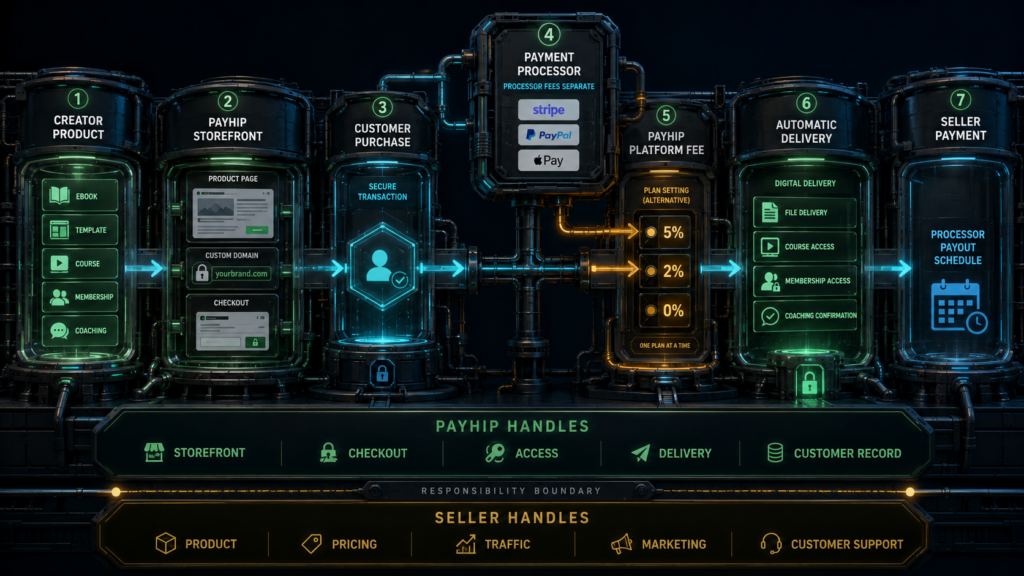
Payhip uses a relatively short setup workflow, allowing a seller with a finished product and an available payment-processor account to move from registration to a published listing without building a separate ecommerce website. The sequence typically looks like this: create an account, connect a payment processor, add a product, build or customize the store, connect a custom domain if desired, publish the product, generate traffic, let the customer complete checkout, allow Payhip to deliver the product or membership access, and receive payment through the connected processor.
Each stage is straightforward. Account creation takes minutes. Connecting a processor such as Stripe or PayPal is required before checkout can accept live payments. Adding a product means uploading a file or setting up a course, membership, or coaching offer and writing a description and price. The storefront can be customized with themes, colors, and a custom domain, or the seller can skip the storefront entirely and embed a buy button on an existing website. Traffic generation, whether through social media, email, SEO, or paid ads, remains entirely the seller’s responsibility. Once a customer purchases, Payhip handles delivery of the file or membership access automatically. Payment itself moves through whichever processor is connected, and the timing of when funds land in a seller’s bank account depends on that processor’s payout schedule, not on Payhip directly.
Payhip Pricing Explained
Payhip’s pricing is unusually simple compared to most SaaS ecommerce tools, because all three plans include the same core feature set. The only thing that changes across plans is the monthly subscription cost and the percentage Payhip keeps from each sale. This is confirmed on Payhip’s current pricing page and in the platform’s payment and payout documentation.
| Plan | Monthly subscription | Payhip transaction fee | Product limits | Revenue limits | Best suited for |
|---|---|---|---|---|---|
| Free | $0 | 5% | Unlimited | Unlimited | Testing a first product, low or inconsistent sales |
| Plus | $29 | 2% | Unlimited | Unlimited | Steady monthly sales in the hundreds to low thousands |
| Pro | $99 | 0% | Unlimited | Unlimited | Established sellers with consistent, higher monthly revenue |
Under the current pricing structure, the Free plan costs nothing until a sale occurs, at which point Payhip keeps 5% of that transaction. Plus costs $29 a month and reduces the cut to 2%. Pro costs $99 a month and removes Payhip’s transaction fee entirely. It is worth being precise here: Pro is not a fee-free plan in absolute terms, because PayPal, Stripe, or any other connected payment processor still charges its own fee on every transaction, separate from Payhip’s charge. Unlimited products and unlimited revenue on every plan is a real advantage, but it does not mean zero operating cost once sales begin.
Which Payhip Plan Is Cheapest at Different Sales Levels?

Because all three plans share identical features, the decision of which plan to use is a pure math problem based on monthly gross sales. The following formulas isolate only Payhip’s own platform charges, excluding payment-processor fees, refunds, taxes, and any other cost.
Free plan monthly Payhip cost: 5% multiplied by monthly gross sales.
Plus plan monthly Payhip cost: $29 plus 2% multiplied by monthly gross sales.
Pro plan monthly Payhip cost: a flat $99.
Setting the Free and Plus formulas equal to each other finds the point where upgrading from Free to Plus starts saving money:
0.05R = 29 + 0.02R, which simplifies to 0.03R = 29, giving R = $966.67.
At approximately $967 in monthly gross sales, Plus becomes cheaper than Free based on Payhip’s platform fee alone. Below that figure, staying on Free costs less in absolute dollars, even though the percentage feels higher.
Doing the same comparison between Plus and Pro:
29 + 0.02R = 99, which simplifies to 0.02R = 70, giving R = $3,500.
At approximately $3,500 in monthly gross sales, Pro becomes cheaper than Plus based on Payhip’s platform fee alone. Below that threshold, Plus remains the better value; above it, the flat $99 fee wins out over the 2% cut.
| Monthly gross sales | Free plan cost | Plus plan cost | Pro plan cost | Cheapest plan |
|---|---|---|---|---|
| $0 | $0 | $29 | $99 | Free |
| $250 | $12.50 | $34 | $99 | Free |
| $500 | $25 | $39 | $99 | Free |
| $1,000 | $50 | $49 | $99 | Plus |
| $2,000 | $100 | $69 | $99 | Plus |
| $3,500 | $175 | $99 | $99 | Plus / Pro (tie) |
| $5,000 | $250 | $129 | $99 | Pro |
| $10,000 | $500 | $229 | $99 | Pro |
In practical terms, this creates three approximate economic ranges: roughly $0 to $966 in monthly sales favors Free, roughly $967 to $3,499 favors Plus, and roughly $3,500 and above favors Pro. These calculations exclude Stripe, PayPal, or other processor fees, along with refunds, taxes, affiliate commissions, and advertising spend. “Cheapest” here refers only to Payhip’s own platform charges; a seller might still choose a different plan for cash-flow reasons or budgeting preference even if it is not the mathematically cheapest option that month.
The Real Total Cost of Using Payhip
Payhip’s platform fee is only one line item in the cost of running a digital-product business. A seller should also expect some combination of payment-processing fees, domain registration if using a custom domain, the cost of actually creating the product being sold, design or production software, video hosting for course content, email tools used outside Payhip’s built-in list features, advertising spend to generate traffic, affiliate commissions if a referral program is used, occasional refunds, and potentially professional tax advice. A full breakdown of these categories is covered in our guide to real ecommerce startup costs, which applies to Payhip sellers just as it does to sellers on any other platform.
Not every seller incurs every one of these costs. Some are fixed regardless of sales volume, such as a Plus or Pro subscription or a domain renewal. Others are percentage-based and scale with revenue, such as Payhip’s transaction fee and processor fees. Some are optional, such as premium design software or paid advertising. And some occur before a single sale is made, such as product creation, while others only occur after a sale, such as refunds or affiliate payouts. Treating Payhip’s monthly plan cost as the entire cost of doing business understates what it actually takes to run a profitable store.
What Can You Sell on Payhip?
According to Payhip’s digital-download tools and its broader platform documentation, sellers can list ebooks, PDFs, software, license keys, templates, audio files, video files, design assets, online courses, memberships, coaching sessions, and subscription-style products. Physical products are also supported for sellers who want to combine digital and physical inventory in one storefront, though Payhip’s core strength remains digital delivery. Each uploaded digital-product file can currently be up to 5GB. Payhip supports most common document, audio, video, and archive formats, although certain executable or potentially unsafe file types cannot be uploaded directly and may need to be packaged inside a ZIP archive.
Payhip Store Builder and Branding
Payhip’s store-builder documentation outlines a hosted storefront with selectable themes, adjustable colors and fonts, custom pages, basic navigation, and individual product pages. Sellers can also connect a custom domain, which replaces the default Payhip subdomain with a branded web address.
Payhip provides meaningful branding control for a creator platform, but it is not as structurally customizable as a fully built Shopify or WooCommerce store. There is no equivalent to Shopify’s app ecosystem or a theme-editing language as flexible as Shopify’s Liquid or WordPress’s PHP-based template system. For a seller whose main goal is a clean, professional page for a handful of products, this is rarely a limitation. For a seller planning a large multi-category storefront with deep customization needs, it becomes one.
Checkout and Digital Delivery
Buyers complete checkout directly on the Payhip-hosted page or through an embedded buy button on the seller’s own site. Supported payment methods depend on which processor is connected and the buyer’s region. Once a purchase clears, Payhip delivers the file, license key, or membership access automatically, and sellers can typically test the checkout flow themselves before publishing a product live. Custom checkout questions may be available depending on the product type, letting a seller collect information needed to fulfill an order. Even with this automation, the seller remains responsible for product quality, accurate descriptions, a clear refund policy, and responsive customer communication. Payhip handles the mechanics of the transaction, not the seller’s reputation.
Payments and Payouts
Sellers connect one or more supported payment processors to their Payhip store, and processor availability varies by country. At the time of writing, Payhip integrates with multiple major processors, and sellers should confirm current regional availability directly through Payhip’s account settings before launching in a specific market. Payments generally move through the connected processor rather than sitting in a centralized Payhip balance, and payout timing depends on that processor’s own schedule rather than on Payhip itself.
Payhip’s platform fee and the processor’s transaction fee are charged separately, and depending on the processor and account setup, Payhip’s cut may be deducted automatically per transaction or billed to the seller on a separate schedule. Sellers should review Payhip’s payment and payout documentation to confirm exactly how funds move for their specific processor and country before relying on a particular payout timeline.
VAT and Sales Tax
According to Payhip’s official tax-handling overview, the platform is designed to calculate and remit digital VAT for qualifying sales in the EU and UK, along with applicable sales tax in relevant US states and Canadian provinces, referencing Payhip’s digital VAT documentation and US sales-tax guidance.
This is a genuine convenience, but it does not eliminate every possible tax obligation for every seller. Tax treatment depends on the product type being sold, the seller’s location, and the buyer’s location. A seller may still owe income tax on their earnings, and some jurisdictions may require informational or zero-dollar filings even when no tax is directly owed on a transaction. This review does not constitute personal tax advice, and sellers with meaningful revenue should confirm their specific obligations with a qualified tax professional rather than relying solely on any platform’s automated handling.
Online Courses
Payhip’s online-course features include course sections, video lessons, downloadable files, basic quizzes, drip content that releases lessons on a schedule, and student access management through a sales page built like any other Payhip product. This suits independent educators, small course creators, and authors looking to extend an ebook into a more structured course format. It is not intended to replace a full learning-management system built for large institutions with complex grading, accreditation, or certification requirements. Creators with straightforward video or text-based course content will find it functional; those needing an enterprise-grade LMS will likely need a dedicated tool instead.
Memberships and Recurring Payments
Payhip supports memberships with recurring billing periods, gated content that unlocks based on subscription status, and customer access management tied to the connected payment processor’s recurring billing capability. This works well for a creator offering an ongoing content subscription or a small paid community tied to downloadable resources. It is worth distinguishing between selling a membership, which Payhip handles well, and building a full community platform with forums, live chat, or event calendars, which is a separate category of product entirely. Payhip provides the billing and access mechanics; it does not include every feature found in dedicated community-platform software.
Coaching Products
Coaching products on Payhip are packaged as sellable offers, with scheduling handled through integrations such as Calendly where currently supported, and video calls typically conducted through Zoom or a similar external tool. Payhip manages the sale, payment, and customer record for a coaching offer, but it does not provide the coaching expertise, an audience of potential clients, or the meeting software itself. It is a sales and fulfillment layer around a service the coach already has to deliver.
Marketing Tools
Payhip includes a set of built-in marketing tools referenced in its marketing tools documentation, including discount coupons, an affiliate program that lets others promote a seller’s products for a commission, cross-selling and bundling options, customer reviews, basic email updates to past buyers, lead-magnet style free downloads that capture an email address, and integration support for tools such as Google Analytics and the Meta Pixel for tracking ad performance.
These tools genuinely help a seller improve conversion and repeat business, but they are promotional utilities, not a traffic source. Payhip gives sellers ways to convert an audience they already have or are building elsewhere; it does not manufacture demand or guarantee that a product will be discovered.
Payhip Marketplace and Product Discovery
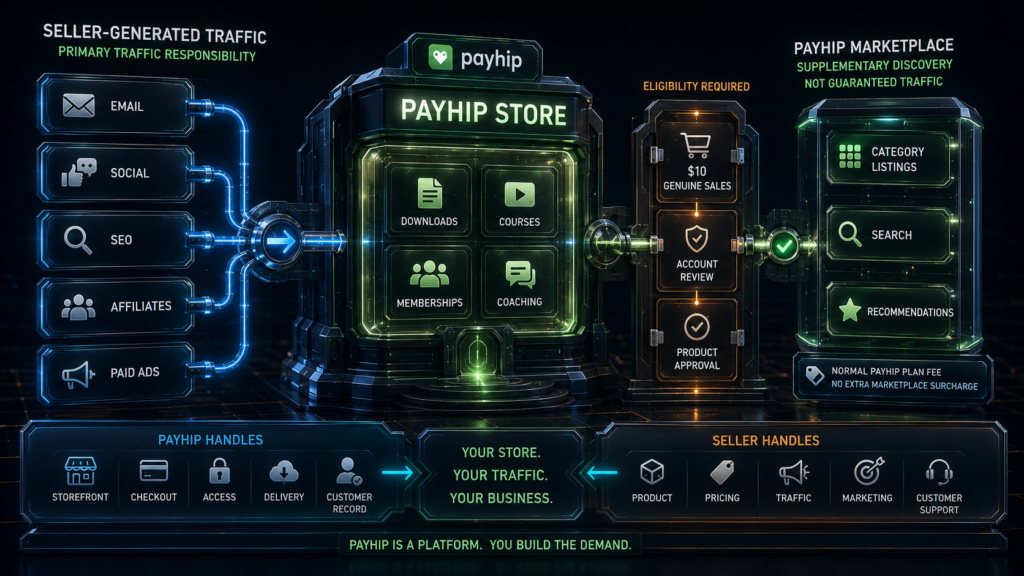
Payhip now gives eligible digital-product sellers an additional discovery channel through its Marketplace. Approved products can appear in category pages, search results, and recommendation areas, giving creators a chance to reach buyers beyond their own email list or social audience.
Marketplace access is not immediate or guaranteed. A store must first generate at least $10 in genuine sales and pass Payhip’s account review. Individual digital products must then be submitted and approved before they can appear publicly. Payhip currently does not charge an additional Marketplace fee, so sellers continue paying the normal transaction fee associated with their Free, Plus, or Pro plan.
The Marketplace should be treated as a supplementary discovery channel rather than a complete customer-acquisition strategy. Approval does not guarantee impressions, sales, or predictable traffic, so creators should still develop their own audience and marketing channels. Current eligibility and submission rules are explained in Payhip’s Marketplace documentation.
Language, Currency and International Selling
Per Payhip’s language and currency settings documentation, each store currently operates with one default display language and one default currency at a time. Payment processor availability also varies by country, which affects which buyers can check out smoothly in a given market. This is a real limitation for sellers targeting a genuinely multilingual, multicurrency audience simultaneously, since Payhip does not currently offer the kind of automatic per-visitor localization found in larger platforms like Shopify. Sellers targeting a single primary market, such as English-speaking buyers in the United States, will rarely notice this constraint.
Payhip Pros and Cons
| Strengths | Limitations |
|---|---|
| No required monthly subscription on the Free plan | Seller must already own or create the product being sold |
| All core features available on every plan | Traffic generation is entirely the seller’s responsibility |
| Unlimited products and unlimited revenue on every plan | Free and Plus transaction fees rise directly with revenue |
| Transparent, predictable fee progression | Payment-processor fees apply on top of Payhip’s own fee |
| Digital delivery, courses, memberships, and coaching supported | Storefront customization is more limited than Shopify or WooCommerce |
| Customizable hosted storefront with custom-domain support | One default language and currency per store |
| VAT and sales-tax handling on qualifying transactions | Smaller app and integration ecosystem than Shopify or WordPress |
| Multiple supported payment processors | Not a full enterprise-grade learning-management system |
| Built-in coupons, affiliates, and marketing tools | Marketplace discovery is available, but eligibility, approval, and sales are not guaranteed |
Payhip vs Gumroad
Payhip and Gumroad are the two platforms most frequently compared by creators selling digital downloads, and the differences matter more at scale than they first appear. Payhip allows sellers to begin on the Free plan without a monthly subscription. Plus and Pro are optional paid monthly plans that reduce or remove Payhip’s transaction fee as sales volume grows. Gumroad also has no monthly subscription. Under Gumroad’s current pricing, direct sales carry a 10% plus $0.50 platform fee, with payment processing charged separately. Sales generated through Gumroad Discover carry a flat 30% fee that includes processing costs. Since early 2025, Gumroad has also operated as a full merchant of record, meaning it takes on broader responsibility for tax collection and remittance across jurisdictions than Payhip’s model, which handles specific VAT and sales-tax categories rather than assuming full merchant-of-record status.
On pure platform-fee math, Payhip is meaningfully cheaper at almost every revenue level once a seller processes more than a small amount of monthly sales, since Gumroad’s 10% direct-sale rate exceeds even Payhip’s uncapped 5% Free-plan rate, and Payhip’s Plus and Pro tiers push the effective percentage down further as revenue grows. Both platforms now offer marketplace discovery, but their economics differ. Payhip currently charges no additional Marketplace surcharge beyond the seller’s normal plan fee, while Gumroad charges a 30% fee on Discover sales. Gumroad’s Discover system is more established, while Payhip’s Marketplace provides a newer supplementary channel for approved digital products. Gumroad’s full merchant-of-record status can also reduce a seller’s own tax administrative burden in some situations. For a full breakdown, see our detailed Gumroad review.
Choose Payhip when lower platform fees matter, when a more complete customizable storefront is wanted, when predictable upgrade points fit the business’s growth plan, or when courses, memberships, or coaching products are part of the catalog. Choose Gumroad when merchant-of-record simplicity is the top priority, when a minimal direct-link sales process is preferred over storefront customization, or when Gumroad’s Discover marketplace is likely to meaningfully contribute to sales.
Payhip vs Shopify
Shopify is a full ecommerce operating system built to support physical inventory, dropshipping, digital products, subscriptions, and complex multi-channel selling, all backed by a large app ecosystem and deep storefront customization through its own theme language. That power comes with a real monthly subscription cost from day one, along with a learning curve that exceeds what most single-product digital creators need. Payhip, by comparison, has no required starting subscription, a much simpler setup process, and is purpose-built for digital delivery, courses, memberships, and coaching rather than broad multi-channel retail.
For a deeper look at Shopify’s own pricing tiers and app costs, see our independent Shopify review. Payhip is usually the more rational starting point for a creator validating a small digital-product catalog, since it minimizes upfront cost and technical overhead. Shopify is usually stronger for a merchant building a larger independent ecommerce brand that needs advanced integrations, physical inventory management, and deeper storefront control than a creator-focused platform can offer.
Payhip vs WooCommerce
WooCommerce is a free, self-hosted plugin built on WordPress, giving a seller full ownership over their store’s code, data, and hosting environment. That ownership comes at the cost of needing to manage hosting, security updates, plugin compatibility, and technical maintenance directly, or paying someone else to do it. Payhip trades that ownership for hosted simplicity: there is no server to maintain, no plugin conflicts to troubleshoot, and no separate hosting bill, but also less structural flexibility than a fully built WooCommerce store offers.
Our full WooCommerce review covers hosting and extension costs in more detail. Payhip prioritizes simplicity and low setup risk, which suits a creator who wants to be selling within a day. WooCommerce prioritizes ownership and technical flexibility, which suits a seller who wants complete control over their storefront’s code and data and is willing to manage the technical responsibility that comes with it.
Is Payhip Legit?
Yes. Payhip is an established, publicly operating platform with transparent published pricing, functioning product and payment documentation, an active help center, working integrations with major payment processors, and documented tax-handling procedures for qualifying transactions. These are all verifiable operational signals of a legitimate business, not marketing claims that require blind trust.
Legitimacy, however, is not the same thing as guaranteed profitability. A legitimate platform does not guarantee that a product will find buyers, that traffic will arrive, that sales will happen, or that a business will be profitable. Those outcomes depend on the product, the market, and the seller’s own marketing effort, not on the platform hosting the transaction.
Who Payhip Is Best For
Payhip fits well for an author selling an ebook who wants a working sales page without learning a full ecommerce platform, a designer selling templates who needs simple file delivery and license management, a creator testing a first downloadable product before investing further, a small course creator with straightforward video or text lessons, a coach selling one-on-one sessions who needs a clean checkout and scheduling handoff, a membership creator running a small paid content subscription, a seller who wants to avoid any fixed monthly cost at launch, and a creator earning enough to benefit from moving predictably between Payhip’s fee tiers as revenue grows.
Who Should Choose Another Platform?
Another platform may be a better fit when the seller has no product yet and expects the platform itself to generate traffic or sales, when a large third-party app ecosystem is required for the business to function, when full custom checkout logic is essential, when the storefront must support multiple languages and currencies simultaneously, when enterprise-grade learning-management functionality is required for course delivery, when complete ownership of the underlying code through WordPress is a priority, when merchant-of-record simplicity outweighs the value of Payhip’s lower fee structure, or when a business needs to manage a large, complex mix of physical and digital inventory at once.
How to Choose a Payhip Plan
Based purely on Payhip’s own platform charges, Free makes sense when monthly sales are below approximately $967, particularly while validating demand and avoiding any fixed cost. Plus makes sense in the roughly $967 to $3,499 range, where the reduced 2% transaction fee delivers meaningful savings over Free’s 5% rate. Pro makes sense at approximately $3,500 or more in monthly sales, where the flat $99 fee becomes cheaper than continuing to pay a percentage under Plus.
These thresholds reflect only Payhip’s platform charges and should be weighed alongside a broader evaluation, covered in our guide on how to evaluate an ecommerce platform. A complete decision should also account for payment-processing fees, tax obligations, product margins, expected refund rates, affiliate commissions if used, advertising spend, and the ongoing workload of customer support.
Final Verdict: Is Payhip Worth It?
This Payhip review concludes that the platform is one of the strongest low-risk options available for creators who already have a digital product ready to sell. The Free plan offers a genuinely practical way to validate demand without any upfront financial commitment, and the pricing ladder above it is unusually easy to model, with clear, calculable thresholds at roughly $967 and $3,500 in monthly sales where upgrading becomes the cheaper choice. The platform goes well beyond basic file delivery, supporting courses, memberships, and coaching products alongside a customizable hosted storefront, VAT and sales-tax handling on qualifying transactions, and multiple supported payment processors that together reduce a meaningful amount of administrative friction.
The central limitation is not a flaw in the platform itself: Payhip does not create products, and it does not generate traffic. Sellers still need something worth selling and a way to reach buyers. Larger brands with complex, multi-channel catalogs will eventually find more room to grow on Shopify or WooCommerce. For the independent creator, author, coach, or small course seller who already has a product and wants a low-risk, transparently priced way to start selling it today, Payhip remains a strong long-term option worth using.
Frequently Asked Questions About Payhip
Is Payhip really free?
The Free plan costs $0 per month and includes every core feature, unlimited products, and unlimited revenue. It is not free once sales occur, however, since Payhip charges a 5% transaction fee on each sale under the current pricing structure, in addition to whatever fee the connected payment processor charges separately.
How much does Payhip charge per sale?
On the Free plan, Payhip charges 5% per transaction. On Plus, which costs $29 a month, the fee drops to 2%. On Pro, which costs $99 a month, Payhip charges no transaction fee at all, though the connected payment processor’s own fee still applies on every plan.
Which Payhip plan is the cheapest?
It depends on monthly sales volume. Free is cheapest below roughly $967 in monthly gross sales, Plus is cheapest between roughly $967 and $3,499, and Pro is cheapest at roughly $3,500 and above, based purely on Payhip’s own platform fees.
When should I upgrade from Payhip Free to Plus?
Upgrading to Plus becomes cost-effective at approximately $967 in monthly gross sales, the point at which the $29 subscription plus a 2% fee costs less than paying 5% on the Free plan.
When should I upgrade to Payhip Pro?
Upgrading to Pro becomes cost-effective at approximately $3,500 in monthly gross sales, the point at which the flat $99 monthly fee costs less than continuing to pay a 2% transaction fee under Plus.
Does Payhip charge payment-processing fees?
Payhip’s own transaction fee is separate from payment-processing fees. Processors such as Stripe or PayPal charge their own fee on every transaction across all three Payhip plans, including Pro, where Payhip’s own cut is eliminated but the processor’s fee still applies.
Does Payhip handle VAT and sales tax?
According to Payhip’s official documentation, the platform calculates and remits applicable digital VAT in the EU and UK, along with certain US and Canadian sales tax on qualifying transactions. This does not eliminate every possible tax obligation, and sellers with significant revenue should confirm their specific filing responsibilities with a tax professional.
How do Payhip payouts work?
Payments generally move through whichever payment processor a seller has connected, and payout timing depends on that processor’s own schedule rather than on Payhip directly. Payhip’s platform fee and the processor’s fee are charged separately.
Is Payhip better than Gumroad?
Payhip is generally cheaper on platform fees at most revenue levels and offers a more customizable storefront, while Gumroad offers a built-in discovery marketplace and operates as a full merchant of record. The better choice depends on whether lower fees or merchant-of-record simplicity matters more to a given seller.
Can Payhip sell online courses and memberships?
Yes. Payhip supports course sections with video lessons and basic quizzes, along with memberships that use recurring billing and gated content. Both are well suited to independent creators, though neither replaces a large-scale, enterprise-grade learning-management or community platform.
Does Payhip provide customers or traffic?
Payhip does not guarantee customers or predictable traffic. Eligible digital products can be submitted to the Payhip Marketplace, which may expose them to buyers outside the seller’s existing audience. Marketplace access requires prior genuine sales, account review, and product approval, so creators should still build their own traffic through email, search, social media, partnerships, or advertising.
Related Articles



Leave a Reply