

The short answer: WooCommerce itself is free, and the company does not take a platform share of store revenue. That does not make checkout free. The total cost can include a payment processor’s percentage-and-fixed transaction charge, cross-border and currency adjustments, optional paid extensions, hosting, fraud tools, maintenance, and the operational cost of keeping payment integrations compatible. The right question is not “What does the WooCommerce plugin cost?” but “What will my checkout stack cost per order and per month in the country where I actually sell?”
The appeal of WooCommerce is straightforward: merchants can build a store around WordPress, choose their own hosting, and retain control over which services they use. Its core platform does not require a subscription or a revenue-share fee. That is a compelling contrast to SaaS ecommerce products whose plan and transaction structure is chosen for you. But it also makes comparison harder. The very flexibility that WooCommerce offers means that two shops using the same free core plugin may have dramatically different total checkout costs.
One store may rely on standard card payments, basic tax settings, and few add-ons. Another may need recurring subscriptions, local payment methods, fraud protection, express wallets, specialized checkout fields, and extensive tracking. Both can use WooCommerce, but the second store carries an entirely different set of licensing, processing, and maintenance obligations. Search results often describe the core software as “free” without showing how a realistic checkout budget behaves once orders begin arriving. This guide addresses that gap with a per-order cost framework, three budget scenarios, and a practical method to avoid unnecessary checkout plugins.
Start by separating platform cost from payment processing
WooCommerce’s official pricing page describes the core product as a free, open-source ecommerce platform with no monthly platform subscription and no revenue share. It also explains that merchants choose hosting, payment providers, and extensions independently. This distinction matters because a processing fee paid to a card company or payment provider is not a fee charged by WooCommerce merely for using the store software. The processor is performing authorization, settlement, and payment-related services; the platform supplies the ecommerce layer that connects the order to the payment flow.
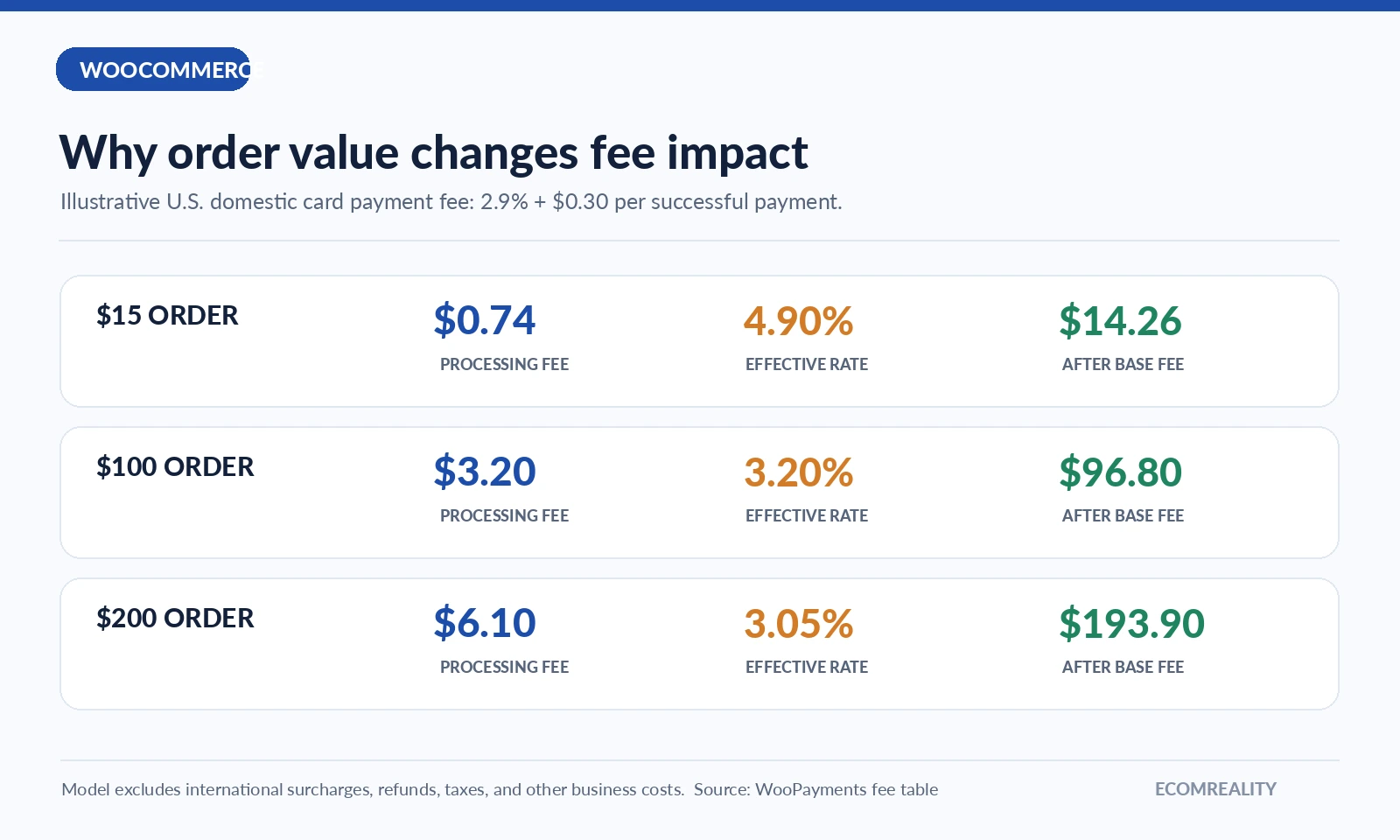
Consider a US-based seller processing a $100 card order with WooPayments. According to WooPayments’ published US schedule, the domestic online card base fee is 2.9% plus $0.30, before relevant additional charges. At that rate, the illustrative processing cost is $3.20, leaving $96.80 of the transaction before product, tax, fulfillment, marketing, and any other business costs. Nothing about the example suggests that $96.80 is profit. It is simply the amount remaining after one payment fee category.
For a $15 order on the same illustrative rate, the processor’s base fee is $0.735, normally rounded to approximately $0.74. The effective percentage is almost 4.9%, higher than the advertised 2.9% because the fixed $0.30 charge matters more on small orders. For a $200 order, the base fee is $6.10, an effective 3.05%. This is the first checkout lesson: fixed per-transaction charges hit lower average order values harder, even when the percentage rate is unchanged.
Why WooPayments fees depend on geography
A common mistake is quoting an American payment rate as if it were global. WooPayments maintains country-specific tables. For example, its published page currently shows US online cards at 2.9% + $0.30, while the German standard card table uses 1.5% + €0.25, with separate rules for international payments and currency conversion. Even those headline numbers can change when a card was issued abroad, settlement requires conversion, or the payment method is not a standard card. Different customer mixes can therefore produce noticeably different effective rates.
The business’s location, the buyer’s location, payment method, and currency all matter. The official schedule also lists a US $15 dispute fee in relevant cases, although whether and when a fee is assessed can depend on the dispute outcome and applicable terms. A shop with a large cross-border customer base should model additional international and conversion percentages separately rather than using only the domestic card rate. Likewise, merchants should look at local methods available in their country rather than assuming every wallet, bank debit, or buy-now-pay-later option costs the same as an ordinary credit card.
The published US table also shows different rates for some alternative methods. That means adding more choices can improve customer convenience while changing the processing-cost mix. A checkout page with four visible methods may have four different unit economics. The right measure is a weighted average across the methods customers actually use, not the lowest number displayed on a pricing page.
WooPayments versus third-party gateways
WooCommerce’s pricing page states that the platform does not add an extra fee simply because a merchant chooses a different payment provider. That policy is one of its strengths. The merchant can compare processors, negotiate terms where possible, and replace a gateway if service or pricing is unsatisfactory. However, “no extra WooCommerce fee” does not mean the third-party processor is free. Each provider has its own published rates, reserve and payout practices, refund rules, and geographic coverage. Those terms must be examined directly.
There is also an integration question. Some gateways provide an official free plugin that covers common card payments. Others require a paid extension for a specialized method, advanced subscriptions integration, or local compliance needs. A checkout decision should therefore compare three layers: processor fees, integration licensing, and day-to-day operations. Choosing the nominally cheapest processor can be a false economy if the integration causes abandoned orders, manual support work, or an unstable checkout after updates.
The best approach is to shortlist providers that support your target countries and currencies, confirm which payment methods matter to customers, then calculate estimated effective processing cost using real order assumptions. Add any integration licensing separately. Finally, test refund handling, order status synchronization, duplicate payment protection, and webhook reliability in a controlled environment before switching the live checkout.
Extensions: the cost most “free WooCommerce” comparisons miss
WooCommerce’s own pricing page currently frames hosting as typically $25–$350 per month for many stores and paid extensions as often $29–$299 per year per extension. These are broad planning ranges, not mandatory charges or prices every shop must pay. They are useful as a reality check. A merchant with a modest plugin stack can easily spend more on hosting and a few specialized extensions than on the core ecommerce platform itself, which remains free.
For a concrete example, WooCommerce Subscriptions is a separately priced paid extension currently listed at $279 for a one-year license. That is not a WooCommerce platform transaction fee. It is the cost of supporting a feature set related to recurring products, subscriber account management, and subscription workflows. A shop selling one-time products probably does not need it. A membership or replenishment business may consider it an important requirement. The existence of such extensions is exactly why any honest checkout budget should begin with the store’s business model, not with a generic “must-have plugins” shopping list.
Other paid functionality can include advanced tax automation, specialized conditional fields, B2B workflows, abandoned-checkout recovery, subscriptions, memberships, fraud screening, analytics, and multi-currency tools. Some functions have capable free alternatives. Others may be provided already by a host, theme, gateway, or existing subscription. Buying overlapping tools creates cost and increases compatibility risk. A merchant should map each extension to a specific problem and expected outcome before approving the expense.
Why plugin compatibility is a real expense
Software maintenance does not appear as a line item on every pricing page, but it has an economic cost. WooCommerce stores sit on a stack: WordPress, WooCommerce core, a theme, payment plugins, checkout enhancements, caching, and sometimes many independent extensions. Updates can affect form fields, payment return routes, JavaScript behavior, and order data. A checkout that works with a particular plugin combination today may need retesting after updates. The extra labor is part of ownership, even when the software licenses themselves are free.
This is especially relevant to changes around the WooCommerce Checkout Block and classic shortcode checkout. Some payment plugins support one checkout implementation more completely than the other; compatibility should be verified with the provider’s current documentation. A merchant installing an attractive checkout optimizer should confirm that it does not bypass important validation, interfere with wallet buttons, or break accessibility. The cost of one silent payment failure can outweigh the price difference between two extensions.
Budget for staging tests, backups, security monitoring, a clear rollback procedure, and responsibility for release coordination. These are not reasons to avoid WooCommerce. They are reasons to treat the store as a production application rather than as a static website. The platform rewards control, but control brings maintenance work with it.
The four cost buckets to use in a WooCommerce budget
A practical budget separates expenses into four categories. Transaction costs include payment processing, currency conversion, refunds and disputes where applicable. Recurring infrastructure includes hosting, backups, monitoring, email delivery, and security services. Licensed features include premium extensions that support actual commercial requirements. Operational overhead covers maintenance, troubleshooting, conversion testing, and staff time. Keeping these categories separate makes comparisons with bundled SaaS platforms much more honest.
The buckets also help reveal where an optimization will matter. If processing fees dominate, reducing subscription cost by a few dollars may accomplish little. If license renewals dominate, review whether multiple plugins duplicate the same capability. If operational overhead dominates, paying more for a stable and supported integration may be rational. Cost optimization should be targeted at the largest real expense, not at whichever price appears most visible in the admin dashboard.
Three illustrative checkout budgets
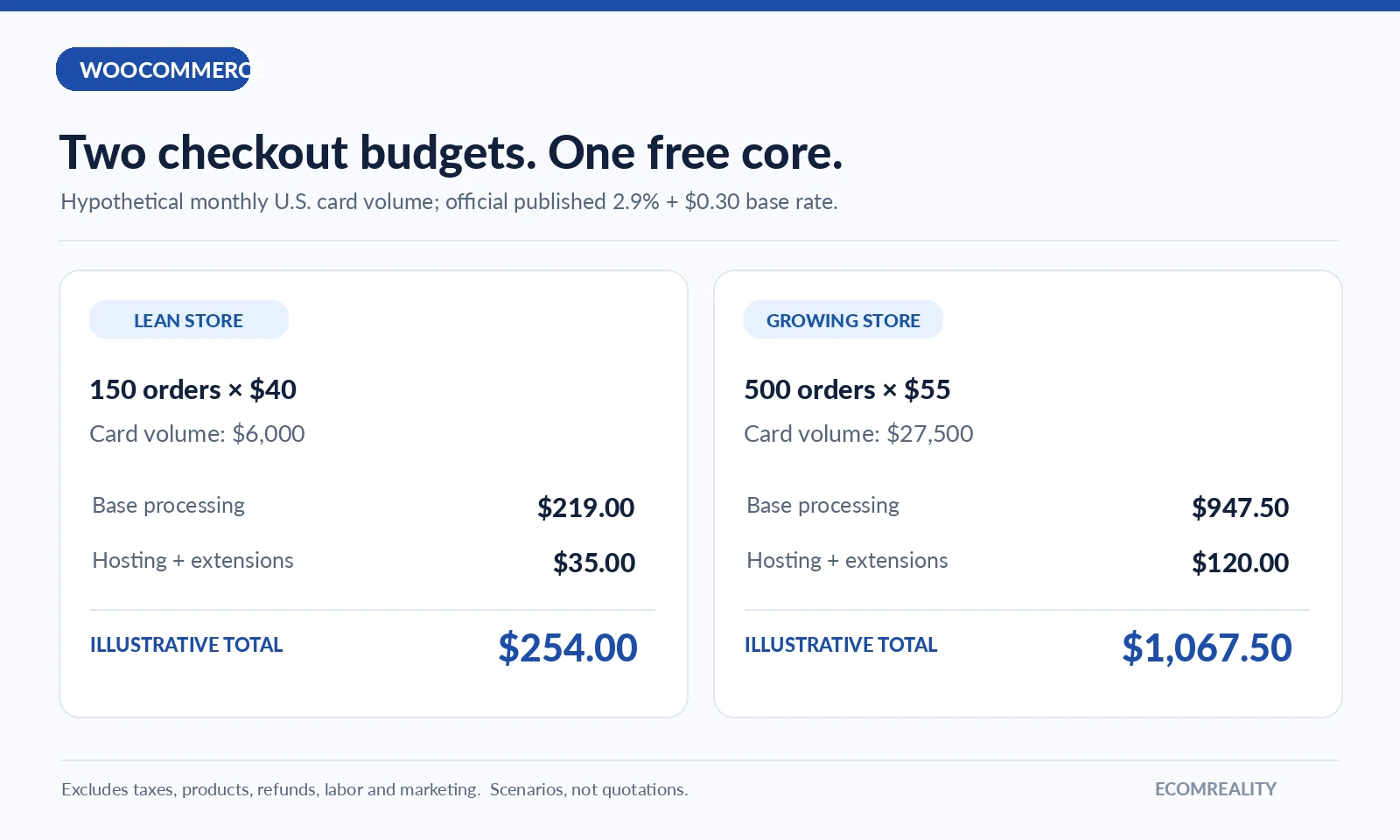
Scenario A: a lean store. Imagine a simple WooCommerce site with one paid hosting plan at $35 per month and no premium checkout extension. If it processes 150 domestic US card orders at $40 each, gross monthly card volume is $6,000. At a hypothetical uniform WooPayments rate of 2.9% + $0.30 per order, estimated processing expense is $219: $174 from the percentage component and $45 from the fixed component. Adding $35 hosting brings the illustrative checkout-related subtotal to $254. It excludes domain fees, taxes, refunds, labor, and every other business expense.
Scenario B: a growing catalog. Now imagine hosting and operating services cost $95 per month and two extensions together renew at $300 per year, or an allocated $25 per month. At 500 domestic card orders averaging $55, card volume is $27,500. The same base processing formula produces $947.50: $797.50 in percentage fees plus $150 in fixed fees. Add $120 fixed cost allocation and the subtotal becomes $1,067.50. This scenario illustrates how transaction processing can dwarf extension expense as volume grows.
Scenario C: a specialist subscription business. A store that needs a paid recurring-billing extension, fraud screening, advanced reporting, and heavier hosting will have more fixed overhead. But it may also have higher customer lifetime value and more stable repeat demand. The right comparison is not a raw monthly software bill; it is checkout cost per successfully collected order, net of failed payments, chargebacks, support work, and necessary compliance effort. The economics become especially sensitive to retry logic and recurring payment reliability.
These examples are scenarios, not a quote, and they intentionally use US domestic card rates to keep the arithmetic understandable. Shops in other markets must replace every processing assumption with their applicable country schedule. Promotional rates, negotiated pricing, local payment methods, cross-border fees, and tax treatment may change the result substantially.
Small-order economics: why average order value matters
Merchants often focus on increasing order volume without considering that each payment carries a fixed charge. At a $10 price point, a $0.30 fixed component is 3% of revenue by itself before the processor’s percentage charge. At $100, it is only 0.3%. This is one reason bundles and sensible minimum order amounts can materially improve checkout economics when they fit the customer experience. An average order value strategy is not merely a marketing question; it is a payment-cost strategy too.
However, merchants should not force customers into confusing bundles just to reduce payment fees. A transparent bundle that solves a related problem can improve both value and unit economics. An artificial cart threshold can reduce conversion. The real metric is total contribution after fees and other variable costs, not a checkout fee expressed in isolation. Test meaningful changes, measure conversion and refunds, and calculate what the business retains after the full transaction cost.
Refunds, chargebacks and payout timing
Another underexplained cost area is what happens after a successful charge. Merchant policies for refunds and disputes vary by payment provider. Some processors may not return original processing fees after a refund; others handle partial refunds or disputes differently. WooPayments publishes dispute charges, but merchants should also read the operational instructions for evidence submission, chargeback timing, and payout adjustments. These events can affect cash flow even when order volume looks healthy.
Payout timing can also matter. A store selling high-margin goods but receiving settlements several days later may need more working capital than its revenue headline suggests. New accounts, risk reviews, reserve policies, or specific payment types may further affect availability. These conditions depend on the processor and account, not on the open-source license of the store software. A checkout comparison that ignores payout behavior is incomplete for businesses with tight cash-flow cycles.
How to keep checkout plugins from multiplying
Begin with the minimum stable configuration. Install WooCommerce core, one supported gateway, and only the essential checkout features. Then add functionality based on evidence from real user journeys. If customers request local wallets, verify whether the gateway already supports them. If a fraud product promises greater protection, compare its recurring cost with actual dispute exposure. If a checkout-field editor is suggested, ask what customer or compliance requirement it solves. An extension that adds visual complexity without solving a specific problem can make checkout worse while increasing maintenance work.
Keep a written inventory for every payment-related plugin: owner, vendor, renewal date, purpose, dependencies, support channel, and the last successful test. Audit that inventory every quarter. When an extension is removed, retest the checkout path rather than assuming deactivation is harmless. This approach turns plugin spending into a controlled operating decision instead of a collection of subscriptions that nobody remembers purchasing.
Where WooCommerce is genuinely cost-effective
WooCommerce looks strongest for merchants who value custom control and have access to reliable WordPress operational skills. The free core, broad gateway choice, and absence of a WooCommerce platform revenue share provide meaningful flexibility. A relatively simple store can keep the fixed software layer modest. A more complex business can invest selectively in the tools that make its checkout distinctive, rather than paying for a feature bundle designed around somebody else’s workflow.
Its weaker fit is a merchant who wants a completely managed checkout without maintenance responsibility and expects every add-on to work together automatically. Hosting, performance, updates, security, and checkout compatibility are still the merchant’s problems to solve, directly or through a managed service. Free core software can be inexpensive to license and still expensive to operate poorly.
Final verdict: price the stack, not the logo
WooCommerce gives merchants an unusually flexible starting point: no platform subscription, no WooCommerce revenue share, and the ability to choose payment services and feature extensions. But the actual price of checkout is the sum of processor charges, infrastructure, extensions, and maintenance. The cheapest advertised rate is rarely the full story. Build a country-specific fee sheet, model real order values, list every recurring license, and test how payment integrations behave in production-like conditions.
For most readers, the most useful outcome of this review is not a single total. It is a repeatable checklist for reaching the correct total for their own business. If you know your order mix, payment geography, required features, and support burden, WooCommerce costs become understandable. Without those facts, “free checkout” and “expensive checkout” are equally unreliable shortcuts.
Frequently asked questions
Does WooCommerce charge its own transaction fee?
WooCommerce says the open-source platform has no revenue share and does not impose an extra platform fee for using a third-party gateway. Payment processors still charge their own fees, and extensions or providers may have separate charges.
Is WooPayments free?
WooPayments has no setup or monthly fee for ordinary online payments, according to its published documentation, but deducts a fee from each payment. Country, payment type, cross-border status and currency conversion affect the amount.
What is a typical WooCommerce checkout extension budget?
There is no universal budget. WooCommerce’s own pricing page describes extensions often ranging from $29 to $299 per year, but a store may use only free integrations or pay more for specialized requirements.
Should I use several payment plugins at once?
Only when each has a clear purpose and the combination is tested. More gateways may improve customer choice but can increase maintenance complexity and alter processing economics.
How should I calculate effective processing rate?
Divide total processor fees for a period by gross successfully processed volume, and separately account for refunds, disputes and cross-border adjustments. Compare the resulting effective rate with your expected order size and customer mix.
Sources and editorial method
Prepared from the official WooCommerce pricing page, WooPayments fee schedule, WooCommerce Subscriptions product page, and WooCommerce FAQ, checked October 2026. Budget scenarios are labeled examples rather than quotes, and payment schedules should always be rechecked for the merchant’s country.

Jo Carter is an editor and ecommerce researcher at Ecom Reality, where she covers ecommerce platforms, digital selling tools, online business software, pricing models, and emerging industry trends. She focuses on turning complex platform features and costs into clear, practical information for entrepreneurs and digital sellers. Her work combines detailed research with a balanced editorial approach, helping readers compare services, understand potential limitations, and choose tools that fit their business goals.
Comments
Related Articles



Leave a Reply