

Public discussions about Sellvia tend to collapse very different experiences into one word: complaint. A recurring subscription charge, an advertising campaign that did not produce the expected result, an order waiting for action, a refund request, and a genuine account error can all sound similar in a short review. They are not the same problem, and they should not be evaluated in the same way.
When I reviewed current Sellvia policies alongside patterns visible on public review and complaint platforms, the most useful distinction was not positive versus negative feedback. It was whether the issue could be traced to a documented rule, a business-performance expectation, an account-specific operational failure, or a billing discrepancy that required evidence and escalation. Most competing pages collect dramatic comments. Very few help a reader diagnose what actually happened.
Quick answer: Sellvia complaints generally fall into four groups. Some come from misunderstanding the subscription, advertising, order-processing, or payout model. Some are ordinary business-performance disappointments rather than platform defects. Some are real support or account issues that need documentation. A smaller group involves possible billing, cancellation, or service-delivery discrepancies that should be escalated promptly. The platform remains a practical, structured option, but users get better outcomes when they identify the exact category before reacting.

The Search Gap: Complaint Lists Rarely Explain the Mechanism
A typical page about Sellvia complaints does one of two things. It repeats negative reviews without testing the underlying claim, or it dismisses every complaint as user error. Neither approach is useful. A reader needs to know what the platform promised, which rule applied, what the dashboard showed, and whether the user completed the required step.
For example, “Sellvia kept charging me” can describe at least four different situations: the subscription was never canceled; the cancellation was started but not completed; the subscription was canceled but a separate paid service remained active; or a charge occurred after a confirmed cancellation date. The first three cases require different corrections. The fourth may justify a formal billing dispute with evidence. A one-line review does not tell you which occurred.
The same applies to “Sellvia would not release my money.” Current Sellvia terms distinguish customer payments, internal commission records, order-processing requirements, verification, and redemption eligibility. A complaint may refer to an unprocessed order, an incomplete verification step, an active-account requirement, a review triggered by suspected fraud or disputes, or a genuine delay outside the documented process. Those scenarios are not interchangeable.
This article therefore treats complaint research as a diagnostic exercise. Public feedback from sources such as the Better Business Bureau complaint profile, Trustpilot, and G2 can reveal recurring themes, but an allegation on a review platform is not automatically a verified fact. The claim has to be compared with the current account record and current policy.
A Four-Part Framework for Reading Sellvia Complaints
| Complaint type | What it usually means | First evidence to check | Best next action |
|---|---|---|---|
| Policy mismatch | A documented rule was not understood before purchase or use. | Current Terms of Use, checkout disclosure, account email, dashboard status. | Confirm the rule and decide whether cancellation, refund, or a workflow correction is available. |
| Expectation gap | The service operated, but sales, ad results, speed, or profit did not match the user’s expectation. | Ad spend, order data, conversion, margins, time period, and the exact promise relied on. | Separate platform delivery from commercial performance and adjust the business decision. |
| Operational issue | An order, payment, store feature, verification, or support process is not moving as expected. | Order ID, timestamps, screenshots, account notifications, support ticket history. | Submit a precise support case and follow the documented workflow. |
| Possible discrepancy | The account record appears inconsistent with the policy, confirmation email, checkout amount, or promised delivery. | Invoices, cancellation confirmation, bank record, before-and-after screenshots, written promises. | Escalate in writing, request a specific resolution, and retain all evidence. |
This framework matters because it prevents two common mistakes. The first is calling every disappointing result a platform defect. The second is assuming every complaint is merely a misunderstanding. Sellvia can be a useful system and still produce legitimate service cases. A fair analysis has to leave room for both.
Complaint Pattern 1: “I Was Charged After the Trial”
Subscription billing is one of the most common sources of frustration across SaaS products, not only Sellvia. The current Sellvia Terms of Use state that subscribers receive a reminder before the trial ends and can cancel through the account. The documented path is My Account, Plans, the three-dot options menu, and “Unsubscribe and Delete Store.” Sellvia’s cancellation guide describes the same process.
The critical evidence is the confirmation email. Clicking a menu item is not the same as proving the cancellation completed. A user evaluating a recurring charge should assemble a short timeline: the date the trial began, the renewal date, the date cancellation was submitted, the confirmation email timestamp, and the charge date. That timeline usually identifies the issue faster than an emotional description.
When this is probably a misunderstanding
- The user explored the cancellation screen but did not complete the final step.
- The account remained active and no confirmation email was received.
- The charge belonged to a separate add-on or dashboard service rather than the base subscription.
- The user assumed deleting a store, closing a browser tab, or stopping advertising automatically canceled every recurring service.
When this deserves escalation
- A subscription charge posted after a dated cancellation confirmation.
- The amount charged does not match the checkout or invoice record.
- Support confirmed cancellation in writing but the same service renewed again.
- The account interface prevented cancellation and support did not provide an alternative route.
Best practice: keep the cancellation confirmation, take a screenshot of the Plans page, and verify that any separate services have their own status. This is more useful than relying on memory after a charge appears.
Complaint Pattern 2: “Sellvia Refused My Refund”
Refund complaints often combine different purchases under one label. The base subscription, dashboard services, advertising credits, order-processing credits, and delivered add-on services do not necessarily share one refund rule. Current terms state that the latest subscription payment can be refunded when requested within 30 days, while previous months are not refunded. Additional services can become non-refundable once work begins or access is delivered. Ads Credits and Order Processing Credits are described as non-cash service units and are generally non-refundable.
This is exactly where public complaint summaries become misleading. A person may say, “I requested a refund within 30 days,” but the decisive question is: a refund for which transaction? The 30-day rule for the latest subscription payment should not automatically be applied to a completed design service, used advertising credits, or order-processing credits.
| Purchase | Question to ask | Evidence that matters |
|---|---|---|
| Monthly or annual subscription | Was the latest payment challenged within the stated refund window? | Invoice date, written request date, support response. |
| Dashboard service | Had work begun or had the service already been delivered? | Checkout terms, delivery notice, service status. |
| Ads Credits | Were credits purchased, used, or processed under the Promotion Service? | Credit purchase record, campaign status, daily deductions. |
| Order Processing Credits | Were prepaid processing units purchased or applied? | Credit history, order IDs, processing timeline. |
| Custom or add-on service | Was cancellation requested before fulfillment started? | Order confirmation, start notice, delivery timestamp. |
The positive side of this structure is that the rules are more specific than a vague “all sales final” policy. The difficult side is that users have to identify the exact purchase. Before contacting support, list each charge separately rather than asking for one combined refund covering unrelated services.
Complaint Pattern 3: “The Ads Spent Money but Did Not Produce Profit”
This is the complaint category most likely to be misclassified. A campaign can operate as designed and still fail commercially. Sellvia’s current terms state that promotional results, sales, reach, engagement, and profitability are not guaranteed. The Promotion Service uses Ads Credits, processes charges daily, and can be paused from the dashboard. Current terms also describe staged daily packages and explain that credits are used for Sellvia-operated promotion rather than acting as withdrawable cash.
That does not make every advertising complaint invalid. A user can reasonably question a discrepancy between the dashboard and the service description, a campaign that remained charged while shown as paused, missing reporting, or a product-selection rule that was not disclosed at checkout. But “I spent money and did not profit” is not enough by itself to prove the service malfunctioned.
When I read these complaints, I look for five numbers before forming a conclusion:
- Total Ads Credits purchased and consumed.
- The dates the promotion was active, paused, or restarted.
- Orders or attributed results shown during the same period.
- Order-processing and service costs connected to those results.
- The difference between gross activity and the user’s final economic outcome.
This is why the broader Sellvia review and the separate Sellvia pricing analysis exist. They explain the platform and plan structure in detail. A complaints article should not repeat the entire cost model; it should show how to decide whether a complaint concerns delivery, disclosure, or normal advertising risk.
Useful distinction: poor advertising performance is a business outcome. Charging after a confirmed pause, displaying inconsistent campaign status, or failing to provide the service recorded in the account would be an operational issue. The evidence required is different.
Complaint Pattern 4: “An Order Appeared, but I Had to Pay Again”
Order processing is another point where expectation and workflow collide. Sellvia’s current order-processing documentation explains that orders can be processed manually or through a funded balance. Current terms also describe Order Processing Credits as prepaid service units used to initiate or prioritize processing. An order showing in the dashboard does not automatically mean every downstream processing obligation has been completed.
A complaint is often phrased as, “The customer already paid, so why did I have to fund processing?” That question is understandable, but the answer depends on the account model. Current Sellvia terms distinguish a Partner Storefront model from customer-managed payments and describe commission as a Sellvia-funded promotional incentive rather than direct settlement of customer funds. A user who expects a conventional merchant-account flow may misunderstand what the balance represents.
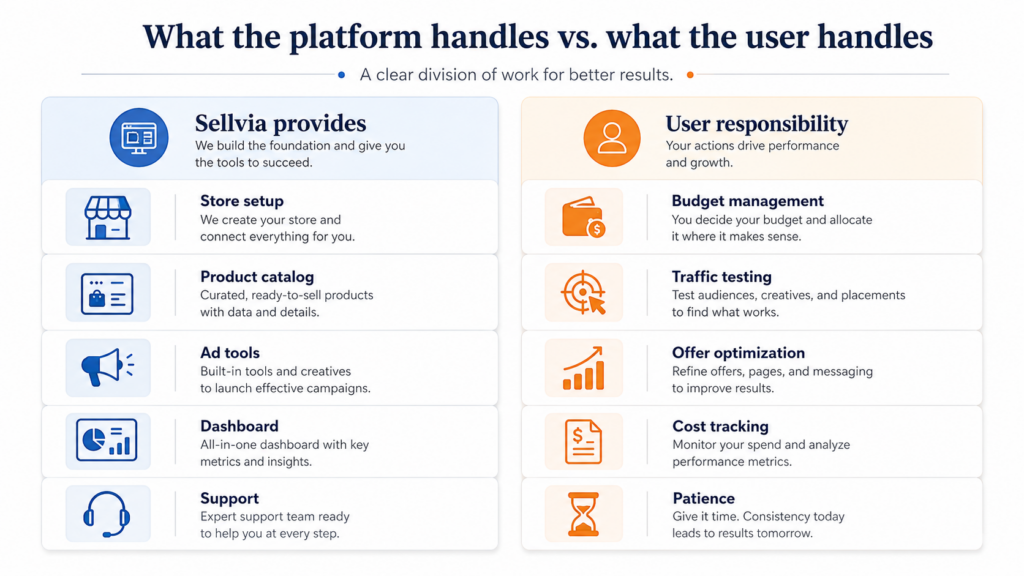
The first diagnostic question is therefore not “Did an order exist?” It is “Which account model applied, what processing action was required, and what did the dashboard show before confirmation?” Useful evidence includes the order ID, the amount due, the processing screen, the exact status, the deadline, and any automatic application of available commission or processing credits.
A real operational issue may exist when:
- The same order appears to have been charged twice.
- The processing amount differs from the amount displayed at confirmation.
- An order remains stuck after the required payment and verification completed.
- The order status changes without an explanation or associated account record.
- Support cannot identify the order from a valid order ID and timestamp.
By contrast, the mere existence of a processing charge is not automatically evidence of an error if the charge was part of the documented workflow and disclosed before authorization.
Complaint Pattern 5: “My Sales Were High, but I Could Not Withdraw the Same Amount”
Revenue, commission, available commission, processing costs, and redeemed cash are different accounting concepts. Many public reviews use the word “sales” as though it means money currently withdrawable by the account holder. The current terms do not frame the Partner Storefront model that way. Commission is described as a promotional incentive paid by Sellvia after eligibility conditions are met, and redemption may require an active paid subscription, completed order processing, and verification.
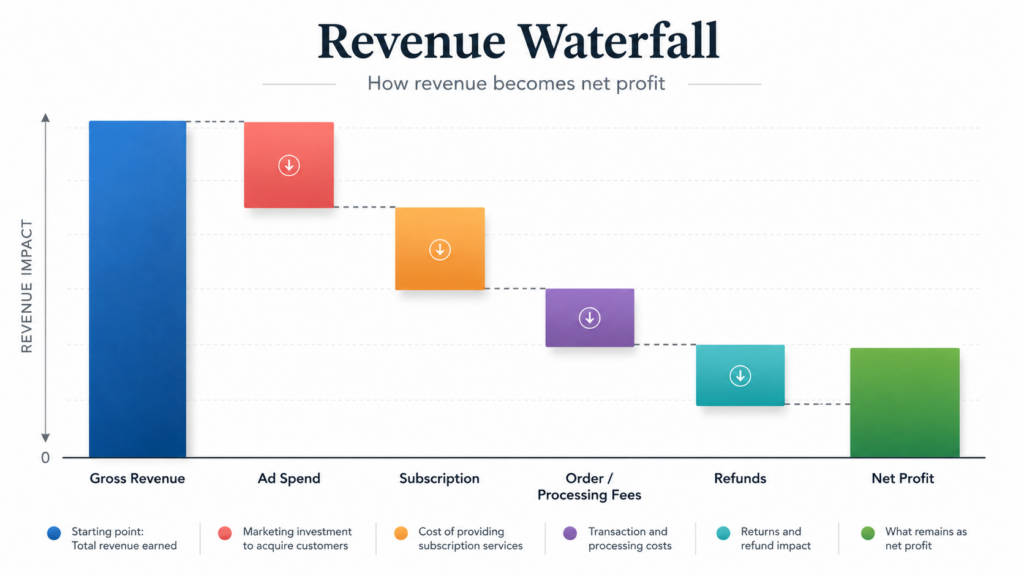
This does not mean payout complaints should be dismissed. If an account satisfies the stated conditions and a request remains unresolved beyond the documented review process, the user should ask for the exact hold reason and the specific condition still outstanding. The support request should identify the commission redemption date, amount, verification status, processed orders, and any disputes or chargebacks associated with the account.
The weak version of the complaint is: “They are holding my money.” The stronger, actionable version is: “My subscription was active on the redemption date, all linked orders show processed, verification was completed on this date, and the redemption request has remained in this status since this timestamp. Please identify the unmet eligibility condition.”
That wording does not guarantee an immediate resolution, but it forces the case toward a testable answer. It also creates a clean written record if further escalation becomes necessary.
Complaint Pattern 6: “Support Only Sent Generic Answers”
Generic support answers are frustrating, but they often reflect generic support requests. “My account is wrong,” “my ads do not work,” or “where is my money?” gives the agent very little to investigate. A useful ticket should be structured around one transaction or one workflow.
| Include this | Why it matters | Example |
|---|---|---|
| Exact issue category | Routes the ticket to the correct team. | Subscription renewal, Ads Credits, order processing, commission redemption. |
| Transaction or order identifier | Allows the account record to be found quickly. | Invoice number, order ID, redemption request ID. |
| Timestamp and timezone | Prevents confusion across payment and account logs. | July 28, 2026, 14:42 EDT. |
| Expected result | Shows which policy or screen the user relied on. | Cancellation confirmation said no further renewal. |
| Actual result | Defines the discrepancy without exaggeration. | A renewal posted two days later for the same subscription. |
| Evidence | Turns the report into a verifiable case. | Invoice, screenshot, confirmation email, bank record. |
| Requested resolution | Gives support a clear endpoint. | Reverse the duplicate charge or explain the unmet payout condition. |
One well-structured case is generally more effective than sending the same complaint through several channels with different wording. Multiple fragmented tickets can split the evidence and slow the response. Keep one timeline, one set of attachments, and one specific requested outcome.
Complaint Pattern 7: “I Was Offered Too Many Extra Services”
Upsell pressure appears frequently in public ecommerce reviews. Sellvia offers a base subscription alongside optional services, product packages, promotion, design, and dashboard purchases. Some users appreciate a connected marketplace of services; others experience repeated offers as distracting or expensive.
This complaint is primarily about purchasing discipline unless a service was charged without authorization or presented inaccurately. The right response is not to assume every recommended service is required. Before buying an add-on, identify which measurable constraint it solves. Does the store need more catalog capacity, different design work, additional promotion, or a specific operational service? If the answer is vague, postpone the purchase.
A positive feature of Sellvia’s model is that many services are modular. The risk is that modular services can accumulate. A user should maintain a simple service ledger containing the service name, price, renewal status, delivery condition, refund condition, and expected business purpose. That ledger prevents several separate charges from later being remembered as one unexplained cost.
Which Sellvia Complaints Are Fair?
A fair complaint identifies a specific difference between what was disclosed and what happened. Examples include a confirmed cancellation followed by another charge for the same service, a duplicate processing charge, a delivered service that materially differs from the written order, an account status that contradicts the recorded payment, or a support case that remains unresolved without a stated reason.
A fair complaint does not need to prove deliberate wrongdoing. Software can fail, account records can be misapplied, communication can be incomplete, and internal reviews can take longer than expected. The important point is that the claim can be tested against evidence.
The strongest complaint generally contains:
- A precise date range.
- The exact product or service purchased.
- The written rule, promise, or checkout disclosure relied on.
- The actual account or billing result.
- Copies of relevant invoices, emails, and screenshots.
- A reasonable requested resolution.
Public reviews are useful for visibility, but they are not a substitute for submitting the underlying evidence to the business. A review that says “avoid this company” may express genuine frustration while giving future readers almost no diagnostic value.
Which Complaints Are Usually Expectation Problems?
Some negative experiences are real without being service failures. Advertising may not become profitable. A store may need more time and testing than expected. Revenue can be materially different from available commission. A cancellation can remove access to the turnkey store because the store is tied to the subscription. Optional services can cost more than the user initially planned. None of those outcomes is pleasant, but each may follow the documented model.
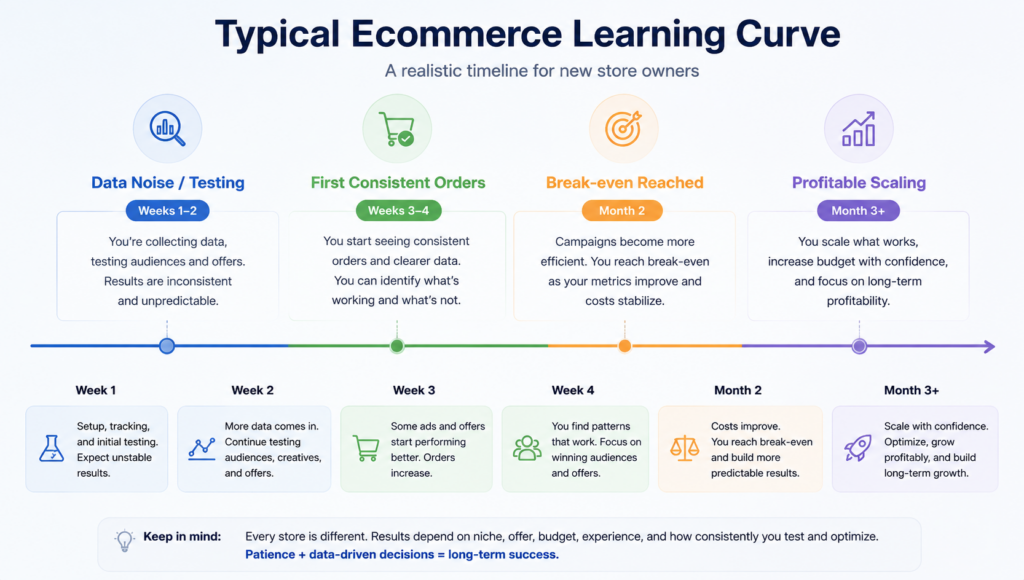
The most common expectation errors are:
- Treating the subscription as a guarantee of traffic or profit.
- Treating an order notification as instantly available cash.
- Assuming advertising credits can be withdrawn or refunded like account funds.
- Assuming all Sellvia services share the same cancellation and refund policy.
- Believing a more expensive plan automatically improves conversion or ad performance.
- Expecting cancellation of the subscription to preserve indefinite access to the included turnkey store.
Recognizing an expectation problem is not the same as blaming the customer. It means the buyer needed a clearer model before spending. The best correction is better disclosure and a slower purchasing process, not a debate over whether the disappointment was emotionally valid.
How to Investigate a Sellvia Problem Before Posting a Complaint
- Name the exact service. Separate the subscription, promotion service, order processing, commission redemption, and optional dashboard services.
- Build a transaction timeline. Record purchase, activation, cancellation, delivery, support contact, and charge dates.
- Capture the dashboard state. Save the plan status, order status, campaign status, credit balance, or redemption status relevant to the case.
- Read the rule that applies to that service. Do not apply the subscription refund policy to advertising credits or a delivered add-on.
- State the discrepancy in one sentence. “The confirmation shows X, but the account or charge shows Y.”
- Request one specific resolution. Refund the duplicate charge, confirm cancellation, process the order, identify the payout condition, or explain the service status.
- Preserve the response. Keep the full email thread and do not rely only on chat messages that may be difficult to retrieve later.
This approach helps even when the result is not what the user hoped for. A documented denial that cites the correct service policy is more informative than an unresolved conversation. It tells the user whether the next step is to accept the rule, ask for reconsideration, or dispute a genuine discrepancy.
What to Check Before Joining Sellvia
The best complaint resolution is avoiding a preventable complaint. Before starting, read the current subscription, cancellation, refund, advertising, order-processing, and commission terms. Confirm what happens to the included store if the subscription ends. Decide how much can be spent on promotion without depending on immediate results. Understand which credits are non-refundable. Keep enough operating capital to process orders under the applicable account model.
Also separate three questions that are often confused:
- Is Sellvia a real and operational platform? Our Sellvia legitimacy evidence check addresses that question.
- What does Sellvia include and how does it work overall? The main Sellvia review covers the broader platform.
- Which plan makes economic sense? The Sellvia pricing and upgrade analysis compares subscription capacity and value.
This page has a narrower job: help readers decide whether a complaint indicates a policy mismatch, an expectation gap, an operational issue, or an evidence-backed discrepancy.
My Overall Assessment of the Complaint Pattern
After comparing the public complaint themes with the current Sellvia documentation, I do not think the evidence supports treating every negative review as proof that the platform itself is nonfunctional. Sellvia provides a real subscription environment, store infrastructure, promotion services, order workflows, account records, and documented cancellation and refund processes. Many complaints arise because the user assumed a conventional ecommerce payment flow or expected the subscription and advertising system to produce profit automatically.
At the same time, it would be wrong to dismiss all complaints. Billing after confirmed cancellation, duplicate charges, inconsistent order status, unexplained verification delays, or a delivered service that differs from its written description are legitimate issues when supported by records. A positive view of Sellvia does not require pretending account errors never occur. It requires evaluating them accurately.
The platform is most likely to suit users who prefer a structured operating system and are willing to learn its specific terminology and financial workflow. It is less likely to suit someone who wants complete control over every advertising decision, expects every purchase to share one refund policy, or relies on immediate cash availability from new orders.
Frequently Asked Questions
What are the most common Sellvia complaints?
Common themes include recurring subscription charges, refund eligibility, advertising results, order-processing costs, commission redemption, optional service costs, and support communication. The correct interpretation depends on the exact service and the account evidence.
Do Sellvia complaints prove the platform is a scam?
No. Complaints show that users experienced dissatisfaction or disputes; they do not, by themselves, prove a universal conclusion. The stronger test is whether the platform is identifiable, operational, governed by published terms, and responsive to evidence-backed service cases. The separate legitimacy review examines that question in detail.
Can a Sellvia subscription be canceled from the account?
Current official instructions describe cancellation through My Account, the Plans tab, the three-dot options menu, and “Unsubscribe and Delete Store.” A confirmation email should be retained as proof that cancellation completed.
Does Sellvia refund subscription payments?
Current terms state that the latest subscription payment can be refunded when requested within 30 days. Previous monthly payments are not refunded, and additional services, Ads Credits, and Order Processing Credits may follow different rules.
Why do some users complain about Sellvia Ads?
Some complaints concern commercial performance: the promotion ran but did not produce enough profit. Others may concern reporting, charging, pause status, or disclosure. Users should compare Ads Credit purchases, active dates, campaign status, account reporting, and the written service terms.
Why is an order not the same as withdrawable money?
The current Partner Storefront terms distinguish orders, processing obligations, internal commission records, redemption eligibility, and approved payouts. Users should not assume that the gross amount associated with an order is immediately withdrawable cash.
What should I include in a Sellvia support request?
Include the service name, invoice or order ID, dates and timezone, expected result, actual result, screenshots, relevant email confirmations, and one clearly stated resolution request.
Is Sellvia still a reasonable platform despite complaints?
Yes, for users who value a connected store and operating environment and who understand the platform’s subscription, promotion, processing, and commission rules. Complaints are most useful when they help buyers identify the rules and responsibilities that require attention.
Final Verdict
Sellvia complaints should not be read as a single verdict. They are a mixture of policy misunderstandings, commercial disappointments, operational support cases, and occasionally serious discrepancies that deserve escalation. The platform’s strength is that it gives users a connected environment instead of forcing them to assemble a store, promotion workflow, order system, and account infrastructure separately. That convenience comes with a specific operating model that has to be understood on its own terms.
The most useful conclusion is positive but practical: Sellvia can work well for users who read the rules, control optional spending, monitor the dashboard, preserve billing records, and diagnose problems precisely. Buyers who treat the subscription as an automatic profit system or assume every balance is immediately withdrawable are more likely to become frustrated. Buyers who approach it as a structured business platform are in a much stronger position to use it successfully and resolve genuine account issues when they occur.
12 responses to “Sellvia Problems and Complaints: What Beginners Should Understand Before Launch”
-
When I stopped expecting overnight riches and started tracking my actual ad spend against margins in week two, I realized Sellvia wasn’t the problem – my expectations were, and honestly getting my first sale in day 4 versus the months I’d waste building from zero made all the difference.
-
genuinely thought something was broken the first time i saw sales on the dashboard but nothing in my account. spent like an hour in support chat before someone just explained how the reserve timing works. would have saved me a lot of anxiety if i’d read this first
-
What I wish I had known before trying other platforms is that the “data-gathering phase” you mentioned is real and not just an excuse – I burned out on a previous platform because I expected profit in week one and quit right before things would have clicked. When I moved to Sellvia, having a Growth Manager actually text me on day one and walk me through tracking cost per order from the start completely changed how I approached those first few weeks. The credibility helped too – knowing it’s Inc. 5000 ranked at #1818 with over 1.5 million stores launched and $1.5 billion earned by real store owners made it easier to trust the process during the slower early stage. Your point about the dashboard being too revenue-centric is fair, but once I started manually separating my ad spend and the $39 monthly subscription from my gross numbers, the actual margin picture got a lot clearer.
-
What changed my mind about Sellvia was actually the payment section of this post – specifically the part about reserves and payout timing, because that is exactly where I almost rage-quit in my second month before I understood what was happening. I had three sales process in one week, saw the revenue sitting there, and kept refreshing my account wondering why I could not touch it yet. Once I hit that $100 minimum threshold and my first bank transfer actually landed, something clicked for me – the system was not broken, I just had not read the rules of the road. Now I treat my Sellvia Payments balance like a separate business account and let it build before I withdraw, which honestly keeps me from raiding it impulsively anyway. The post is right that cash flow planning needs to happen before you scale your ad budget, not after you are already stressed about timing gaps. For anyone side hustling like me with a limited buffer, just know that once the withdrawals start flowing consistently – and they do – the $39 monthly subscription starts looking like the best decision you made all year.
-
ran into the payout timing thing in month one and genuinely thought something was wrong with my account – turns out it’s just how payment processing works everywhere and nobody thinks to mention it until you’re already confused
-
complaint about upgrades feeling confusing is so specific to me it’s almost funny. bought an extra product pack in week one because my growth manager mentioned it and i figured more products = more sales. had no idea i should’ve waited until i understood what was already converting. lesson learned but it cost me money i could’ve put toward ads instead
-
What actually changed my mind about trying it was the detail in this post about cash flow timing – I had almost talked myself out of it assuming I’d be flying blind, but when my Growth Manager texted me on day one and walked me through exactly what the payout reserve window looked like before I even touched my $40 ad coupon, that specific guidance removed the anxiety this post describes so well. I noticed something the other commenters didn’t mention – having a real person reachable by SMS throughout my first few weeks meant I never made a panicked decision based on 48 hours of noisy data, which the post correctly flags as the thing that breaks most beginners early.
-
the upgrade timing point landed for me. spent money on extra product packs before i had consistent orders and told myself it was “investing in the business.” it wasn’t. it was just anxiety spending. the advice to wait until you have a specific problem that an upgrade actually solves would have saved me probably $80 in the first month alone.
-
The point about the built-in ad system being the main pressure point actually matches my experience closely – I am 23 days in with Sellvia and what genuinely surprised me during my lunch break yesterday was how the ad system runs on its own once you set the daily budget, pulling traffic from the major platforms without me having to manage individual campaigns manually. I had tried building this kind of setup myself before and burned through both time and money with nothing to show for it, so having that infrastructure already assembled was a genuine relief rather than just a convenience. The article is right that early campaigns are data-gathering phases, not profit phases, and once I accepted that framing around day 10 the anxiety around the ad spend dropped considerably. If you are considering Sellvia specifically because of the advertising component, the most useful thing you can do is commit to watching cost per order for at least the first two weeks before drawing any conclusions about whether it is working.
-
The complaint about ad spend eating into everything hit close to home – I spent the first two weeks convinced I would need to keep pumping money into paid traffic forever just to see any movement, which honestly made me question whether I had made a smart decision leaving a corporate salary behind for this. After my third sale I finally activated the SEO package through this thing almost as an afterthought, and what surprised me was how it started pulling in visitors who were not costing me anything per click – that shift changed the math I had been stressing over since day one. The post is right that paid ads require a testing mindset, but what it does not fully emphasize is how the SEO layer can actually start reducing that dependency rather than just stacking on top of it as another cost. I went in with genuinely low expectations, so watching organic traffic show up alongside the paid stuff felt like a small but meaningful win that I was not anticipating. For anyone who has been running the SEO package for more than a month – did your paid ad spend actually drop as a percentage of total costs, or does organic traffic just add volume without replacing much?
-
The part about traffic costing money or time before anything breaks even is exactly right, and honestly what I kept telling myself during a slow week when I was watching this thing’s built-in ad system run automatically at $10 a day – yeah, the first few campaigns were not miracle workers, but not having to manually manage where the budget was going across Google and Facebook while I figured out the business math was the difference between me staying in or rage-quitting like some of those reviewers clearly did.
If you’re on the fence, just respect the 14-day trial for what it is – a window to watch the system work, not a promise that you’ll retire by Tuesday.
-
[…] For a detailed examination of recurring user concerns, read Sellvia Problems and Complaints. […]



Jo Carter is an editor and ecommerce researcher at Ecom Reality, where she covers ecommerce platforms, digital selling tools, online business software, pricing models, and emerging industry trends. She focuses on turning complex platform features and costs into clear, practical information for entrepreneurs and digital sellers. Her work combines detailed research with a balanced editorial approach, helping readers compare services, understand potential limitations, and choose tools that fit their business goals.
Comments
Leave a Reply
Related Articles


Leave a Reply