
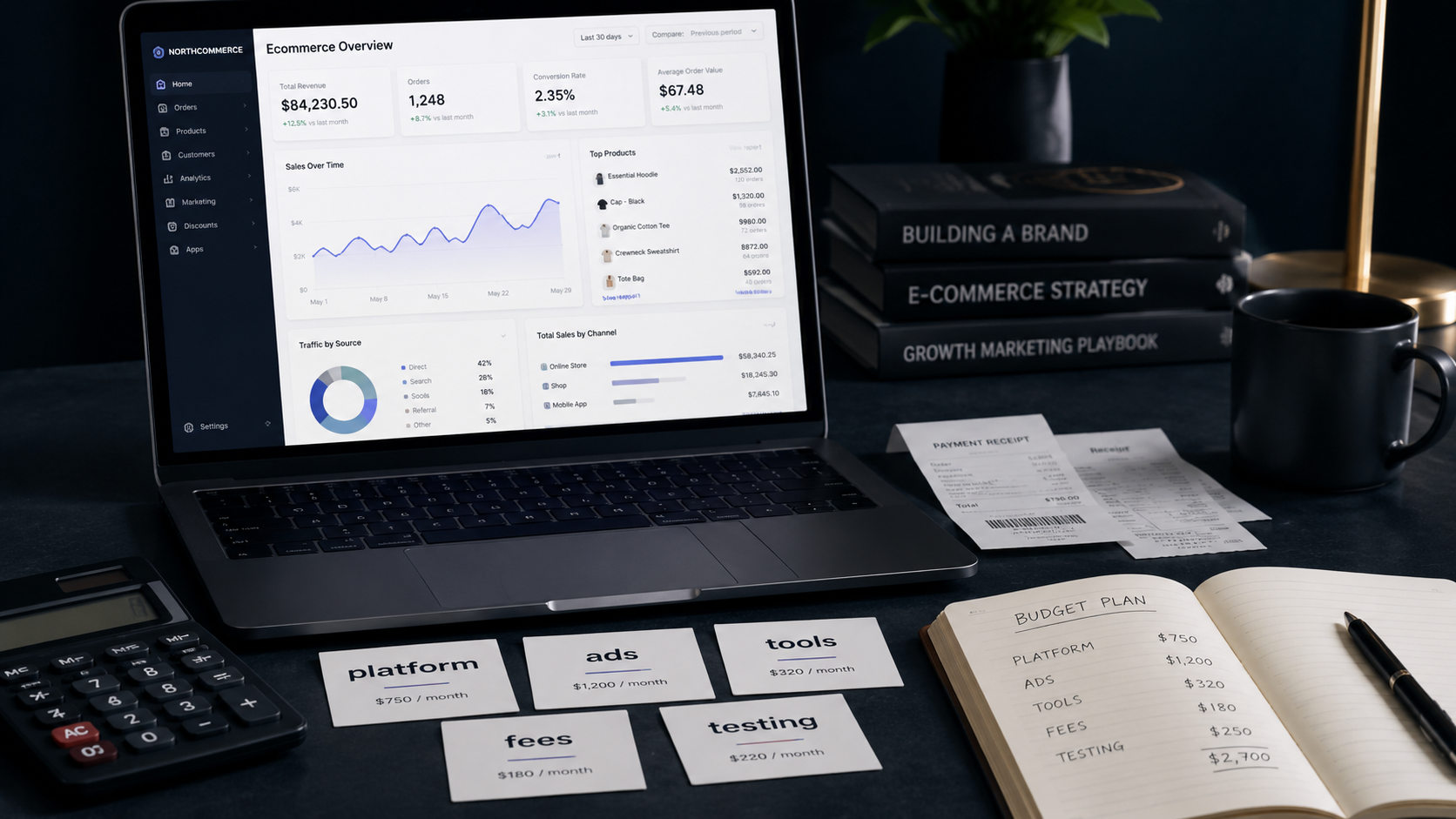
So, how much does it cost to start an ecommerce business? The honest answer is: anywhere from under $100 to $10,000 or more. But that range is only useful if you understand what the money actually pays for.
The real question isn’t “Can I launch a store cheaply?” It’s “Can I afford to get enough traffic, run enough tests, and survive early mistakes to figure out if this business model actually works for me?”
Many beginners calculate their platform fee, add a domain, and call it a budget. Then they run out of money before they’ve even had a chance to learn what’s wrong with their offer. The real cost of starting an ecommerce business includes testing, traffic, failed experiments, tools you didn’t expect to need, and fees that quietly erode your margin.
This article breaks all of it down – by category, by budget level, and by business model – so you know what you’re actually getting into before you spend a dollar.
The Short Answer: Ecommerce Startup Costs Can Range Widely
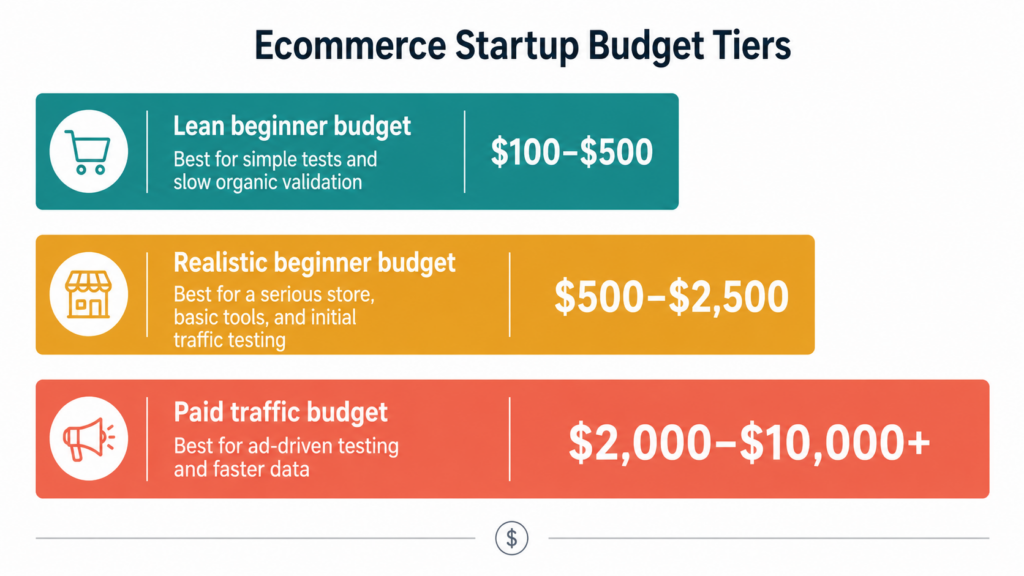
There are roughly three budget zones for starting an ecommerce business. Which one fits you depends on your model, your traffic strategy, and how fast you need to validate.
| Budget Level | Estimated Cost | Best For | Main Risk |
|---|---|---|---|
| Lean test | $100–$500 | Digital products, marketplace selling, validating a simple idea | Slow traffic, limited testing capacity |
| Serious beginner | $500–$2,500 | Branded store, paid tools, initial ad testing, content investment | Running out before profitable |
| Paid traffic focus | $2,000–$10,000+ | Ad-driven stores, product testing at scale, competitive niches | Burning cash on losing offers |
Most people who say they “started ecommerce for almost nothing” either already had an audience, got lucky on organic traffic, or took 12+ months to see results. None of those are bad – but they’re not representative of the average beginner experience.
The Main Ecommerce Startup Cost Categories
Before looking at numbers, it helps to know where the money actually goes. Most ecommerce costs fall into these categories:
- Platform or subscription fee – the monthly cost of your store
- Domain and basic branding – your web address and brand name
- Website design or theme – how your store looks
- Apps and plugins – tools added on top of the platform
- Product or catalog costs – what you’re actually selling
- Payment processing fees – the cut taken from every transaction
- Marketing and advertising – how customers find you
- Content creation – product images, copy, video
- Email and automation tools – follow-up sequences, abandoned cart
- Analytics and tracking – understanding what’s working
- Legal, tax, and business setup – LLC, privacy policy, terms
- Time and testing costs – the budget for things that don’t work
The last two categories – analytics and failed tests – are the ones beginners most commonly leave out of their planning.
Platform Costs: The First Number Beginners Notice
Your platform choice shapes not just the monthly fee, but the total cost of running and growing the business. Platforms are not equal, and the cheapest one is often not the cheapest business.
Hosted platforms (like Shopify, BigCommerce, or Squarespace Commerce) charge a monthly subscription. The store infrastructure is managed for you. The tradeoff: monthly costs plus transaction fees on some plans.
Open-source platforms like WooCommerce are technically free to install – but you’ll pay for hosting, security, plugin licenses, backups, and possibly a developer when things break. The “free” label is misleading.
Marketplaces like Etsy have lower setup friction. You don’t need a standalone site. But you pay transaction fees, listing fees, and you’re building on someone else’s platform – not your own brand.
Structured or done-for-you platforms reduce the setup burden by bundling a ready-made store environment, product catalog access, or built-in traffic tools into a single subscription. Sellvia and Ecomzy are examples of this category. The tradeoff is that users still need to understand traffic costs, platform fees, order economics, and payout timing – the platform handles setup, not profitability.
| Platform Type | Typical Monthly Cost | What’s Hidden | Best For |
|---|---|---|---|
| Hosted (e.g. Shopify) | $29–$79/month | Apps, themes, transaction fees | Flexible custom stores |
| Open-source (e.g. WooCommerce) | $5–$30/month hosting | Plugins, developer time, security | Tech-comfortable builders |
| Marketplace (e.g. Etsy) | $0.20 per listing | Transaction % + ad fees | Handmade, niche, creative products |
| Done-for-you platforms | Often $30–$100+/month depending on plan | Ad spend, order fees | Complete beginners, fast setup |
| Digital-only (e.g. Gumroad, Payhip) | Free or 5–10% cut | Payment fees, marketing tools | Simple digital product tests |
See our detailed Shopify Review 2026 and WooCommerce Review 2026 for full cost breakdowns, and our Comparisons section if you’re deciding between platforms.
Domain, Branding, and Basic Setup Costs
These are usually one-time or annual costs, and they’re relatively small – but beginners often overspend here before validating anything.
- Domain name: $10–$15/year for a standard .com, more for premium names
- Logo and basic branding: Free (DIY via Canva) to $100–$300 for a freelancer
- Business email address: $6–$12/month (Google Workspace or similar)
- Legal pages (privacy policy, terms): Free templates to $50–$100 for a service
- Initial product pages: Your time, or $50–$200 for a copywriter
Total realistic range: $30–$500, depending on how much you do yourself.
The rule here is simple: don’t spend $300 on branding until you know someone wants to buy what you’re selling. A clean, simple store with a clear offer beats an expensive-looking store with no traffic.
Design Costs: Free Theme, Premium Theme, or Designer?
Most platforms offer free themes. They’re sufficient for testing. The goal early on is clarity and trust, not stunning visuals.
- Free themes: $0. Can be used to launch a real, functional store.
- Premium themes: $50–$350 one-time. Better layouts, more customization. Not a sales guarantee.
- Freelance designer: $200–$2,000+. Only makes sense once the offer is validated.
A beautifully designed store with no traffic generates zero sales. A clean, basic store with a real audience and a clear offer can generate plenty. Don’t confuse aesthetics with conversion – they’re related but not the same thing.
Apps, Plugins, and Software Costs
This is where monthly costs quietly multiply. Most platforms don’t include everything you need in the base subscription. You’ll likely add tools for:
- Email marketing ($15–$50/month)
- Review collection ($0–$30/month)
- Upsells and cross-sells ($10–$30/month)
- SEO optimization ($20–$50/month)
- Abandoned cart recovery ($10–$25/month)
- Page builder or customization ($10–$40/month)
- Analytics beyond the basics ($0–$50/month)
- Digital product delivery (if applicable) ($10–$30/month)
Four or five modest apps can easily add $60–$150/month to your costs – before you’ve spent a dollar on advertising. When comparing platforms, add up the total stack cost, not just the subscription line.
Product Costs Depend on the Business Model
Your product model determines more about your actual costs than almost anything else.
1. Digital products
No inventory, no shipping, instant delivery. Lower fulfillment cost – but you still need to create, position, and market the product. Platforms like Gumroad or Payhip let you start with minimal overhead. Profitability depends heavily on traffic and conversion, not logistics.
2. Physical products with inventory
Buying stock upfront means higher initial costs. You’ll need to budget for samples, MOQs (minimum order quantities), storage, packaging, and handling. Getting it wrong means cash tied up in unsellable inventory.
3. Supplier-based or dropshipping models
No upfront inventory – you only pay when a sale is made. Lower entry cost, but margins tend to be tighter, fulfillment quality varies, and you often compete on price in crowded categories. Advertising costs frequently determine whether it works at all.
4. Marketplace selling (Etsy, Amazon, eBay)
No standalone store costs, but you pay platform fees on every transaction and you’re operating inside their rules. Traffic is built in, but so is competition.
5. Done-for-you or structured platforms
Some structured ecommerce platforms provide a ready-made store environment, product catalog access, or built-in tools that reduce setup work. Sellvia is one example, but the tradeoff is that users still need to understand traffic costs, platform fees, order economics, and payout timing. See Sellvia complete guide and Sellvia problems and payments breakdown for a detailed look at how the cost structure works.
There’s no universally cheapest model. The right model depends on your budget, risk tolerance, skills, and how much time you can invest.
Payment Processing Fees and Transaction Costs
Payment processors take a cut of every sale. This isn’t optional, and it applies regardless of platform. Standard rates:
- Stripe, PayPal, Square: Around 2.9% + $0.30 per transaction
- Shopify Payments: 2.4–2.9% (lower on higher plans), plus additional transaction fees if using third-party processors
- Marketplaces: Often layer processing fees on top of listing and referral fees
Simple example:
A $50 product sale with 2.9% + $0.30 in processing fees costs about $1.75 in payment fees alone. Before platform fees, product cost, and advertising.
Chargebacks and refunds create additional friction. A single dispute can reverse a sale and result in a $15–$25 chargeback fee depending on your processor.
When calculating profit margins, always subtract payment fees before anything else.
Marketing Costs: The Budget Beginners Underestimate Most
Traffic is usually the biggest real expense – and the one most beginner budgets underestimate.
There are four main ways to get traffic:
| Traffic Source | Cash Cost | Time Cost | Speed | Dependency Risk |
|---|---|---|---|---|
| Paid ads (Google, Meta, TikTok) | High | Low | Fast | Medium |
| SEO / content marketing | Low | Very high | Slow | Low |
| Social media (organic) | Low | High | Variable | Platform risk |
| Marketplaces | Fees | Low | Medium | High |
Most beginners don’t have an established audience or strong SEO, which means they need paid ads or marketplace traffic. Both cost money – either directly (ads) or through fees (marketplace).
Paid Ads Budget
The common mistake is asking “how much do I need to spend to get sales?” The better question is: “How much do I need to spend to get enough traffic to make a real decision about this offer?”
Key metrics to understand before running ads:
- Cost per click (CPC): What you pay per visitor
- Conversion rate: Percentage of visitors who buy
- Cost per acquisition (CPA): What you spend to get one customer
- Average order value (AOV): Average sale amount
- Gross margin per order: Revenue minus product and processing costs
- Break-even CPA: The maximum you can spend per sale and still break even
Break-even formula:
Break-even CPA = gross profit per order (before advertising)
Example:
A product sells for $40. After payment processing and product/order costs, gross profit is $18. If your ads cost $25 per acquisition, you’re losing $7 per sale – before platform fees, apps, or any other overhead.
This is why calculating break-even before running ads is essential. Many beginners celebrate their first sales without realizing they’re losing money on each one.
For more on interpreting early results, see The First Sale Trap.
Quick Ecommerce Startup Cost Formula
A simple way to estimate your starting budget before committing to anything:
Startup budget = platform cost + domain + theme/design + apps + product costs + payment fees + traffic testing budget + emergency buffer
A concrete example for a beginner store with initial ad testing:
| Line item | Estimated cost |
|---|---|
| Platform fee (first month) | $39 |
| Domain name | $12 |
| Theme or basic design setup | $100 |
| Apps (email, reviews, analytics) | $60 |
| Initial ad test budget | $500 |
| Buffer for unexpected costs | $100 |
| Total | $811 |
That $811 isn’t the cost of success – it’s the cost of getting enough data to know whether the offer has potential. Some stores find traction with less. Others need more rounds of testing before the numbers work. Either way, having this number calculated before you start is far better than discovering it mid-campaign.
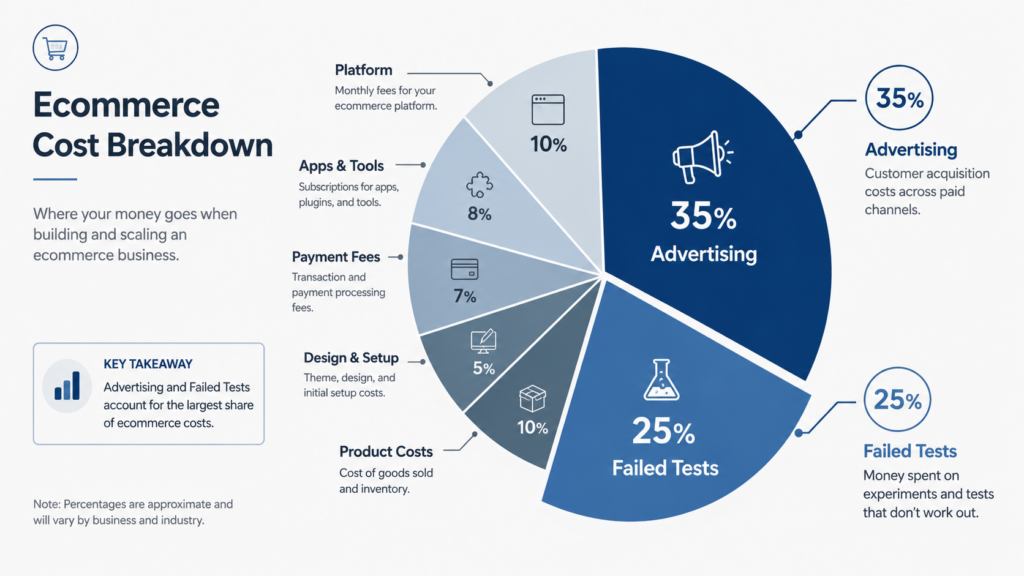
The Hidden Cost: Failed Tests
No beginner gets everything right on the first try. Failed product selections, weak ad creatives, confusing store layouts, poor product pages, and low-converting offers are normal parts of the process – not exceptional bad luck.
A budget that only works if everything goes right is not a real budget.
Budget explicitly for things not working. At minimum, assume 30–50% of your early ad spend will generate useful data rather than profitable sales. That’s not failure – it’s the cost of learning what works.
Example Ecommerce Startup Budgets
Here are four concrete examples of how startup costs break down depending on the approach.
| Setup Type | Estimated Budget | Key Costs | Notes |
|---|---|---|---|
| Ultra-lean digital product test | $100–$300 | Domain, free platform tier, basic branding, organic promotion | Very slow without paid traffic or audience |
| Beginner Shopify-style store | $500–$1,500 | Platform, domain, theme, 2–3 apps, initial ad budget | Realistic entry point for a serious test |
| WooCommerce setup | $300–$2,000 | Hosting, domain, plugins, possible developer help | Highly variable; tech skill determines cost |
| Paid traffic ecommerce test | $2,000–$5,000+ | Store + tracking + creative testing + multi-campaign spend | Appropriate for niches requiring fast data |
Example 1: Ultra-lean digital product test ($100–$300)
Domain ($12), free plan on a digital platform ($0–$20/month), Canva branding ($0), content marketing (free but time-intensive). Works best if you already have an audience or a strong organic strategy. Results are slow.
Example 2: Beginner Shopify-style store ($500–$1,500)
Platform subscription ($29–$79/month), domain ($12), premium theme ($50–$100), 2–3 basic apps ($30–$60/month), initial ad test ($300–$500). This is the minimum serious test for an ad-driven store.
Example 3: WooCommerce setup ($300–$2,000)
Hosting ($10–$30/month), domain ($12), theme ($0–$100), essential plugins ($30–$80/month), potential developer fix ($50–$300 one-time). Costs vary hugely depending on how technically comfortable you are.
Example 4: Paid traffic ecommerce test ($2,000–$5,000+)
Store and tools ($200–$500), pixel and tracking setup ($0–$100), ad creative ($100–$500), multi-campaign testing ($1,000–$3,000+). The budget reflects the reality that profitable paid traffic requires testing before optimization.
What Budget Is Realistic for a Beginner?
For most beginners starting from scratch with no existing audience, a realistic serious starting budget is $500–$2,500.
- If you’re relying on paid ads: Budget higher. $500 in total won’t give you enough data to make real decisions.
- If you’re relying on content or SEO: Cash cost can be lower, but time investment increases significantly. Results take months, not days.
- If you’re using a structured platform with built-in traffic tools: Monthly cost may be higher, but setup friction and time investment can be lower. The Sellvia complete guide and Ecomzy Review go deeper into whether that tradeoff works for specific types of beginners.
The Biggest Beginner Budget Mistakes
- Counting only the platform fee – and ignoring everything else on this list
- Spending too much on design before validation – aesthetics don’t sell unvalidated offers
- Ignoring ad testing costs – treating ad spend as optional until you’re “ready”
- Ignoring payment fees and refunds – 3% sounds small until you calculate it across margin
- Using too many apps too early – $10/month adds up to $120/year across ten apps
- Not calculating break-even – launching ads without knowing the number that means you’re profitable
- Confusing revenue with profit – a $1,000 week in sales can mean a $200 loss after costs
- Expecting first sales to confirm the business works – one or two sales prove very little
- Choosing the cheapest platform without considering complexity – free hosting often means paid headaches
- Not keeping cash for testing – spending everything on launch, nothing on iteration
How to Keep Ecommerce Startup Costs Under Control
- Start with one offer or one narrow product category – avoid trying to sell everything
- Calculate gross profit per order before turning on any ads
- Use free or basic themes until conversion data justifies an upgrade
- Choose a platform based on your actual business model, not what’s trending
- Track every monthly cost and review it weekly
- Test paid ads in small daily budgets ($10–$20/day) before scaling
- Don’t add apps until you have evidence you need them
- Keep fixed monthly costs low – subscriptions, tools, and plugins compound quickly
- Budget explicitly for failed tests, not just the perfect-case scenario
So, How Much Does It Really Cost?
| Scenario | Realistic Budget |
|---|---|
| Minimum viable test | $100–$500 |
| Serious beginner budget | $500–$2,500 |
| Paid traffic test | $2,000–$10,000+ |
| Physical inventory model | Can be significantly higher |
The real cost is not the store launch. It’s the campaign, the iteration, the testing, and the time between “store is live” and “this business is actually working.”
Final Verdict
Starting an ecommerce business can cost very little. Building one that has a real chance of working typically costs more than most beginners plan for.
The most common mistake is spending too much on how the store looks and too little on getting traffic, testing the offer, and understanding the unit economics. Before you pay for anything – platform, design, ads – calculate your break-even. Know what margin you’re working with. Know how much you can spend to acquire a customer and still profit.
The cheapest ecommerce business isn’t the one with the lowest platform fee. It’s the one that reaches clarity – does this offer work or not – with the least wasted money.
FAQ
1. What is the minimum cost to start an ecommerce business?
Technically, you can start for under $50 using a free plan on a digital product platform and a basic domain. But without a budget for traffic or testing, results will be slow and highly dependent on organic reach.
2. Can I start ecommerce with $100?
Yes – but you’ll be limited to slow, organic traffic strategies or platforms with built-in audiences. $100 won’t support meaningful paid ad testing. It’s enough to validate an idea, not enough to scale one.
3. How much should a beginner spend on ecommerce?
A realistic budget for a serious beginner is $500–$2,500. Less is possible, but the tradeoff is usually slower results and more manual work. More may be required if your model depends heavily on paid ads.
4. Is Shopify expensive for beginners?
The base plan is $29/month, which is manageable. The full stack – apps, a good theme, payment fees, and ad spend – can easily reach $200–$400/month before profitability. See our Shopify Review 2026 for a full breakdown.
5. Is WooCommerce cheaper than Shopify?
WooCommerce software is free, but hosting, plugins, security, and potential developer costs can add up quickly. It can be cheaper than Shopify for technically capable users, and more expensive for those who aren’t. See our WooCommerce Review 2026 and Comparisons section for a detailed breakdown.
6. What is the biggest hidden ecommerce cost?
Ad spend and failed tests. Beginners consistently underestimate how much it costs to generate reliable traffic and how many tests are needed before finding what converts.
7. How much should I spend on ads when starting?
Enough to get statistically meaningful data – typically at least 50–100 clicks to a specific offer page before drawing conclusions. In most niches, that means $100–$300 minimum per test. Budget for multiple tests.
8. Do digital products cost less to sell?
Yes – no inventory, no shipping, instant delivery, and no returns on physical goods. The main costs are platform fees, payment processing, and traffic. Margins can be high, but traffic still needs to be built or bought.
9. Can ecommerce be profitable in the first month?
It’s possible, especially with strong existing audiences or lucky early traction. For most beginners starting from scratch, the first month is primarily a testing and learning period. Profitability in month one is the exception, not the expectation.
10. What should I calculate before starting?
At minimum: gross profit per order (price minus all fulfillment and processing costs), break-even CPA (maximum ad spend per sale at which you don’t lose money), and total monthly fixed costs (platform, tools, apps). If your break-even CPA is lower than average ad costs in your niche, you’ll struggle to make the math work.
EcomReality is an independent ecommerce review and education platform. We don’t accept payment for platform rankings or reviews.
12 responses to “How Much Does It Cost to Start an Ecommerce Business”
-
Credibility hits different at $100 withdrawn.
-
Can you actually reduce paid ad dependency over time – because that question kept me up at night until this thing’s SEO package started pulling in organic traffic around week three, and on a Tuesday evening after work I realized I hadn’t topped up my ad budget in days and sales were still coming in.
-
The breakdown on Inc. 5000 and Forbes credibility actually mattered to me when I was researching – during a slow week at the salon I kept second-guessing whether any of these platforms were real, but seeing that the service had 1.5 million stores launched behind it shifted something in my thinking from “this feels risky” to “okay, there’s actual scale here that I can lean on.” Before I found it, I was paralyzed by the startup cost math this article describes so well – platform fees, app stack, ad budget all stacking up before a single sale – but after signing up I had the store running with digital products already loaded and the built-in ad system live within my first 48 hours, which meant I was testing instead of still building. Has anyone else here found that the credibility signals – the awards, the user numbers – actually changed how seriously you committed to learning the platform once you were inside it?
-
The catalog quality point is what your article glosses over when it mentions digital products – because after 60 days on Sellvia while traveling for work, the depth of the guides and course materials already loaded into my store is what separated it from anything else I considered, and I had zero content creation costs to account for. Does anyone here have experience comparing digital catalog depth across different platforms before they committed?
-
The article’s breakdown of “failed experiments” as a real budget line is the one I wish I had read before week one, because I burned about 11 days adjusting settings instead of just running something. First month reality was roughly this: subscription covered, ad spend covered, and then a small profit that surprised me given how non-technical I am. What I’m using kept the platform side simple enough that the costs stayed predictable – and that predictability is what finally made the numbers feel real rather than just hopeful.
-
When coworkers started asking about my store around day 21, I told them the honest number isn’t the subscription – it’s the 6 weeks of small tests before anything clicked. Tbh, the service replaced what I was paying for across three separate tools, which made the math easier to defend than I expected.
-
The hidden cost nobody prepares you for is the time you burn testing tools that don’t deliver – and tbh that was eating more of my budget at week 11 than any platform fee. The setup I’m using now costs less per month than what I was cancelling before, and the moment I realized I’d stopped worrying about whether it was “worth it” was when I knew I wasn’t going to cancel it either.
-
Week 17 and the actual cost breakdown for me was subscription plus one small ad test – compared to what I budgeted for this experiment, it came in under. The first sale processed while I was asleep, which told me more than any calculator could. Three people asked me this week what I’m using, and honestly the subscription fee is the least interesting part of the answer.
-
I thought the service would need me watching it constantly – it wasn’t, and at week 14 I woke up to three processed orders I never touched.
-
I thought the installment option through Sellvia Market was just a footnote – it wasn’t, and around day 24 on a commute I did the math and realized I could recoup my full investment in structured payments over up to 48 months if I ever needed to exit.
-
[…] tool, a landing-page builder, and paid ads to get anyone to visit the store. Understanding the real cost of starting an ecommerce business means adding up every one of these pieces, not just the recurring subscription. We also looked […]
-
[…] professional tax advice. A full breakdown of these categories is covered in our guide to real ecommerce startup costs, which applies to Payhip sellers just as it does to sellers on any other […]



Croom Raymond is an ecommerce writer and digital business researcher at Ecom Reality. He covers online selling platforms, SaaS tools, pricing structures, platform features, and practical strategies for building digital businesses. His articles focus on clear, evidence-based analysis that helps readers understand how different services work, compare their advantages and limitations, and make more informed business decisions.
Comments
Leave a Reply
Related Articles



Leave a Reply