

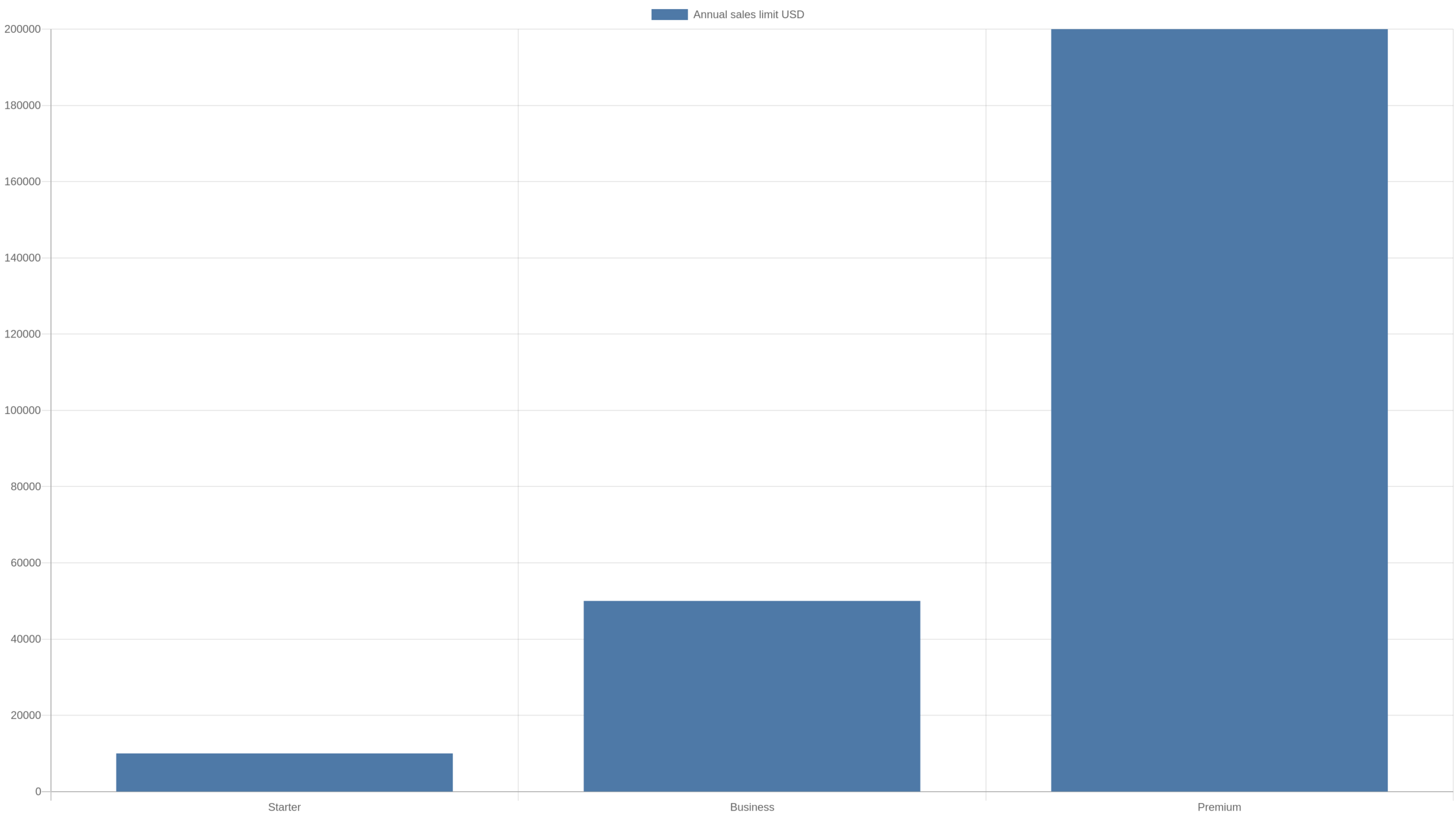
Quick Answer: Sellfy currently ties its three standard paid plans to annual sales-volume thresholds: Starter up to $10,000, Business up to $50,000, and Premium up to $200,000. Sellfy says the limit is calculated from store sales in the most recent 12 months. Crossing a threshold does not switch off the store, but Sellfy expects the account to move to the next plan and says a 2% overage fee may apply to revenue above the plan limit if the account is not upgraded. That makes the threshold a pricing trigger, not a hard sales cap.
Why Sellfy’s revenue limits are easy to misunderstand
The phrase “annual sales limit” sounds like a ceiling that stops checkout once a store reaches a number. That is not how Sellfy currently describes it. Its help documentation explicitly says the revenue limit does not affect the ability to sell or otherwise limit the store. Instead, the threshold determines which subscription tier Sellfy expects a merchant to use.
That distinction matters. A creator evaluating Sellfy should think of the thresholds as part of the platform’s effective pricing model. Subscription cost is not based only on features; it is also linked to the amount of revenue the store generates over a rolling 12-month period.

The current thresholds
| Plan | Annual sales volume | Next step at threshold |
|---|---|---|
| Starter | Up to $10,000 | Business |
| Business | Up to $50,000 | Premium |
| Premium | Up to $200,000 | Custom/high-volume arrangement |
Sellfy’s help center, updated in July 2026, lists monthly prices of $39 for Starter, $79 for Business and $159 for Premium, with lower effective monthly costs when paying for longer terms. Pricing can change, so the threshold mechanics are more durable than any single promotional price.
It is a rolling 12-month calculation
Sellfy says it starts calculating yearly revenue once the store begins selling and counts store sales in the most recent 12 months. That is different from a calendar-year reset on January 1. A rolling window follows the business continuously.
For example, imagine a store generated $1,000 per month from November through August and then no sales in September or October. The rolling total would change as older months leave the 12-month window. The threshold is therefore sensitive not only to current sales but also to what happened during the preceding year.
What happens when Starter reaches $10,000?
Sellfy says a Starter account that reaches $10,000 or more in the last 12 months will be asked to upgrade to Business. The store is not described as being disabled at that moment. The commercial consequence is that the account has outgrown the revenue band attached to Starter.
This makes $10,000 an important planning number. Averaged evenly across a year, it is about $833 per month. A store does not need to be large to reach it. A creator with a $29 product needs roughly 29 sales per month at that price to average around the threshold before refunds, taxes or other adjustments are considered.
What happens when Business reaches $50,000?
The Business threshold is $50,000 over the most recent 12 months. Averaged evenly, that is about $4,167 per month. At that point Sellfy expects the merchant to move to Premium. Business also includes growth features that Starter does not, such as product upselling, cart abandonment and affiliate marketing, so the upgrade is not only about the higher revenue allowance.
What happens above $200,000?
Premium covers up to $200,000 in annual sales volume. Sellfy directs higher-volume merchants toward a custom plan. An even monthly pace of $200,000 per year is about $16,667 per month, although real stores rarely sell in a perfectly even pattern.
The 2% overage fee changes the decision
Sellfy’s current help documentation says that if an account exceeds its plan revenue limit and does not upgrade, Sellfy may start charging a 2% overage fee on revenue above the limit. It also says notifications are provided before fees are assessed. This means the financial comparison is not simply “old subscription price versus new subscription price.” The alternative to upgrading can include an additional percentage cost.
A simple overage example
Suppose a Starter store reaches $12,000 in rolling 12-month sales. The amount above the $10,000 threshold is $2,000. At 2%, that excess corresponds to $40 of overage cost if the fee applies. That does not automatically mean upgrading is cheaper in every billing configuration, because plan prices and billing terms matter, but it gives the merchant a concrete number to compare.
If the same store continues growing, the overage base can expand quickly. At $20,000 of rolling sales, the amount above Starter’s threshold is $10,000; 2% of that is $200. At that point, remaining on a lower tier solely to avoid the higher subscription price becomes increasingly difficult to justify.
The upgrade can also change the toolset
Revenue limits should not be evaluated in isolation from features. Sellfy currently lists unlimited products across the paid plans, while higher tiers add capabilities such as upselling, cart abandonment, affiliate marketing, larger email-marketing allowances, migration assistance and priority support. A growing store may therefore receive operational value from an upgrade before the revenue threshold forces the issue.
The free trial is not a selling period
Sellfy currently offers a 14-day trial, but its help center says product checkout is disabled during the trial. That means the trial is best treated as a build-and-evaluate period rather than a free plan for processing live sales. A merchant needs a paid subscription to continue and to enable actual selling.
Revenue limit is not the same as transaction fee
Sellfy advertises 0% platform transaction fees on its paid plans. The revenue threshold is a separate mechanism. A merchant can therefore have a 0% Sellfy transaction-fee rate and still face a plan upgrade or possible overage fee after exceeding the plan’s annual sales volume.
Payment processing is separate again. Sellfy notes that merchants still pay the fees charged by their payment processor, such as Stripe or PayPal. This is a useful reminder that “0% transaction fee” does not mean the total cost of accepting a payment is zero.
Think in effective platform cost
A better comparison metric is effective platform cost: subscription payments plus any Sellfy overage fees, divided by store revenue. Payment-processing costs can then be modeled separately because they depend on the payment provider and transaction mix.
For a low-revenue store, the subscription itself dominates effective platform cost. As revenue grows, that fixed cost becomes a smaller percentage of sales. Crossing a revenue threshold can raise the subscription again, but the higher plan cost may still represent a small percentage of a larger revenue base.
Monthly sales equivalents for planning
| Rolling annual threshold | Even monthly equivalent | Even weekly equivalent |
|---|---|---|
| $10,000 | About $833 | About $192 |
| $50,000 | About $4,167 | About $962 |
| $200,000 | About $16,667 | About $3,846 |
These equivalents are planning aids, not separate Sellfy limits. The platform describes the actual calculation as the most recent 12 months of store sales.
Seasonality can make the threshold arrive suddenly
A creator who makes most sales during launches, holidays or a short promotional season can cross a threshold even if ordinary months are quiet. For example, a store averaging $500 per month for nine months but generating $6,000 during a three-month launch period would reach $10,500 for the 12-month window.
That is why a rolling revenue tracker is more useful than multiplying this month’s sales by twelve. It shows what Sellfy is likely to see when evaluating the plan band.
Build a threshold warning into your own dashboard
Do not wait until the exact limit. Track the rolling total and set internal alerts at 70%, 85% and 95% of the plan threshold. At 70%, confirm the next plan’s price and features. At 85%, model the cost of upgrading versus possible overage. At 95%, decide before the threshold becomes an urgent billing question.
When upgrading early can make sense
An early upgrade can be rational when a higher-tier feature is likely to produce more value than the incremental subscription cost. For example, a merchant may value cart-abandonment recovery, upsells or affiliate tools before reaching $10,000. In that case the revenue limit is not the reason to upgrade; it is simply confirmation that the account is moving toward the next tier anyway.
When waiting can make sense
If sales briefly spike but the rolling total is still comfortably below the threshold, there may be no reason to change plans purely because one month was strong. Likewise, a merchant who does not need the higher-tier features can monitor the rolling total until the upgrade becomes economically or contractually relevant.
Do refunds change the revenue calculation?
Sellfy’s public help article describes the metric as store sales in the most recent 12 months, but the excerpted documentation does not provide enough detail to define every edge case involving refunds, taxes, chargebacks or currency conversion. If your store is close to a threshold and those adjustments are material, use the revenue figure Sellfy displays in the account and ask support how the total is calculated for your specific case rather than assuming a bookkeeping definition.
How this compares with a pure percentage-fee model
Platforms price growth in different ways. Some take a percentage of every transaction; others rely primarily on subscription tiers; Sellfy combines fixed subscriptions with revenue bands and a possible overage mechanism. None is automatically cheaper. The right comparison depends on annual revenue, average order value, payment processing, required features and how predictable the business is.
A decision framework before crossing the limit
- Calculate the current rolling 12-month sales total.
- Estimate when the current threshold will be reached under conservative and strong-growth cases.
- Check the current price of the next plan.
- List higher-tier features you would actually use.
- Model potential overage on revenue above the current threshold.
- Compare annualized subscription cost, overage risk and feature value.
- Recheck the platform’s current terms before making the final decision.
What we verified
For this article we checked Sellfy’s current pricing page and help-center documentation. Those sources currently show the $10K/$50K/$200K annual sales bands, describe the calculation as sales in the most recent 12 months, state that the limit does not disable selling, and describe a possible 2% overage fee when an account exceeds its plan limit without upgrading. We also checked the current plan-feature comparison and trial behavior. Prices and features can change, so readers making a purchase decision should confirm the live pricing page.
FAQ
Does Sellfy stop sales when I hit the revenue limit?
Sellfy’s help center says the revenue limit does not affect the ability to sell or limit the store. The account is expected to upgrade, and overage fees may apply if it does not.
Is the $10,000 Starter limit per calendar year?
Sellfy describes it as sales in the most recent 12 months, which is a rolling window rather than a January-to-December reset.
Does Sellfy charge transaction fees?
Sellfy currently advertises 0% platform transaction fees on its paid plans. Payment processors still charge their own fees, and Sellfy may assess an overage fee above the plan’s revenue limit if the account is not upgraded.
What happens after $200,000?
Sellfy directs merchants above the Premium plan’s $200,000 annual sales band to contact the company about a custom plan.
Model the threshold at different average order values
Revenue thresholds become easier to understand when converted into orders. At a $20 average order value, $10,000 of annual sales is 500 orders; at $50 it is 200 orders; at $100 it is 100 orders. The Business threshold of $50,000 corresponds to 2,500, 1,000 or 500 orders at those same average order values. These are simple revenue equivalents, not Sellfy quotas, but they help a merchant see how quickly a plan can be outgrown.
A creator selling a $9 template and a creator selling a $299 course can therefore encounter the same revenue threshold with completely different operational workloads. Plan choice should consider both sales volume and the features needed to support the actual selling model.
Forecast the rolling window month by month
The simplest forecast has 12 historical monthly sales cells plus three or six forecast months. For each future month, remove the sales figure that will fall out of the 12-month window and add the new forecast. This shows whether the rolling total is accelerating toward a threshold or flattening because a strong historical month is about to expire.
This matters for seasonal businesses. A store may appear close to $10,000 today but have a large launch month about to roll out of the calculation. Another store may look comfortable at $7,000 but have a major holiday campaign approaching. The same current total can therefore imply very different upgrade timing.
Compare upgrade cost with overage cost correctly
Do not compare a full year’s higher-tier subscription cost with one month of overage. Put both choices on the same time horizon. Estimate how much revenue will sit above the current threshold during the remaining billing period, calculate the potential 2% overage on that excess, and compare it with the incremental cost of the next plan over the same period.
Then add feature value. If Business tools recover abandoned carts or enable upsells that the merchant would otherwise buy elsewhere, their value belongs in the comparison. If those features will not be used, do not assign them imaginary savings simply to justify an upgrade.
Annual billing makes timing more important
Sellfy offers longer billing periods at lower effective prices, but committing for longer changes the decision. A merchant close to a revenue threshold should understand how a mid-term plan change is handled before choosing a long billing period solely for the discount. Sellfy’s billing documentation explains that downgrades generally take effect with the next billing cycle; merchants should confirm the current treatment of upgrades and credits in their own account before relying on a specific proration assumption.
Revenue bands can affect platform comparisons
A platform that looks inexpensive at $5,000 of annual sales may rank differently at $60,000 because the required tier changes. When comparing Sellfy with another platform, run the comparison at the revenue you expect next year, not only the revenue you have today. Include required apps or external tools on the competing platform as well.
This is especially important when comparing a fixed subscription with a percentage-fee platform. Percentage fees rise continuously with revenue, while tiered subscriptions often rise in steps. The cheaper option can change as the business crosses different revenue levels.
Create a threshold reserve in the budget
If the store is clearly approaching the next band, budget for the higher subscription before it becomes mandatory. Setting aside the incremental monthly cost prevents the upgrade from feeling like an unexpected penalty. It also gives the merchant time to learn the higher-tier features and decide which ones can replace other paid tools.
Questions to ask Sellfy support near a threshold
- What exact rolling-sales figure is currently being used for my account?
- Which transactions or adjustments are included in that figure?
- When would an overage fee begin to accrue if I do not upgrade?
- How would an upgrade interact with my current monthly or annual billing term?
- What happens if the rolling 12-month total later falls below the threshold?
These questions focus on account-specific mechanics that public documentation may not fully describe. Save the answers if they materially affect the decision.
Three growth cases to model
For a Starter store at $7,500 of rolling sales, model three cases for the next six months. In a flat case, monthly sales remain unchanged and the store may stay below $10,000 depending on which older months roll out. In a moderate-growth case, sales rise 10% to 15% per month and the threshold can arrive quickly. In a launch case, one large promotion can cross the threshold in a single month. The plan decision should be prepared for the plausible case, not only the most comfortable one.
The same method applies at $50,000 and $200,000. A forecast does not need sophisticated software. A spreadsheet with historical monthly sales, forecast sales and the resulting rolling total is enough to show when the pricing band is likely to change.
Do not optimize only for the cheapest subscription
Choosing a platform solely to minimize the monthly subscription can be false economy if the store then needs several external tools or loses features that materially improve conversion. Conversely, paying for a higher tier makes little sense when the merchant will not use its additional capabilities. The right target is total operating cost for the required workflow.
For Sellfy, revenue bands make this especially important because the platform cost changes as the business grows. Re-run the comparison whenever the rolling total approaches a threshold instead of assuming the plan that was optimal at launch remains optimal indefinitely.
Review the threshold after every major launch
A launch can move the rolling total much faster than normal monthly growth. After a promotion, recalculate the 12-month sales figure immediately instead of waiting for the next routine review. If the store has moved into the final 10% of its plan band, check the current upgrade terms while the campaign data is still fresh.
This is also a good time to ask whether the higher tier’s features would help the next launch. A plan upgrade can be treated as an operating decision tied to the business’s next stage rather than as an unpleasant surprise after a dashboard warning appears.
Planning note: Recheck Sellfy’s live pricing and help documentation before acting on a threshold because subscription prices, plan features and billing rules can change after this article is published.
Takeaway
Sellfy’s revenue limits are best understood as pricing bands, not checkout caps. Track the rolling 12-month total, start planning well before the threshold, and compare the next subscription tier with the cost and limitations of remaining on the current one. For a growing store, the important question is not simply “Did I cross $10K?” but “Which plan produces the lowest effective cost for the features and sales volume I actually have?”

Sylvia Pierce is an editor and ecommerce researcher at Ecom Reality. She specializes in reviewing ecommerce platforms, digital selling tools, pricing models, and online business software. Her work focuses on providing clear, practical, and balanced information that helps entrepreneurs make informed decisions.
Comments
Related Articles



Leave a Reply