

We analyzed WooCommerce’s official positioning, real user complaints across Trustpilot, the BBB, Reddit, G2, and Capterra, and the platform’s actual cost structure. The word “free” does a lot of heavy lifting here.
There is a specific kind of appeal that comes with the word “free.” In the world of ecommerce platforms, no word does more marketing work than WooCommerce’s claim to be a free, open-source solution. That single word has made WooCommerce the most widely installed ecommerce plugin on the internet, powering over 4 million online stores and accounting for 31% of the top one million ecommerce sites worldwide. When 43% of the entire internet runs on WordPress, and WooCommerce plugs directly into it at no cost, the adoption numbers make sense.
But “free” in software almost never means what it says on the label. What WooCommerce actually offers is free software – a distinction that matters enormously in practice. The server it runs on is not free. The security patches someone must apply are not free. The plugins required to match what hosted competitors include by default are not free. The developer you will eventually need to call when something breaks is definitely not free.
This review examines WooCommerce honestly: what the platform genuinely offers, what the real costs look like, where merchants consistently run into trouble, and who should – and probably should not – be using it in 2026.
WHAT WOOCOMMERCE CLAIMS TO BE
WooCommerce describes itself as “the open-source commerce platform for WordPress that gives you full control: of your checkout, your data, your costs. Choose any payments, any features, any host.” The positioning is built around freedom and flexibility – the anti-Shopify. Where Shopify locks merchants into its ecosystem and charges accordingly, WooCommerce offers escape from those constraints.
The numbers backing this claim are real. Over 4 million online stores have been built with WooCommerce, and the platform benefits from the staggering scale of the WordPress ecosystem that underpins it. The plugin is owned by Automattic, the same company behind WordPress.com, which provides a degree of institutional stability. Updates arrive regularly, the developer community is enormous, and the plugin directory offers thousands of extensions covering virtually every ecommerce use case imaginable.
The core pitch – that you can build a fully functional online store without a monthly platform fee – is technically accurate. The question is what “fully functional” actually costs once you add everything a real store needs.
THE REAL COST OF “FREE”
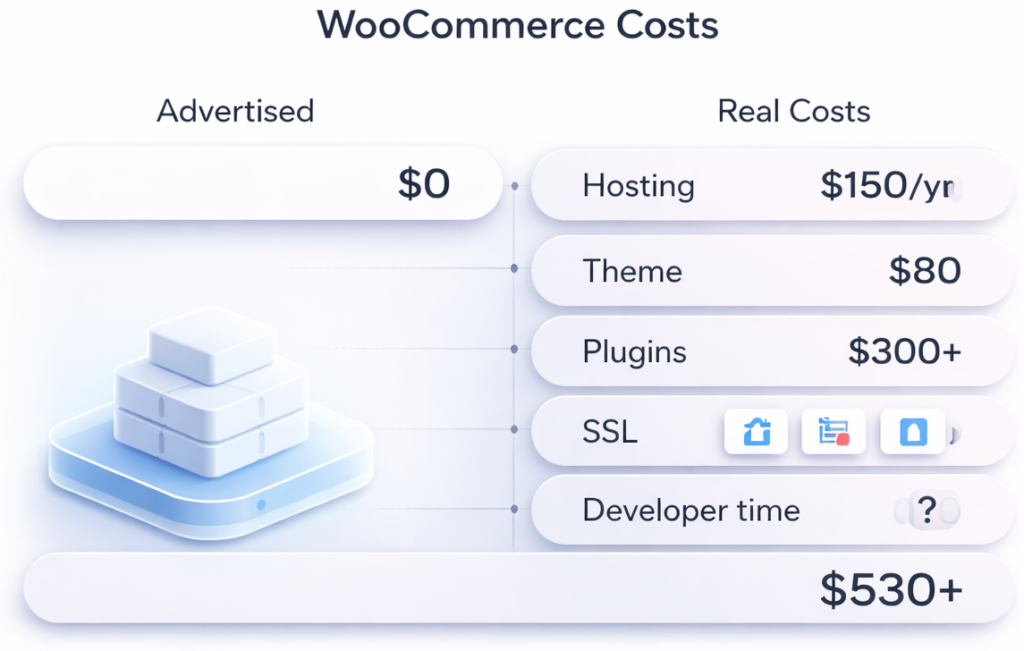
WooCommerce the plugin costs nothing. Everything required to run a WooCommerce store costs quite a lot.
Real costs come from hosting, domain, and any premium themes and plugins chosen. A domain runs $10-15 per year. Reliable shared or managed WordPress hosting adds $100-150 per year at the budget end, and significantly more for managed WordPress hosting that can handle real traffic. Premium themes add $50-100 annually. SSL certificates are often free via Let’s Encrypt, but require configuration. And then there are plugins.
If you want to add subscriptions or product reviews to your store, there are plugins for that – hundreds to choose from. So the reality is there is no one price point for using WooCommerce. Subscription management, advanced product filtering, loyalty programs, abandoned cart recovery, custom shipping rules, product bundles – each requires a plugin, and most of the useful ones carry annual license fees ranging from $49 to $299.
A typical small store might spend $100 to $300 per year on a premium theme and essential plugins, beyond hosting and domain costs. That estimate is optimistic for any store with real complexity. A merchant who needs subscriptions ($199/year for WooCommerce Subscriptions), advanced bookings ($249/year), and a quality multi-currency plugin can easily spend $600-800 annually on plugins alone – before paying for hosting, their theme, or a developer’s time.
The comparison with Shopify’s $29/month Basic plan is more nuanced than WooCommerce advocates typically admit. Shopify’s $348/year includes hosting, security, updates, and a support team. WooCommerce’s “free” requires purchasing all of those separately, and managing them yourself. WooCommerce wins on customization and price flexibility, but requires more upkeep. Shopify and BigCommerce win on simplicity and managed hosting but at higher cost and less code access. Neither answer is universally correct – but merchants should enter the WooCommerce ecosystem with their eyes open about what the total bill looks like.
THE TECHNICAL BURDEN: WHAT “YOU’RE IN CONTROL” ACTUALLY MEANS
The freedom WooCommerce offers is real. So is the burden that freedom creates.
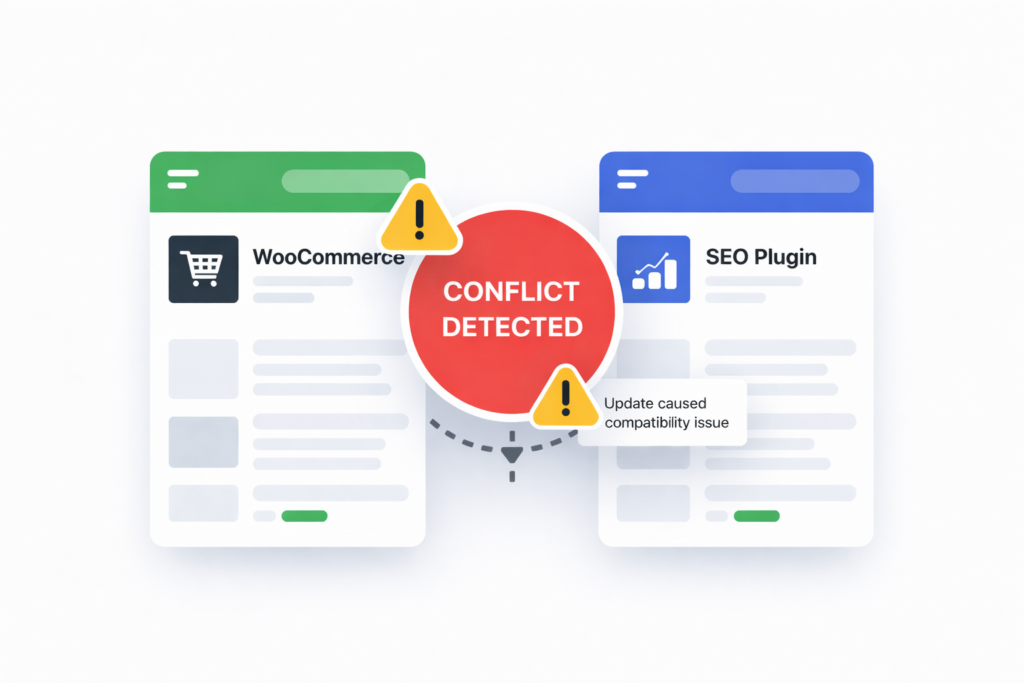
Updates can cause issues. Frequent updates are a good thing for plugins in order to prevent security vulnerabilities and eliminate bugs. But sometimes a new update can complicate things, by temporarily or permanently messing up connections with other elements of your WordPress site. You can quickly go from pumping out sales to visitors not being able to checkout from the cart because a new update changed the payment process. This can be a costly scenario.
This is not a theoretical risk – it is the lived experience of WooCommerce store owners at scale. A store running twelve plugins across WordPress core, WooCommerce, a theme framework, and multiple payment gateways has twelve different update schedules to monitor, and twelve potential points of conflict every time any one of them releases a new version. Managed platforms like Shopify handle this invisibly. WooCommerce hands it to the merchant.
WooCommerce’s learning curve is a bit steeper than an all-in-one platform since you have to mind the way it interacts with other elements of your WordPress site. You may have to spend more time doing admin work on your platform to make sure everything is optimal.
The primary issue is that WooCommerce may lag if you need to install several other plugins in order to activate certain fundamental features. Performance and site speed may be impacted, particularly on larger stores.
Performance is a recurring complaint. Unlike Shopify, which runs on infrastructure optimized specifically for ecommerce, WooCommerce stores live on whatever hosting the merchant has chosen. Budget shared hosting produces slow stores. Even mid-range hosting can struggle when a WooCommerce store grows to tens of thousands of products, high traffic, or complex filtering requirements. Large stores with heavy traffic may find WooCommerce extremely slow without proper hosting or caching setup. The solution – upgrading to managed WordPress hosting optimized for WooCommerce – eliminates much of the cost advantage the platform originally offered.
One challenge with WooCommerce is the potential for security vulnerabilities due to its open-source nature. Since the source code is openly accessible, the attack surface is exposed, which could allow security issues to be exploited across many stores if they are not regularly patched. WordPress and WooCommerce are among the most frequently targeted platforms in the world precisely because their open-source code is well-documented and the install base is enormous.
THE SUPPORT PROBLEM: NOBODY IS IN CHARGE
When something goes wrong on Shopify, there is a clearly identified support team to contact. When something goes wrong on WooCommerce, the question of who is responsible is genuinely complicated.
There is no central WooCommerce support team available to fix issues or provide solutions in real time. Automattic offers support for WooCommerce core, but their scope is limited to the base plugin. If the problem involves a conflict between WooCommerce and a third-party theme, or between two premium plugins, or between WooCommerce and the hosting environment – none of those parties has clear accountability. The merchant is left navigating between the hosting provider, the plugin developer, and the WooCommerce support forums, each of whom is likely to point at someone else.
WooCommerce users are responsible for managing their hosting, backups, and security, unlike Shopify or BigCommerce, which automate these tasks. For users without technical expertise, this can lead to serious issues when problems arise.
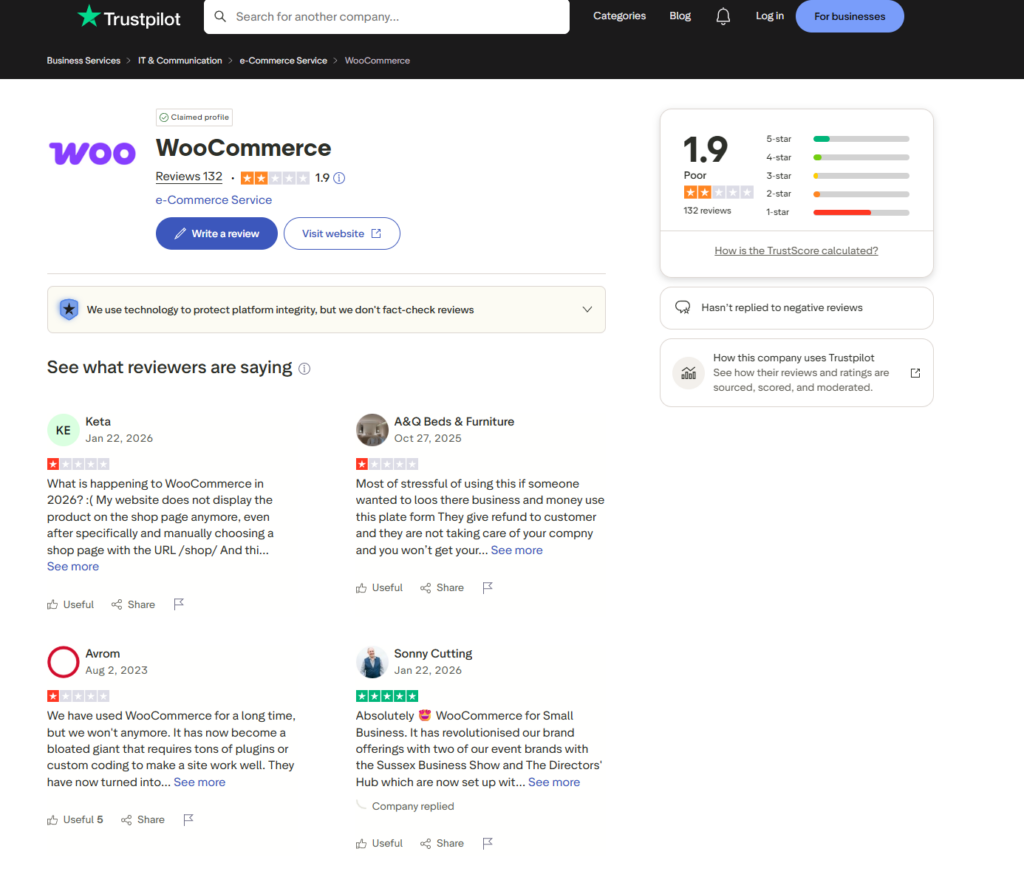
The Trustpilot numbers reflect this reality. With a 1.9 out of 5 rating from 132 reviews – placing it in the “Poor” category – and the same “Hasn’t replied to negative reviews” flag on its profile, WooCommerce’s user satisfaction on independent platforms is consistently low. The complaints cluster around the same themes: broken stores after updates, plugin conflicts with no clear resolution path, WooPayments accounts closed or frozen without warning, and support that ultimately leaves merchants to solve their own problems.
One reviewer on Trustpilot, Keta, writing in January 2026, described her experience: “What is happening to WooCommerce in 2026? My website does not display the product on the shop page anymore, even after specifically and manually choosing a shop page with the URL /shop/.” Another, Avrom, wrote: “We have used WooCommerce for a long time, but we won’t anymore. It has now become a bloated giant that requires tons of plugins or custom coding to make a site work well.”
These are not edge cases from technical novices. They are the pattern of a platform whose power users eventually hit a ceiling of complexity that requires either significant developer investment or a migration to something more managed.
WOOPAYMENTS: THE SHOPIFY PAYMENTS PROBLEM, REPEATED
The story of WooCommerce’s payment processing closely mirrors the Shopify Payments narrative, and not in a flattering way.
WooPayments – the platform’s native payment processing solution built on Stripe – offers the appeal of consolidated management: payments handled directly inside the WooCommerce dashboard, no additional transaction fees, and simplified reconciliation. For many merchants it works well.
For others, it has produced the same freezing and account closure problems that plague Shopify Payments users. BBB complaints against WooCommerce document several cases of WooPayments accounts closed without warning, funds held during dispute windows, and merchants unable to access money they had already earned from delivered goods.
One BBB complaint documented a merchant who had been notified of a customer dispute with a clear deadline of August 16 to submit evidence. When they attempted to submit their evidence on August 4 – almost two weeks before the deadline – their account had already been closed without warning, leaving them with no ability to respond despite the deadline still being active.
The response from WooCommerce in that case was that their payments team does not assist with disputes on rejected accounts. The merchant’s recourse was essentially nothing.
This is the inherent tension in any payment platform that is also the gatekeeper to a merchant’s revenue. WooCommerce, like Shopify, faces the same fundamental conflict of interest: the platform benefits from rapid merchant onboarding, but risk management requires aggressive intervention once fraud signals appear – and those interventions fall hardest on small merchants with limited negotiating leverage.
WHERE WOOCOMMERCE GENUINELY EXCELS
Fairness requires acknowledging what the platform does better than its hosted competitors – and in several areas the advantages are substantial.
True ownership of data. Unlike hosted ecommerce platforms, you manage everything – store settings, pricing, and integrations – without limits or platform lock-ins. You own your store and customer data. You can modify the code and design anytime. You control updates, hosting, and security. For merchants with specific compliance requirements, or those who have been burned by platform migrations before, data ownership has real operational value.
No transaction fees. WooCommerce charges no percentage of sales for using third-party payment processors. A merchant doing $100,000 per year in revenue through a payment gateway of their choice pays nothing extra to WooCommerce. The equivalent Shopify Basic merchant would pay $2,000 per year in transaction fees if not using Shopify Payments.
SEO and content capabilities. WooCommerce’s integration with WordPress gives it excellent SEO and content capabilities. A WooCommerce store can maintain a sophisticated content marketing operation – deep editorial content, structured data, custom taxonomies, advanced SEO configurations – that hosted platforms struggle to match.
Unlimited customization. As one Economy Candy co-owner put it: “What’s amazing about WooCommerce is that since it’s open source, there’s no ceiling. There’s no limit to what you can do, customize, or create.” Any feature that can be built for a web application can be built for WooCommerce. The constraint is not the platform – it is the budget and technical skill available to implement it.
No vendor lock-in. A merchant who decides WooCommerce is wrong for them can export their data and move it elsewhere. The freedom to leave is genuinely valuable and often underappreciated until you need it.
WHO WOOCOMMERCE IS ACTUALLY FOR
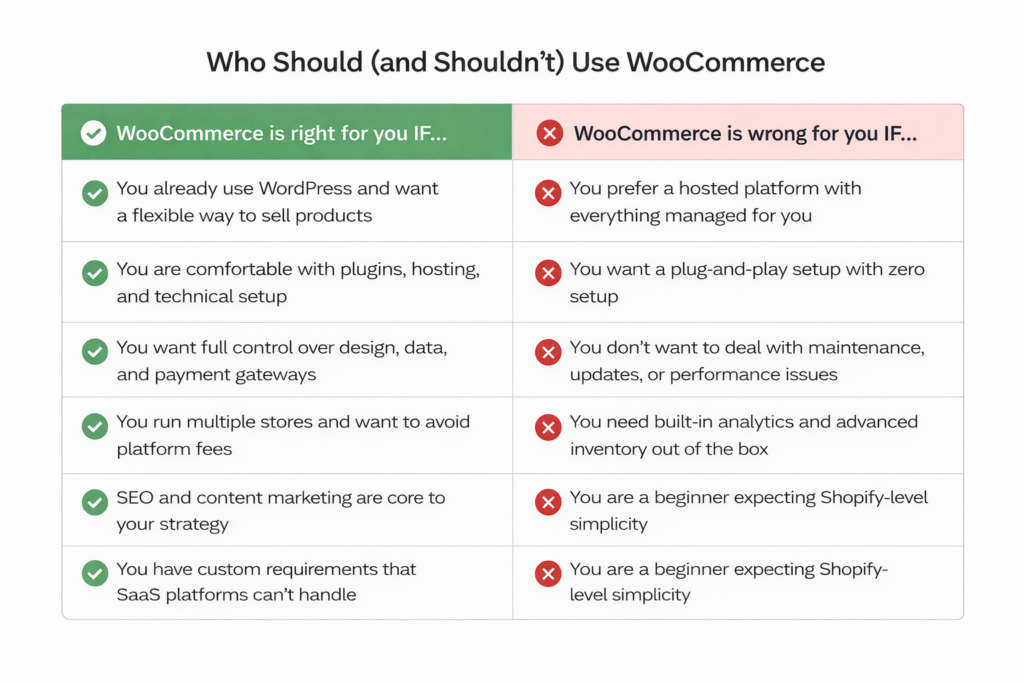
The honest answer to “should I use WooCommerce” depends entirely on what kind of merchant is asking.
WooCommerce works well for:
- Small business owners who already use WordPress and want an affordable way to sell physical or digital products
- Developers and tech-savvy users who like having full control over design, data, and payment gateways
- Brands managing multiple stores who want to avoid per-store platform fees
- Merchants who prioritize SEO and content marketing as core growth channels
- Businesses with custom requirements that hosted platforms cannot accommodate
WooCommerce is the wrong choice for:
- Store owners who prefer a hosted platform where hosting, support, and updates are managed for them
- Businesses that want a plug-and-play setup without worrying about plugins, maintenance, or site speed
- Large stores with thousands of products that need advanced inventory management and built-in analytics
- Users who don’t want to handle plugin costs, maintenance, or depend on developer support
- Beginners with no WordPress experience who expect Shopify-level simplicity
The critical variable is technical confidence. A merchant who understands WordPress, is comfortable managing hosting environments, can diagnose plugin conflicts, and has either the skills or the budget to hire a developer when needed will find WooCommerce an extraordinarily capable and cost-effective platform. A merchant who wants to focus exclusively on their business and expects the platform to handle infrastructure will accumulate frustrations until they eventually migrate to something more managed.
This is not a criticism of WooCommerce – it is an accurate description of the trade-off the platform offers. The problem is that WooCommerce’s marketing, particularly its prominent “free” positioning, attracts exactly the merchants who will struggle with it most: beginners with small budgets and no technical background who see “free ecommerce” and imagine a simpler version of Shopify.
THE BLOATED GIANT PROBLEM
One of the more interesting patterns in WooCommerce’s recent reviews is the criticism coming from long-term users rather than frustrated beginners – people who adopted the platform years ago and have watched it evolve into something more complex than what they originally signed up for.
One Capterra reviewer noted: “It works to support our storefront on the website, but it is a bit tedious and has so many settings that you can really get bogged down in checking them all.”
The Trustpilot reviewer Avrom’s characterization of WooCommerce as “a bloated giant that requires tons of plugins or custom coding” reflects a sentiment that surfaces regularly among experienced users. As WooCommerce has grown, the core plugin has accumulated features, the admin interface has become more complex, and the interaction between WooCommerce, WordPress Gutenberg blocks, and the dozens of plugins that extend both has become harder to manage reliably.
WooCommerce may lag if you need to install several other plugins in order to activate certain fundamental features. Performance and site speed may be impacted, particularly on larger stores. This is the fundamental tension in any plugin-based architecture: each addition that makes the platform more capable also adds weight, potential conflicts, and maintenance overhead. What was a lean, fast store with three plugins in 2018 might be running fifteen plugins in 2026, each with its own update cycle and compatibility requirements.
THE BOTTOM LINE
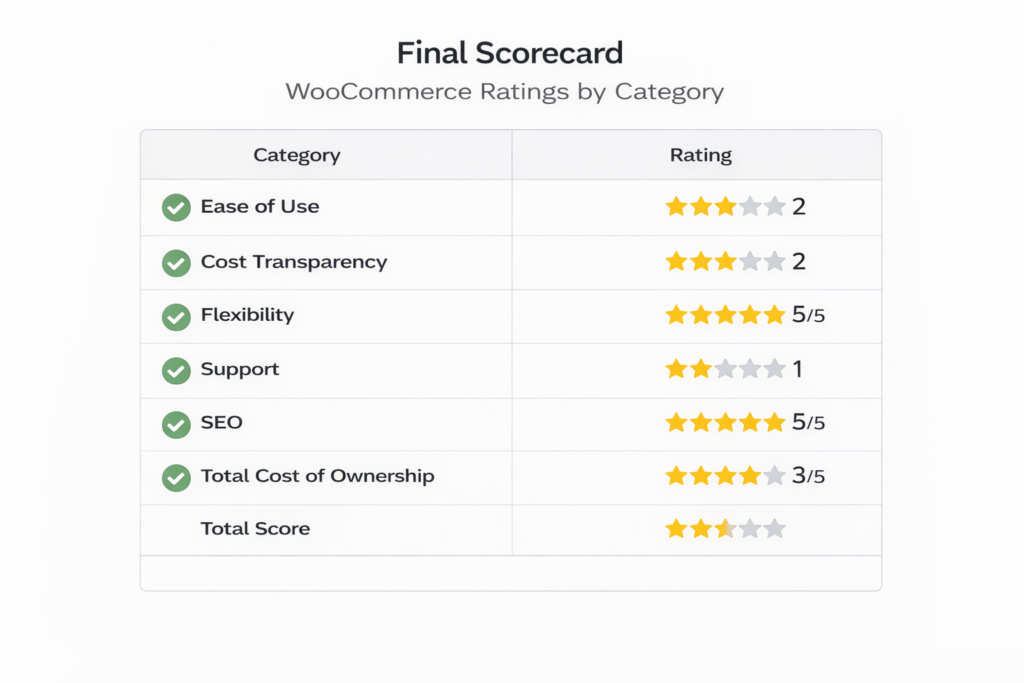
WooCommerce is a powerful, genuinely flexible ecommerce platform that has enabled millions of merchants to build stores that no hosted platform could replicate. Its open-source foundation, no transaction fees, and WordPress integration represent real advantages for the right user.
The problem is not what WooCommerce offers. The problem is the gap between what WooCommerce advertises and what a typical merchant actually experiences.
“Free” turns into $500-1,000 per year once hosting, plugins, and a theme are factored in – before accounting for developer time when something inevitably breaks. “Full control” means full responsibility for security, updates, backups, and performance. “The most flexible ecommerce platform” requires significant technical fluency to actually exercise that flexibility.
Capterra reviewers consistently note that “the setup process and integrations are not as easy as Shopify to set up, which leads to more development costs upfront.” That upfront cost does not disappear after setup – it reappears every time there is a major update, a plugin conflict, a performance regression, or a security incident.
For developers, agencies, and technically capable merchants who value ownership, customization, and freedom from platform fees, WooCommerce remains one of the strongest choices available. For everyone else – particularly merchants who want to focus on selling rather than managing infrastructure – the platform’s real costs, both financial and operational, are higher than the homepage suggests.
The 1.9 out of 5 on Trustpilot does not tell the whole story. But it does tell a part of it that WooCommerce’s own marketing actively avoids.
This review is based on WooCommerce’s official website, pricing documentation, and analysis of merchant reviews across Trustpilot, G2, Capterra, the BBB, and Reddit. No affiliate relationship exists with WooCommerce, Automattic, or any competing platform.
4 responses to “WooCommerce Review 2026: The “Free” Platform That Costs More Than You Think”
-
Been running WooCommerce stores since 2015 so yeah, I know the deal. The article’s mostly spot on but kinda oversells the drama a little.
The “free” thing is just… not even a debate anymore. Everyone in the WordPress space knows you’re gonna drop a few hundred bucks minimum once you stack up hosting, plugins, and a decent theme. That’s just the cost of doing business. The real issue is that Automattic keeps marketing it to people who have zero clue what they’re signing up for – then those same people torch it on Trustpilot when they realize building a store isn’t just clicking a button.
The bloated giant point hits different though. Genuinely. I had a client site running 14 plugins and every single update felt like defusing a bomb. At some point the “flexibility” argument starts feeling like cope.
WooPayments I just skip entirely at this point. Stripe direct, done. Not touching that thing with a ten-foot pole after what I’ve seen happen to people.
Still think WooCommerce is solid for the right person – but that person needs to actually know what they’re doing, or have a budget to pay someone who does.
-
Yeah this hits pretty close to what I ran into.
Started with Woo thinking I’d save money, ended up slowly stacking paid plugins just to get basic stuff working properly. Nothing crazy at first, but it adds up fast… and then one random update breaks something and suddenly you’re digging through forums at 2am.
The flexibility is real, I’ll give it that. But honestly it started feeling like I was maintaining a system more than running a store. Switched away eventually just because I got tired of babysitting it.
Not terrible overall, just way less “simple” than it looks from the outside.
-
The point about plugins being required to match what hosted platforms include by default is exactly where I got stuck last year – I kept adding extensions and watching the “free” label get more expensive by the week. On a Tuesday evening after work I was comparing options and stumbled onto Sellvia, and honestly the digital product catalog surprised me more than anything else – the depth of the guides and course materials felt genuinely production-ready, not the thin filler content I expected at that price point. For someone switching jobs and needing something stable fast, not having to build or source that catalog myself was the actual unlock. I went from zero to my first sale in 11 days.
-
[…] who wants maximum control. It is a difficult starting point for a nontechnical beginner. Our WooCommerce review goes deeper into hosting choices and realistic maintenance workload. Official documentation is […]



Jo Carter is an editor and ecommerce researcher at Ecom Reality, where she covers ecommerce platforms, digital selling tools, online business software, pricing models, and emerging industry trends. She focuses on turning complex platform features and costs into clear, practical information for entrepreneurs and digital sellers. Her work combines detailed research with a balanced editorial approach, helping readers compare services, understand potential limitations, and choose tools that fit their business goals.
Comments
Leave a Reply
Related Articles



Leave a Reply