
Most guides about Sellvia take the same approach: list the features, mention the free trial, quote the price, call it a day. You’ve probably already read three of those Sellvia reviews before landing here.
This one is structured differently. Instead of describing what the platform says it does, this guide walks through what actually happens when you use it – what the mechanics look like at each stage, where new users typically stall, what the real economics are, and how the full business cycle works from sign-up all the way to selling your store for cash. That last part is where most coverage stops. We’re starting there.
What Problem Does Sellvia Actually Solve
To understand why Sellvia is built the way it is, you need to understand the problem it’s designed around – and it’s not “I want to make money online.”
The real problem is structural. Starting an online business in 2026 requires you to simultaneously figure out: what to sell, where to source it, how to build and design a store, how to handle payments, how to run digital advertising across multiple platforms, and how to compete with sellers who’ve been doing all of that for years. Each of those is a full-time learning curve on its own. Most people don’t fail because they lack motivation – they fail because the gap between “I want to start” and “I have a working business” is too wide to cross without infrastructure.
What Sellvia built is that infrastructure. The store comes pre-built. The product catalog is pre-loaded. The advertising system doesn’t require any configuration – it runs on pooled traffic from Google, Facebook, and TikTok that Sellvia buys at scale and redistributes to sellers. The closest analogy is Amazon seller advertising: you pay to participate in an existing traffic ecosystem rather than building your own audience from scratch.
That architecture has a specific consequence: the time from “I signed up” to “I have a working business with real orders” is measured in days, not months. Whether those days translate into something sustainable is a separate question – one this guide spends considerable time on.
The pivot most Sellvia reviews miss
Sellvia’s history matters here. The platform started as a dropshipping service, helping sellers move physical goods through supplier networks. That model carried all the usual headaches: shipping delays, inventory risk, supplier reliability, returns on physical products. The company eventually moved away from it entirely.
The current model is built entirely on digital products. When a buyer purchases something from your store, delivery is instant and automated. There’s no logistics chain to manage, no warehouse involved, and no physical returns to process. This shift isn’t just a product decision – it changes the fundamental unit economics of what you’re operating.
With physical products, your margin is compressed by shipping costs, supplier markup, and potential returns. With digital products, your cost per sale is the processing fee and the platform’s cut. The profit margin on each transaction, typically 50-70% of the sale price, is structurally higher than almost anything you could operate in physical ecommerce at this scale.
How Sellvia Works: The Real Economics
The clearest way to understand Sellvia is to follow a single transaction from start to finish.
A buyer lands on your store – through Sellvia’s ad system – and purchases a digital product: let’s say a financial planning guide listed at $25. The order appears in your dashboard. You approve (process) it. The product is delivered digitally to the buyer. You keep somewhere between $14 and $17 of that $25, depending on the product and current processing fee structure. Sellvia takes the rest.
That’s the core loop. The variables that determine how much you actually earn over time are: how many orders come in, how consistently you process them, and whether your ad spend is profitable relative to the revenue it generates.
The platform subscription runs $39 per month after the trial period – roughly the cost of a streaming service. The advertising budget is separate and runs between $10 and $50 per day based on what you set. A $40 coupon is included in the free trial so you can test the ad system before spending anything out of pocket.
The math that matters: if you’re running $15/day in ads and converting at a modest rate, a handful of orders per day at $15-17 profit each puts you well above break-even before the subscription cost even becomes relevant. The question isn’t whether the model works arithmetically – it does. The question is how quickly you reach consistent order volume, and what you do during the weeks when volume is lower than expected.
One cost that catches new users off guard: processing fees are charged per order, not as a flat rate. They come out of your profit margin, so you’re not paying them out of pocket – but they do reduce the amount you keep on each sale. Understanding this upfront removes the friction that causes some users to interpret their first few orders as less profitable than expected.
Sellvia Step-by-Step: From Sign-Up to First Sale (With Real Numbers)
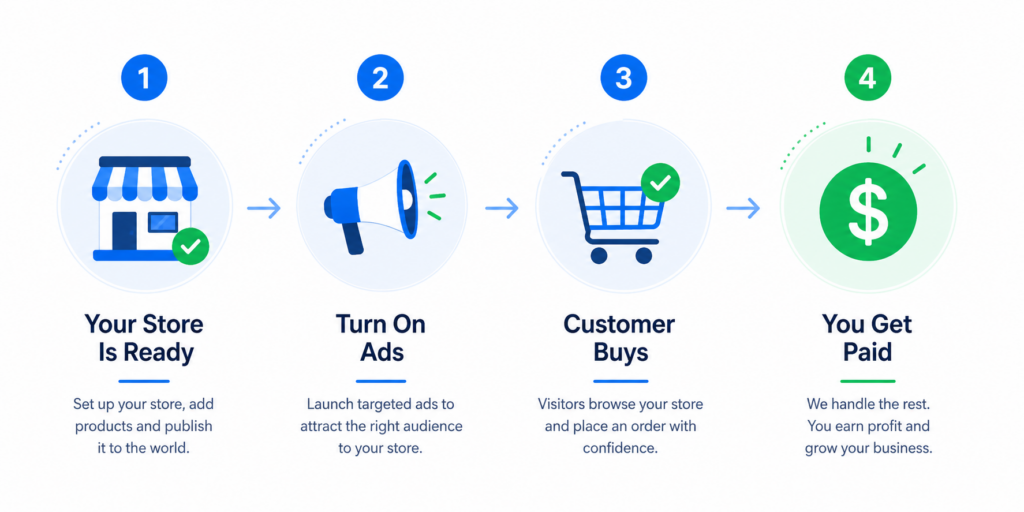
Here’s the actual path from zero to your first order – with costs, timelines, and profit calculations at each stage.
Step 1: Sign Up and Get Your Store (Cost: $0)
The Sellvia PRO trial is completely free for 14 days. You get a fully built turnkey online store pre-loaded with products, a business management dashboard, and a $40 advertising coupon credited to your account automatically.
What you’re getting for $0: a store that would cost several hundred dollars and multiple weeks to build from scratch on Shopify. Sellvia’s team builds it and fills it with products in one business day.
One important note on the subscription cost after the trial: the standard Sellvia plan is $39/month. The PRO annual plan runs $399/year ($33.25/month effective rate – a 15% saving over monthly billing). If you’re planning to use the platform seriously for more than 4 months, the annual plan pays for itself.
Lifehack #1: Don’t waste time exploring every tab on day one. Respond to your Growth Manager immediately and ask them to walk you through ad activation. The store is already built – your only job right now is to get traffic flowing.
Step 2: Activate Sellvia Ads (Cost: $40 free coupon, then $10-50/day)
Your $40 ad coupon covers the first 2-4 days of advertising depending on your daily budget. The minimum budget to activate ads is $10/day, and most new users start between $10 and $20/day.
The real math on your ad spend during the trial:
Let’s model two scenarios based on a $15/day ad budget:
Scenario A – Conservative (2% store conversion rate):
- $15/day x 14 days = $210 total ad spend (covered by $40 coupon for first ~3 days)
- At 2% conversion and average order value of $25, you need 500 visitors to get 10 orders
- Sellvia Ads typically delivers 200-400 visitors/day on a $15 budget
- 10 orders x $15 average profit = $150 gross profit
- Net after $170 out-of-pocket ad spend (post-coupon): -$20 for the trial period
Scenario B – Average (3.5% conversion rate):
- Same $15/day budget, same 300 visitors/day
- 300 x 3.5% x 14 days = ~14-15 orders
- 15 orders x $15 average profit = $225 gross profit
- Net after $170 out-of-pocket ad spend: +$55 profit during the trial itself
The $40 coupon is not cosmetic – it covers your ad costs entirely for the first 2-3 days and reduces your breakeven point meaningfully. Use it on day one.
Lifehack #2: Start at $15/day, not $50/day. You need data first, not scale. Once you see which products are getting orders, you can increase the budget on a store that’s already proven to convert.
Step 3: Process Orders and Understand the Fee Structure
This is where most first-timers get confused – so let’s be completely direct about how the money flows.
Order processing on Sellvia works like this:
Sellvia offers prepaid Order Processing Credits that you fund in advance:
- $100 credit pack – covers processing for approximately 6-10 orders depending on product price
- $200 credit pack – covers 12-20 orders, includes 5 free promo tools
- $400 credit pack (recommended) – covers 24-40 orders, includes 8 free promo tools
Alternatively, you process orders manually through the dashboard at no upfront cost – but this requires you to approve each order within the processing window or it gets cancelled automatically.
What this looks like in real profit terms:
Take a digital product your store sells for $29:
- Customer pays: $29
- Your gross revenue: $29
- Processing fee (approximate): $5-8 depending on product type
- Platform’s cut (built into product cost): already deducted
- Your net profit per order: $21-24
Run this at 10 orders/week: $210-240/week net profit Monthly at this rate: $840-960/month Subtract $39 subscription: $801-921/month net Subtract ad spend ($15/day x 30 days = $450/month): net monthly profit: $351-471
That’s not a guarantee – it’s the math on a modest 10 orders/week at average conversion. Stores doing 20-30 orders/week at higher price points are a different calculation entirely.
Lifehack #3: Buy the $400 credit pack rather than the $100 pack. The per-order processing cost is effectively lower, you get 8 free promo tools included, and you avoid the friction of running out of credits mid-week and having orders auto-cancel. Cancelled orders are revenue you can never recover.
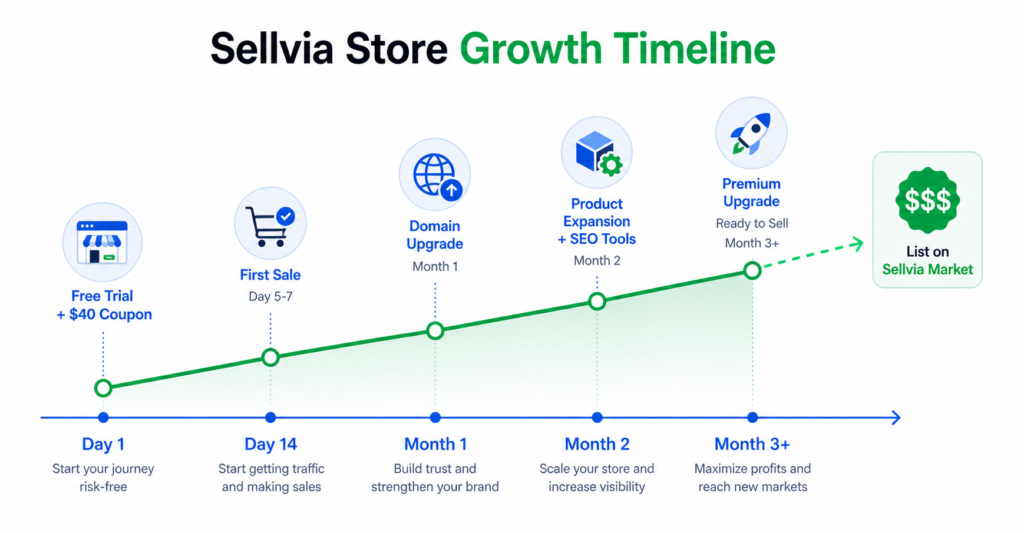
The Sellvia 14-Day Trial: What to Expect Day by Day
Most people who don’t get results with Sellvia make their critical mistakes in the first 14 days. Here’s a realistic timeline of what actually happens:
Days 1-2: Sign up. Get contacted by Growth Manager. Explore the dashboard. Activate ads with your coupon. Focus on this single goal: get ads running before day 3.
Days 3-5: First visitors arrive. Possibly first orders. If you don’t have orders by day 5, talk to your Growth Manager about adjusting your daily budget or checking your store setup.
Days 6-10: Orders coming in. Process every single one. Watch your earnings accumulate in the dashboard. The financial reality of this becoming your business starts to feel concrete.
Days 11-13: Your Growth Manager will prepare you for the subscription transition. At this point, you’ve seen real orders and real revenue. The question becomes: is $39/month worth continuing? If you’ve had sales, the math usually answers itself.
Day 14: Trial ends. If you subscribe, your store continues without interruption. If you don’t, you lose access.
The decision to subscribe almost always comes down to one thing: whether you had real orders before day 14. Customers who activated ads and processed at least one sale during the trial almost never question whether $39/month is worth it – the math is already visible in their dashboard.
Growing Your Sellvia Store Into a Valuable Asset
If Phase 1 is about survival – getting your first sales and deciding the platform is worth $39/month – Phase 2 is about building a business worth selling. This is where most guides stop. Here’s what actually moves the needle, with real costs.
Upgrade Your Domain (Cost: ~$15-30/year)
Your initial store ships with a default long-form domain that looks auto-generated. A premium short domain costs roughly $15-30/year depending on the zone (.com, .store, .shop). Sellvia curates options for you – no domain hunting required.
The ROI on this is straightforward. A branded domain increases buyer trust and store conversion rate. Even a 0.5% improvement in conversion on a store getting 300 visitors/day translates to 1-2 extra orders per day. At $15-20 profit each, that’s $450-600/month in additional revenue from a $20 annual investment.
On Sellvia Market, a store with a short branded domain consistently commands a higher listing price than the identical store on a generic auto-generated URL. This is one of the cheapest high-ROI moves on the platform.
Lifehack #4: Pick a domain that sounds like a real consumer brand, not an SEO keyword string. “WellnessGuideHub.com” builds more buyer trust than “best-wellness-guides-shop.store” – and a higher-trust domain directly increases your Sellvia Market valuation.
Expand Your Product Catalog (Cost: varies by pack)
More products mean more surface area for sales. Each additional product pack is pre-loaded and ready to sell immediately – no sourcing or content creation needed.
The business math: a store with 50 products across 3 niches captures a wider buyer audience from the same ad traffic than a store with 15 products in one niche. If your ad spend stays at $15/day but catalog breadth improves your conversion rate by 1%, you’re adding roughly $135-180/month in net profit at average order values.
Add Organic Traffic Tools (Cost: from $49/month per package)
Sellvia’s SEO Packages, Social Media Packages, and content promotion tools let you build organic reach that doesn’t cost money per click.
The strategic math: a store spending $450/month on Sellvia Ads and earning $900/month from paid traffic only is fully dependent on that ad spend. If SEO or social tools add 30% of that volume organically, your monthly ad-to-revenue ratio improves by roughly $270/month in recovered margin. And buyers on Sellvia Market pay a premium for stores with diversified traffic – because diversified traffic is more stable and lower risk.
Lifehack #5: Start with one tool – SEO or social – and run it for 30 days before adding another. One tool used consistently beats three tools collecting dust.
The Premium Business Upgrade
Sellvia’s team builds a fully custom design for your store and adds exclusive products that no other Sellvia store carries.
Why this matters for your exit price: when a buyer on Sellvia Market compares two stores with similar revenue, they’ll pay more for the one with a unique brand identity and exclusive inventory. Generic stores compete on price. Branded stores with exclusive products command a premium. Think of the difference between selling a plain resale condo versus a renovated unit with custom finishes: same building, meaningfully different sale price.
Phase 3: How to Sell Your Sellvia Business on Sellvia Market
Here’s the part of the Sellvia story that most reviews completely miss – and it’s arguably the most interesting part.
After your store has been running for at least 60 days, you can list it for sale on Sellvia Market, the built-in business marketplace. A buyer pays you for your store – a real, operational business with revenue history – and takes it over completely.
No other mainstream ecommerce platform offers this. Shopify doesn’t have a buyer marketplace built in. Etsy doesn’t let you sell your shop as an asset. Sellvia does.
The Two Payment Options
When you list your business, you choose between:
Full price (lump sum): You receive all the cash at once. This takes longer to find a buyer, but you get the full amount immediately upon sale.
Installments (12, 24, 36, or 48 months): More buyers can afford installments, so you typically sell faster. The trade-off: you receive money over time, not all at once.
The right choice depends on your situation. If you need cash quickly, a full-price sale may be worth waiting for. If you’d rather close the deal fast and receive steady monthly income, installments can be the smarter play.
What Increases Your Sellvia Store’s Sale Price
This is where the Growth Phase choices compound. Every upgrade you made – the domain, the product catalog, the organic traffic tools, the premium redesign – increases your valuation. Buyers pay for revenue history, organic traffic, a unique design, exclusive products, and a clean order history.
Lifehack #6: Think of your store as an investment property from day one. Every dollar you put into domain upgrades, product expansion, and premium redesign is an investment in a higher exit price. The goal isn’t just to earn income while operating – it’s to build an asset you can sell.
Marketplace Upgrades to Sell Faster
Sellvia Market offers featured listing placements and priority visibility upgrades. If you want to sell quickly, investing in a boosted listing can dramatically reduce the time your business sits on the market waiting for a buyer.
The Sellvia Reinvestment Cycle: How the Most Successful Users Scale
This is the strategic insight that separates the top-performing Sellvia users from everyone else – and it’s the part most Sellvia reviews don’t cover at all.
The cycle looks like this:
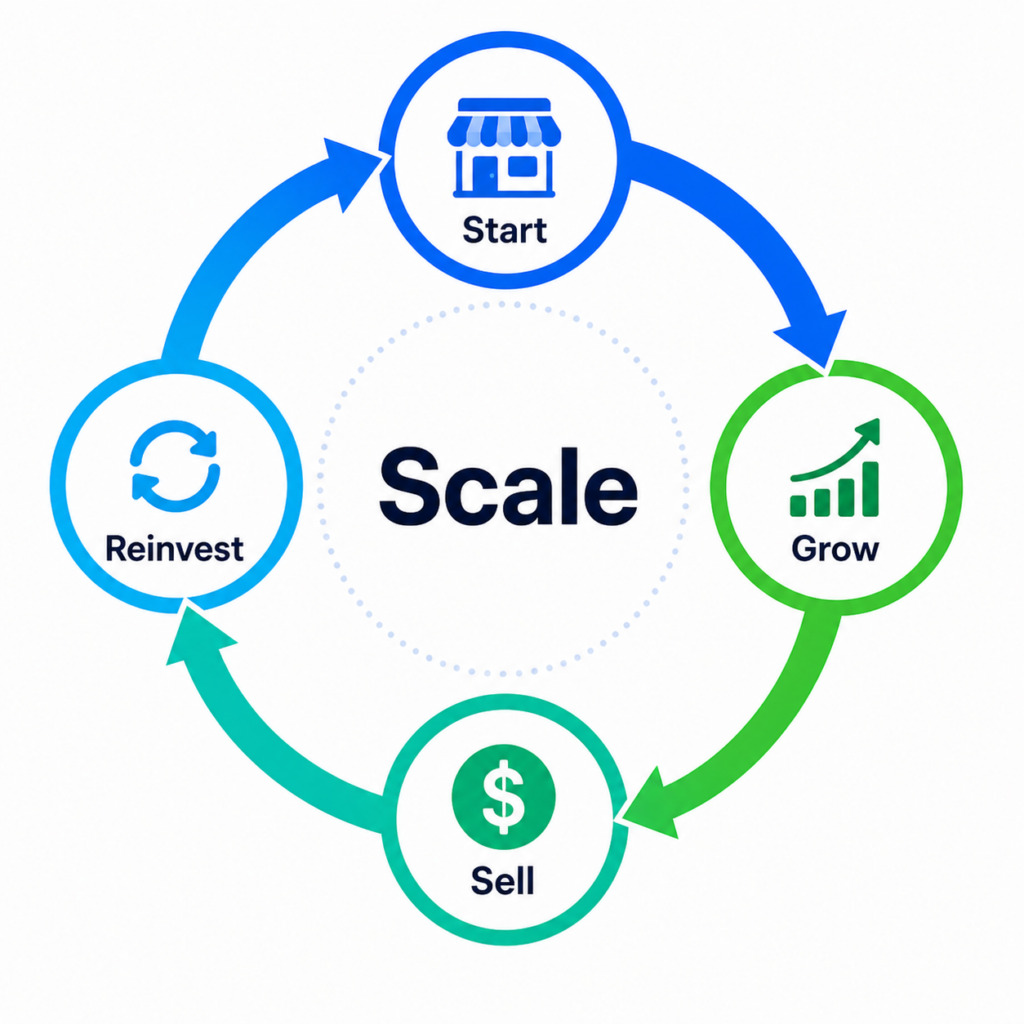
Build → Grow → Sell → Reinvest → Build Again
After selling your first store, you have cash. With that cash, you start your second store – but this time, you already know how the platform works. You know which product categories perform best. You know how to activate ads efficiently. You know which upgrades deliver the best return. Your second cycle is faster and more profitable than your first.
Then you do it again. With experience, some users operate multiple stores simultaneously at different stages of the journey – one in the early growth phase, one approaching sale-ready, one already listed on the market.
This is the flywheel model: each cycle funds the next, and each cycle is executed with more skill than the one before. The customer’s relationship with Sellvia deepens with each cycle, and the lifetime value of the relationship compounds.
For Sellvia, this is also why the platform is designed the way it is. The most valuable customers aren’t people who subscribe for one month and churn – they’re people who understand the full Start → Grow → Sell → Repeat loop and run it continuously.
Common Mistakes (And How to Avoid Them)
After reviewing thousands of user journeys, the patterns of failure are consistent. Here are the most common ones and what to do instead.
Mistake #1: Not Activating Ads During the Trial
This is the single most common mistake. People sign up, explore the dashboard, browse the product catalog, read every FAQ – and never turn on ads. The trial ends with zero orders and they conclude “it doesn’t work.”
The platform works specifically when traffic flows to your store. No ads = no traffic = no orders. The $40 coupon exists to make this free to test. Use it within the first 48 hours.
Mistake #2: Expecting Everything to Be 100% Free
The free trial is genuinely free – you get a real store with real products and real ads. But if you make sales, there are processing fees. Some first-time users are surprised by this. They made $40 in a day but see a deduction for order processing and feel deceived.
Understanding this upfront eliminates the friction. You’re running a business. Businesses have operating costs. The processing fee comes out of your profit – you still earn on every order.
Mistake #3: Ignoring the Growth Manager
The Growth Manager is not a chatbot and not a formality. They’re a real person assigned specifically to your account, available throughout your entire journey – from sign-up to business sale. Users who maintain regular contact with their Growth Manager achieve measurably better outcomes across every metric: activation rates, order volumes, upgrade adoption, and trial conversion.
If you’re not sure what to do next at any point, message your Growth Manager. That’s their job.
Mistake #4: Not Reinvesting in the Store
Customers who subscribe but never buy product packs, never upgrade their domain, and never invest in any growth tools typically operate vanilla stores with mediocre conversion rates that never build resale value. They earn modest income for a few months and eventually cancel.
The stores that succeed are the ones where the owner treats it like a real business – making calculated investments to improve the product, the traffic, and the brand.
Mistake #5: Selling Too Soon (or Never)
Some customers don’t know Sellvia Market exists. They operate their store for a few months, feel like they’ve hit a plateau, and cancel without ever realizing they could have sold their store for cash. This is a lost exit.
On the other end, some customers try to sell after only 60 days with minimal order history. A store with 90+ days of consistent revenue and a premium upgrade is worth meaningfully more than a bare-minimum eligible listing.
Sellvia vs. Other Platforms: The Honest Comparison
When someone looks for a “Sellvia review,” they’re usually also considering alternatives. Here’s an honest framework.
Sellvia vs. Shopify: Shopify is a powerful platform – but it gives you tools, not a business. You need to find your own products, build your own store, learn to run your own ads, and figure out marketing from scratch. Sellvia provides everything pre-built. The trade-off: less flexibility, but radically lower barrier to entry. If you’re a developer or an experienced marketer, Shopify may be right for you. If you’re starting from zero, the learning curve is steep.
Sellvia vs. Etsy: Etsy is a marketplace, not a standalone store. You’re competing with thousands of other sellers on the same platform, and you don’t own the customer relationship. With Sellvia, you have your own store and your own brand. The built-in advertising system also means you control your traffic, not Etsy’s algorithm.
Sellvia vs. Wix or Squarespace: These are general website builders. They’ll give you a nice-looking site, but they won’t give you products, a traffic system, or a built-in marketplace to sell your business when you’re done. They’re tools for building websites, not businesses.
The honest summary: No other mainstream platform gives a complete beginner a ready-to-earn online business – with a store, curated digital products, built-in advertising, and an exit marketplace – for $39/month after a free trial. The trade-off is that you’re operating within Sellvia’s ecosystem and product catalog rather than building something fully custom. For the target customer – someone with no ecommerce experience, limited budget, and a desire to start earning quickly – that trade-off is usually the right one.
The Numbers Worth Knowing Before You Decide
Instead of listing specs, here’s a real monthly P&L model for a Sellvia store at three activity levels:
Level 1 – Minimal (5 orders/week, $20 avg profit per order)
- Monthly gross from orders: 20 orders x $20 = $400
- Sellvia subscription: -$39
- Ad spend ($15/day x 30 days): -$450
- Net: -$89/month (learning phase, not yet profitable)
Level 2 – Moderate (15 orders/week, $20 avg profit)
- Monthly gross: 60 orders x $20 = $1,200
- Sellvia subscription: -$39
- Ad spend ($15/day): -$450
- Net: +$711/month profit
Level 3 – Active (30 orders/week, $22 avg profit)
- Monthly gross: 120 orders x $22 = $2,640
- Sellvia subscription: -$39
- Ad spend ($20/day): -$600
- Net: +$2,001/month profit
The gap between Level 1 and Level 2 is almost entirely about two variables: conversion rate and whether ads are running consistently. The platform subscription is $39/month flat. The annual PRO plan works out to $33.25/month. Either way, the subscription is never the limiting factor – ad performance is.
On the exit side: Sellvia Market accepts listings after 60 days. A store with 60 days of Level 2 activity – 60 processed orders, a branded domain, clean revenue history – is already a sellable asset. A store with 90 days of Level 3 activity, a premium upgrade, and organic traffic alongside paid ads commands a significantly higher price. Installment options (12, 24, 36, or 48 months) expand the buyer pool, which typically speeds up the sale.
One concrete data point: store owners on Sellvia have collectively earned over $1.5 billion across 1.5 million+ stores launched. The distribution is heavily skewed toward actively managed stores – which is exactly the argument for engaging with the Growth Phase rather than running a vanilla store and hoping for the best.
Sellvia Review: Is It the Right Platform for You?
Sellvia is built for a specific type of person – and being honest about this helps set realistic expectations.
Sellvia is a strong fit if you:
- want to start an online business but have no prior experience
- don’t have time to learn digital marketing, product sourcing, or web development
- have a limited budget and need low startup costs
- want to see results quickly, not after months of setup
- are open to building something with the long-term goal of selling it
Sellvia is probably not the best fit if you:
- want full customization of every aspect of your store
- already have ecommerce experience and want to build your own brand from scratch
- are looking for a purely passive income solution with no involvement at all
- are not willing to invest in ads or growth tools
Final Thoughts: What This Platform Actually Is
There’s a version of the Sellvia story that gets told as a simple “make money online” pitch. That’s not the most accurate version.
The more precise description is this: Sellvia is a structured entry point into digital commerce, built for people who wouldn’t otherwise have one. The store, the products, the advertising infrastructure – these aren’t shortcuts. They’re the foundation that removes the multi-year learning curve separating a beginner from a first sale.
What happens after that first sale is where individual outcomes diverge. Some users collect modest income for a couple of months and move on. Others treat the platform as a business-building engine – investing in domain upgrades, product expansion, premium redesigns – and eventually sell their stores through Sellvia Market for a lump sum that funds the next cycle. The platform accommodates both approaches. The second one is considerably more interesting.
The honest limitation: you’re operating inside Sellvia’s ecosystem. Your products come from their catalog. Your traffic comes through their ad system. Your exit goes through their marketplace. For someone building a standalone brand with full control over every variable, this is the wrong tool. For someone who wants a functional business that generates real revenue without a six-month setup runway, it’s a serious option that most alternatives can’t match at this price point.
The free trial exists specifically so you can verify that before committing. Use it to find out – not as a casual exploration, but as a 14-day test run with ads running and orders being processed. That’s the only data point that matters for your specific situation.
Quick-Start Checklist: Your First 48 Hours on Sellvia
If you’ve decided to try Sellvia, here’s your action plan for the first two days:
- Sign up for the free trial at sellvia.com
- Log into your dashboard and explore for 15–20 minutes
- Respond to your Growth Manager’s first message – do this before anything else
- Ask your Growth Manager to walk you through ad activation
- Activate Sellvia Ads using your $40 coupon
- Set a daily budget between $10 and $20
- Check your dashboard the next morning for visitor and order data
- Process any orders that came in
- Message your Growth Manager with your results
If you complete those 9 steps within 48 hours, you’re in the top tier of Sellvia users by engagement – and you’ve given yourself the best possible chance at a successful trial.
This article is an independent editorial review based on publicly available information, platform documentation, and analysis of the product’s business model. We are not affiliated with Sellvia or any other platforms mentioned in this article. We do not receive compensation for coverage. Individual results vary. This is not a paid endorsement.
Related Articles

Leave a Reply